Installation of the controller
Installation in the A1200 on the IDE-port
Installation in the A1200 to the Clock-port
Installtion in the A4000 to the IDE-port
Installation of the Zorro-II version
Connecting diskdrives
Jumpers of the diskdrives
Installation of the software
Using the Catweasel-drives
AmigaDos Versions
The Dosdriver files
Contents of the disk
Back-sides of 1541-disks
Appendix
How to open a shell
Service
The Thanks-page
retailer addresses
Installation of the controller
You should only install the controller on your own if you have experience in installing hardware upgrades. If you don’t dare to do it on your own, your service partner will help you.
Installation in the A1200 on the IDE-port
For this way of installation a cable is necessary that is not shipped with the Catweasel. It’s a standard 2,5" -> 3,5" IDE cable. If you have such a cable, follow the instructions on installing the controller to the IDE-port in the A4000. The local expansion slot on your Catweasel MK2 will be inactive with this way of installation, so you should consider installation on the clock-port.
Installation in the A1200 to the Clock-port
We strongly recommend using the clock-port for installing your Catweasel controller. Using this port, the local expansion slot is usable, and the compatibility to standard 4-way adaptors is given (e.G. IDE-fix 97 interface). Using such a buffered adaptor is recommended if you’re using a cable that’s longer than 30 cm (12 inches) or if you’re using more than one IDE-device.
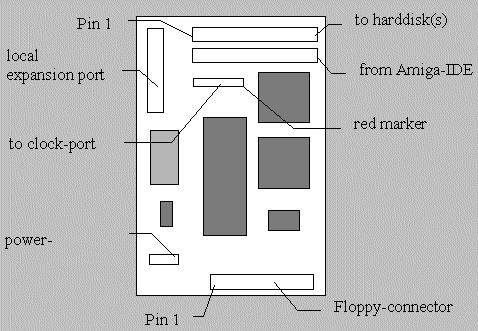
First, connect the 22-pin cable to the clock-port of your A1200. The red marker on the cable must face to the right, towards the 150-pin connector. Then, connect the other end to the Catweasel controller with the red marker facing to the MACH-chip (the square chip, see figure!). The power-connector can be used for additional power supply, but it shouldn’t be necessary.
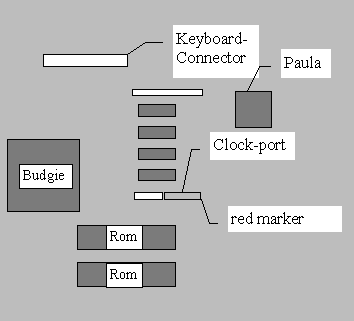
Not every A1200 has got a clock-port. You can identify
a clock-port by a 22-pin pinheader installed in P9B facing towards the
150-pin connector. Other (very uncommon) versions of P9B are: The connector
faces towards the harddisk, the connector has got 40 pins, or there’s no
connector at all. In all these cases, your service partner will help you.
Installtion in the A4000 to the IDE-port
Use the 40-pin cable that’s shipped with the controller for connection to the IDE-port. The red marker must face to pin 1 of the port, in A4000 desktop versions this is „towards the power supply". On your Catweasel controller, pin 1 faces towards the local expansion connector.
For power supply, there’s a Y-style adaptor shipped with the controller.
Just plug the „small" end to the power-connector of the Catweasel, and
the other end to a free connector of the power supply. The second output
of the adaptor (5,25" connector size) can be used for a harddisk or a CD-Rom
drive.
Installation of the Zorro-II version
Plug the card into a free Zorro II or Zorro III slot of your computer. Mind the correct orientation of the card: The three IDE-ports must face to the front of the computer, and the 26-pin local expansion port must face to the back. The parts of the controller must face towards the diskdrives in A2000 systems, and they must face up in A3000/4000 desktop computers.
The new Z-II cards are designed not to be connected the wrong way in standard-computers.
REM: Proper function of the Z-II Catweasel is only guaranteed with commodore-computers. The Zorro-signals are not generated by a buster-chip on Zorro-expansions for the A1200, so adaption of the Zorro-expansion may be necessary. Please contact the vendor of the expansion for the adaption.
The new Zorro-II versions of the Catweasel („long cards") should fix
most problems with these expansions. Especially if the Zorro-PCB is connected
with cables to the A1200, there are reflections on the bus that can’t even
be eliminated by the ABT technology on the new Zorro-cards. However, it
has been reported that configurations with these kinds of expansions work
fine.
Connecting diskdrives
The Catweasel controller uses standard PC-diskdrives, it’s not necessary to buy expensive Amiga-HD diskdrives. Unfortunately, there are very low-quality diskdrives on the PC market. These drives are only capable of reading data (installing drivers), but if you want to write to a disk, they just fail. The tracks that have been written by these drives normally loose all data, and need to be re-formatted by a better drive.
The Catweasel MK2 has been successfully tested with drives by Teac, Panasonic, Chinon, Sony, Namki, Sanyo, Sankyo, NEC, Epson and Control Data. During our tests, the TEAC drives have convinced us with good results even when using bad disks.
Caution:
Due to our tests, we can’t guarantee the function with Mitsumi diskdrives. This applies to both, 3,5" and 5,25" drives. However, we can’t completely exclude proper function.
Use the floppy-cable that’s shipped with the controller for connecting the diskdrives. It’s different from Amiga floppy cables, because it uses a certain standard to twist some wires that’s different from the „twist" in the Amiga-cables. Being compatible to this standard, you’ll find spare parts or longer cables much easier and cheaper.
The cable has got five connectors:
3,5"-----------------------------------3,5"---5,25"-----x------3,5"----5,25"
A B C D E F
A: Connector for the controller
B: Connector for a 3,5" diskdrive as unit 0
C: Connector for a 5,25" diskdrive as unit 0
D: standard-twist in the cable
E: Connector for a 3,5" diskdrive as unit 1
F: Connector for a 5,25" diskdrive as unit 1
Rem: In some cases the connectors B and C / E and F are swapped.
Please mind that you can only connect one drive as unit 0. Physically it’s possible to connect a 3,5" drive to B and a 5,25" drive to C, but the Catweasel will fail in this configuration. The same applies to connectors E and F.
Jumpers of the diskdrives
Normally, you don’t have to change the jumpers of the diskdrives. New drives don’t even have jumpers any more, because a standard has been established for the PC-drives. The Catweasel is compatible with that standard, so you can connect almost every diskdrive.
If you have docs about the jumpers of your drive, set the jumpers to a position where pin 34 is diskchange and the drive answers the „select 1" signal, even if you want to use it as „unit 0". The unit number of the drive only depends on the position on the cable, not on the select-signal.
The Panasonic-diskdrives in A1200 computers by Amiga Technologies (the „magic" set) have got a small switch on the bottom of the PCB. This switch mut be set to „0" if you want to use the drive in an Amiga 1200, but it must be set to „1". Be careful with that switch, it’s mechanically very delicate. The diskchange signal is in the correct position on that drive. The drive JU-257A605P can be used as HD-drive on the Catweasel controller.
Amiga-diskdrives can’t be used on the Catweasel without modifications, because they differ in some details: The pinout of the drives has been changed in order to have a diskchange-signal on pin 2 and a RDY signal on pin 34. On 5,25" drives, even the rotation speed is changed to 300 RPM, different from the standard for 5,25" drives, which is 360 RPM.
If you want to use a diskdrive on the Catweasel that is configured to work on the internal Amiga floppycontroller, check the following points:
1. diskchange must be available on pin 34
2. the drive must answer to the „Select 1" signal
3. 5,25" drives must spin at 360 RPM
3,5" drives always spin at 300 RPM, so you don’t have to worry about the speed of these drives.
HD-drives that have been designed for the internal floppy-controller of the Amiga can’t be used on the Catweasel at all. These drives spin down to 150 RPM as soon as a HD-disk is inserted, so these (very expensive!) drives would only reduce the speed of your controller.
The easiest way of finding a drive that works properly with the Catweasel is buying a new PC-diskdrive. Especially if you have to change the rotation speed of a 5,25" drive without having the docs about jumpers, you won’t be very lucky at all.
Installation of the software
The installation of the drivers for the Catweasel is done by the installation script on the disk. Just instert the disk into an Amiga-diskdrive (the Catweasel drives don’t work yet!) and double-click the install_me icon. If your computer doesn’t have a diskdrive (any more?), you can download the drivers directly from the vendor’s mailbox: +49 241 12099. Most of the words in that mailbox are German - maybe your reseller has also got a mailbox with the drivers online.
If you want to run the installation script without the disk, you must first issue the command
assign Catweasel: <pathname>
in a Shell where <pathname>, is the path with the unpacked files of the Catweasel-disk. If you’re running the installation script off the disk, tis command is not necessary.
Start the installation script by double-clicking the „Install_me"-icon and answer the questions you’re being asked. After this procedure, the software is installed as you wish. During installation you’ll be asked if you want a dosdriver to be mounted directly after bootup, or if you want to mount it later. This is done in order not to have a pile of XXX:????-icons opn the workbench screen everytime you insert a disk. If this doesn’t disturb you, you can mount the drives directly after bootup. You can mount a drive later by entering
mount <drivename:>
in a Shell. With the command mount th0: you’ll mount a trackdisk-1,76 MB disk for example.
Using the Catweasel-drives
The drives on your Catweasel are not referred to as dfx:. There’s a name for every diskformat that you’re going to use. The names are:
TD0, TD1 Amiga-DD-disks in 3,5" drives (880 KByte)
TH0, TH1 Amiga-HD-disks in 3,5" drives (1760 KByte)
PD0, PD1 MS-Dos-disks in 3,5" drives (720 KByte)
PH0, PH1 MS-Dos-disks in 3,5" drives (1440 KByte)
OH0, OH1 MS-Dos-disks in 5,25" drives (1200 KByte)
EX0, EX1 XTRA-HD disks in 3,5" drives (2380 KByte)
CBM0, CBM1 Commodore 1541-disks in 5,25" drives
Macintosh 1440KByte-disks in Catweasel drives are supported directly by the Shapeshifter V3.7 and up. Please read the readme-file for support of Mac 800 KByte disks.
AmigaDos Versions
To use the Catweasel drives, you need at least Workbench version 2.1 or higher. Further, Commodore has made some mistakes when „updating" some files, so there occurred some bugs during our beta-tests that are not caused by the Catweasel software. Here are three things where multidisk.device can’t work around without your help:
The copy-command V38.x sometimes trashes target data, so it should be replaced by a newer one (version 40,x or higher).
CrossDosFilesystem V41.x only „asks" mfm.device for a diskchange, so the filesystem won’t recognize when you’re removing a disk from a catweasel drive. Either use CrossDosFilesystem V38.x, or use the patch from the utilities-directory of the Catweasel disk. For a description of this program, see „contents of the disk".
Oldfilesystem/FastFilesystem of the 3.0 and 3.1 ROM’s make enforcer hits if you’re entering a MaxTransfer value of 0x80000000, that means your computer crashes without any visible reason. Just don’t use this value, it doesn’t even make sense: Who can transfer 2GBytes off a floppy disk?
The Dosdriver files
You can also make the files in the directory DEVS:Dosdrivers on your own, here’s an explanation of the lines in these files. The information in these files is only passed over toi the filesystem, not to the device. They must comply with the physical dimensions of the disk, otherwise you will get a lot of errors. In some cases, the filesystem replaces information from the mountlist by information from the GetGeometry() function of the multidisk.device, so with certain filesystems some lines in the mountlist may be overwritten. You can’t change the physical dimensions of the disk by changing the mountlist. For a list of formats you can use see explanation of the FLAGS field.
Device = multidisk.device
This is the name of the exec-driver. The exec-driver is the interface to your Catweasel Controller. Every software that wants to access Catweasel-drives opens this driver.
Unit = 0
This tells the device which drive to use.
Flags = 0
This is propably the most important line in the file, because with this numer you’re telling the multidisk.device what type of disk you want to access. Programmers should know that the Flags-field of the mountlist is the same number as the „openflags" for multidisk.device. Programmers should look at the textfiles in the „developers" directory on the disk.
Available diskformats are:
for 3,5" diskdrives spinning at 300 RPM:
0 Amiga DD 880 Kbyte double-sided
1 Amiga HD 1760 Kbyte double-sided
2 MS-DOS DD 720 Kbyte double-sided
3 MS-DOS HD 1440 Kbyte double-sided
4 Atari 10 sector 800 Kbyte double-sided
5 Atari 11 sector 880 Kbyte double-sided
6 Commodore 1581 800 Kbyte double-sided
7 XTRA high density 2380 Kbyte double-sided
8 MS-DOS HD 20 sector 1600 Kbyte double-sided
9 Macintosh DD 800 Kbyte double-sided
10 Macintosh DD 400 Kbyte single-sided
for5.25" drives spinning at 360 RPM:
16 Commodore64 1541 170 Kbyte single-sided
17 MS-DOS HD 1200 Kbyte double-sided
18 MS-DOS DD 40 Track 360 Kbyte double-sided
19 Amiga DD 880 Kbyte double-sided
20 MS-DOS DD 80 Track 720 Kbyte double-sided
21 MS-DOS DD 180 Kbyte single-sided
22 Apple IIe 140 Kbyte single-sided
23 Atari 800 XL 130 Kbyte single-sided
24 Atari 800 XL 180 Kbyte single-sided
Other numbers will return an eror (error on OpenDevice()).
Multidisk.device can’t check the type of the drive. It doesn’t even
check the presence of a drive, so it’s up to you to choose the correct
unit number and the correct flags number. Choosing wrong numbers will simply
cause a lot of unreadable disks.
Surfaces = 2
This is the number of read/write heads accessing the disk. You must
enter the correct value here, otherwise your disk will have a wrong
size, and formatting such a disk may destroy data! Please look at the table
above for the correct number of surfaces.
BlocksPerTrack = 11
This is the number of datablocks on a track. Mind the difference between a track and a cylinder: A track is always associated with a full revolution of the disk accessed with one read/write head. A cylinder is associated with a full revolution accessed with all the heads available, therefore the number of blocks per cylinder is Surfaces * BlocksPerTrack, so in this case you have 22 datablocks on a cylinder.
Reserved = 2
This is the number of blocks that shall not be used by the filesystem from the beginning of a disk. The two blocks of the Amiga 880K-disk are reserved for the bootblock. If you’d choose this value too small, you might destroy data on the disk by using the install command. It’s better to change this value only for testing purposes.
mask = 0x7ffffffc
This value is a bit difficult to understand. If multidisk.device receives the command to transfer data, this value is a logical AND-mask for the startaddress. The idea is to reduce hardware requirements when designing a DMA controller if you can rely on the lower address bits being zero. The Catweasel only accesses it’s own memory directly, so this value isn’t really important. We have set the upper bit to zero because the Amiga uses a 31 bit address space. The lower two bits are set zero to make the startaddress longword-aligned, so the performance of the controller is always the same.
MaxTransfer = 0x00200000
This is an addendum to the mask-value. The parameter defines the largest block to be transferred at a time. Again, this can be used to simplify a DMA hardware design or to forbid too large DMA transfers. The catweasel software can access all of the Amiga memory and the size of a block can be as big as you want. Due to disks not being larger than 1,76MB at the moment, the given value (2MB) is more than large enough.
Interleave = 0
Interleaving is a very old technique to increase the performance of a mass storage medium. The idea is to place some blocks that are not needed at the time between two blocks that are read successively. During the time the „at the moment not interesting" blocks are passing, the data can be transferred to the computer. After the transfer is finished, the next block is „near", so idle times are reduced to a minimum. The Catweasel controller is a product of the 90’s, it always reads a complete track at a time. The interleave-value is only used by the filesystem, but a change will not alter any speed ratings.
LowCyl = 0, HighCyl= 79
These are the physical borders of the disk. Values between 0 and 79 are allowed. Some diskdrives allow positioning the read/write heads to higher tracks than 79, but other drives are damaged by this command, so we decided to introduce these borders to protect your hardware.
Buffers = 5
This is the number of buffers in memory. The last accesses to the disk are stored in these buffers to increase the speed if the same blocks are read again.
BufMemType = 1
With this value, you’re telling the filesystem what type of memory to
use for the buffers. There are three choices:
1= Any (public) Uses any memory that’s non-virtual, beginning with the highest priority memory.
3= Chipmem The graphics and sound-memory of the Amiga system is rather slow compared to fastmem performance, so using chipmem doesn’t make any sense.
5= Fastmem This is the default value. Fastmem is memory that can only be accessed by the CPU, therefore it’s the fastest memory available in the system.
Stacksize = 4096, Priority = 5
Every process in the Amiga OS has got its own Stack and priority, you can enter the values here. The values are perfect for multidisk.device, you shouldn’t change them.
Activate = 1
If you enter this line, your dosdriver is activated directly after mounting and the catweasel drive starts clicking. If you leave out this line, the drive is not activated until it’s referenced directly, for example by changing the current directory to this drive in a shell.
Contents of the disk
Your Catweasel installation disk contains the following files:
devs/multidisk.device
The exec-driver itself, it will be copied to your DEVS: directory by the installation disk.
devs/mfm.device
This is a replacement for the mfm.device shipped with the Amiga OS. It re- directs accesses to mfm.device to multidisk.device thus making programs using the mfm.device compatible to the Catweasel controller. You can choose the type of disk by the unit number you open: Units 0 and 1 access PC-HD disks in Catweasel drives 0 and 1. If you want to access PC-DD disks, use Unit numbers 2 and 3, where Unit numer 2 accesses a DD-disk in Drive 0, and Unit 3 accesses a disk in drive 1.
Caution: The only way to recognize this „redirection device" is ist filesize. Programs can’t decide whether they’re working with the real mfm.device or with this replacement, so this may cause confusion.
Unfortunately, not every emulator uses mfm.device to access PC-disks, so this device won’t solve all compatibility problems. Most of the times, it’ll be necessary to write a letter to the programmer.
l/1541-handler and l/1541-handler.68030
This is the filesystem for easy access to C-64 disks. The version optimised for your CPU will be copied to your L: directory by the installation script. Please read the file „changelog" in the L: directory for latest information and 1571-disk support.
Beta/BootCat
A program to make Catweasel unit 0 bootable. It will set itself reset-proof and patch a few system routines to accomplish this. If you have more than 2 floppies connected to the standard floppy connections, df2 and df3 will disappear after reset. It will mount TD0: and TH0: This program can only be run from a Shell. See also Utilities/FreeSystem.
Prefs/multidisk
The preferences-program for multidisk.device is self-explaining. The sliders for the step-rate are only meant for older 5,25" drives that can’t handle the standard-steprate of 3ms. This program will be copied to your prefs-directory by the installation script.
Utilities/ModifyCrossDos
Due to a bug in CrossDosFilesystem, the filesystem will not detect diskchanges an any device other than the ones that existed when it was programmed. This program will modify it in a way that it will work with multidisk.device, but after modification, it will no longer work with mfm.device.
You should make a safety-copy of the original file, because this program doesn’t do this. Start this program only once.
Utilities/TrackWindow
A small tool, that opens a window allowing you to see the headposition of the floppies controlled by multidisk.device Use a parameter '0' or '1' to set the unitnumber. It will end by clicking the window's closegadget. If you wish to start it from a shell without loosing control of that shell, use
run Trackwindow 0
Utilities/FreeSystem
A handy little tool that removes all pointers to any type of reset-proof structure in RAM. This includes resetproof drivers like BootCat, the recoverable RAM- disk and viruses. A reset after executing this will start a clean system.
Testroutines/TestCatweasel
This tool tests the controller and a 3,5" drive connected as unit 0. First, the controller’s memory is tested, then two cylinders of kickstart data are written to a DD-disk inserted in unit 0, afterwards the data is verified.
mountlists:
There are several mountlists in the Devs/DosDrivers drawer. To support different diskformats, you will need different mounts. Please note that there will be more than one mount to one physical drive, but the system will not notice that. Formatting a PC-disk in PD0: will loose a disk in TD0:, since that is one single disk, you are just changing formats. A disk inserted will be tested by all mounted drives. One will detect the format and show up with an icon. The others will report an unreadable disk. This is normal and should not be considered as a bug (Amiga OS has the same habit with DF0: and PC0:).
Please mind the correct drivetype when making your own mountlists, because the drivetype can’t be identified by the controller. If you’re using a mountlist for 3,5" drives on a 5,25" drive, you may experience funny errors. Reading disks may be possible, but writing to disks may destroy data without a chance of restoring it!
Back-sides of 1541-disks
You may have noticed that a standard PC-drive can’t read the back-sides of 1541-disks (we all flipped the disks, didn’t we?). This should not be considered as a bug, because the standard PC-diskdrives need the index-hole to check whether the disk is spinning or not. If you flip the disk, the index-hole is in the wrong position, and the drive doesn’t recognize the disk’s rotaion, therefore it won’t enable the data line. Only the „boeder" disks had a second index-hole, these disks can also be used on the B- side with PC-drives.
If you want to read the reverse sides of your 1541-disks, ask your local dealer for modification sets for 5,25" drives, or for modified drives.
Appendix
How to open a shell
A Shell or a CLI (= command line interface) is a window on the Amiga’s workbench. In this window you can start commands, just like in MS-DOS TM. You can find the Shell-icon in the system-drawer of the workbench, just double-click the icon and the window will show up.
If you’re not used to using the Shell, take a look at the „Amiga DOS" manual of your Amiga. This manual is shipped with all Amiga-systems and OS upgrade kits. If you don’t have the new Kickstart manuals, look at chapter 6 of the Workbench 1.3 manual. Please understand that we’re unable to give an introduction to using the shell here, as this would go beyond the scope of this manual.
Service
If you have any problems with your Catweasel controller - concerning installation, malfunction or returns - the first place to go is your retailer.
Just in case adequate help cannot be provided locally, you may directly
contact the developers:
Achim Dahlhoff, Aachen, Germany
eMail: [email protected]
responsible for: All the software for the Catweasel: multidisk.device,
the Prefs-program, das replacement-mfm.device, and the small tools on the
disk.
Jens Schönfeld, Aachen, Germany
eMail: [email protected]
responsible for: The idea of the Catweasel, the hardwaredesign, coordination
of production, retailer management, and this manual.
Michael Krause, Hamburg, Germany
eMail: [email protected]
responsible for: the 1541-filesystem on the disk.
The Thanks-page
One of the most important topics in this manual, because there are many
people who supported my idea since the very beginning. There’s no special
order in the list.
Achim „Sunshine" Dahlhoff for the Amiga-software
Tobias „Simba" Haustein for the PC-drivers
Daniel „Roogun" Frey for beta-testing the first series-Catweasel (ISA-card)
Thomas „Bughunter" Lewandowski for excessive beta-testing of the ISA-card
Thorsten „Ovaron" Schaaps for some ideas and betat-testing of the ISA-card
Stephan „Stylon" Kanthak for linux-drivers based on Alpha AXP (ISA-card)
Michael „Plasm" König for some ideas in the developer conference
Colin „Albatros" Hirsch for Intel-based linux-drivers (ISA-card)
Michael „Rawstyle" Krause for his licenses
John „Graham" Selck for beta-testing the combination Catweasel+1541-filesystem
Christian „Cebix" Bauer for adaption of the Shapeshifter (Amiga versions)
Martin Korndörfer for adaption of Diavolo-Backup (Amiga versions)
Holger Schupp for graphics and design (logos and stickers)
Chris Hülsbeck for promition on his homepage
Norbert „Norb" Haley for promotion on his homepage and introduction
of the Catweasel in New Zealand.
The participants of Scala-Meetings in Stade/Germany, especially Dierk
„Chaos" Ohlerich
Jeremy Moskowitz for the Apple IIe documenation
Tobias Seiler for some help in decoding the Mac 800K disks
and last not least Vera Henkelmann for moral support.
I hope I didn’t forget anybody!
Jens Schönfeld
retailer
International credit card orders via e-mail: click here
or write to:
Norbert HALEY
Poste Restante
P.O. Wellesley St.
Auckland
New Zealand