
In this section there is the link to join our Yahoo Group for all league members along with what the group has to offer.
1. Joining Yahoo Group
- Click this link: Stardreams Yahoo Group
***If you do not have a Yahoo ID, you will need to get one in order to join group.
2. Groups Contents
- After you have signed into the group, you will see a list of links on the left hand side of page like in the picture below. This is your index for the group.
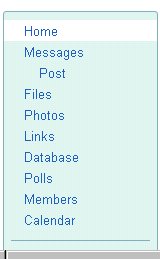
- Home:
- This will take you back to main group page where you will see every group you belong to listed.
- Messages:
- This will show you messages that have been posted. You can read and reply if you would like.
- Post:
- This is where you create and post a message.
- Files:
- This is where we keep stuff for the league.
- Photos:
- This is where you can view pictures of hosts along with other league members as well as posting your own pictures. Just create a new photo album and add your pictures.
- Links:
- Here you can post links you have to your website, etc.
- Database:
- Here you will find sub-categories such as: Recipes, Get To Know Me, TD Tagger, Above & Beyond Duty Call of Hosting, Messenger Names, & Pogo Mail List.
- Below in # 3 you can find out more information about these categories.
- Polls:
- Here you can participate in any open poll. Just click on the poll you want and place your vote. If you are interested in seeing a certain type of poll, please get a hold of Head Administration.
- Members:
- Here you can see all members of the group.
- Calendar:
- Here you can post your birthday, anniversary, etc..
3. Database
You will see links as shown in picture below. In section 4, it will show you how to "Add Record", in other words how to post in sub categories.
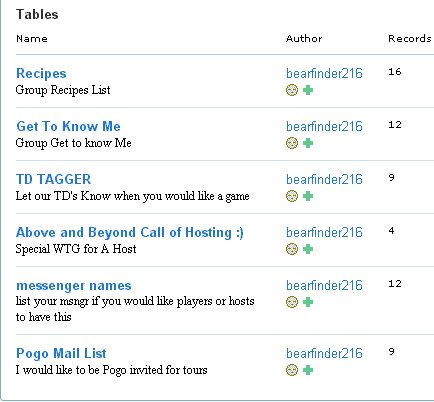
Recipes:
Here you can get some great recipes as well as post one of your own.
Get To Know Me:
Here you can leave some information about yourself for example: how many kids; how many pets; your favorite pogo game; etc..
TD Tagger:
Here you can request a tournament. Put in the game, what day & time is best for you and a host will get your tour scheduled. They will place date of tour along with the jump # of tour where you posted the request plus send you an email and/or pogo message.
Above & Beyond Call of Hosting:
Here you can post a special note about a host. Maybe they did a special type of tour or helped you out in someway. Let everyone know about it..don't be shy. ;)
Messenger Names:
Here you can post your contact information for instant messaging such as: AOL, Yahoo, & Msn.
Pogo Mail List:
This is if you would like to receive invitaions to tours thru pogo. Post your pogo screen name so you can receive those invites.
4. Add Record
- To post in any category under documents, click on the category you would like. Once in the category you would like to post you will see a "Add Record" link at the top of the category. Click on the link and you should see a page like in the example pictures below(recipes, td tagger).
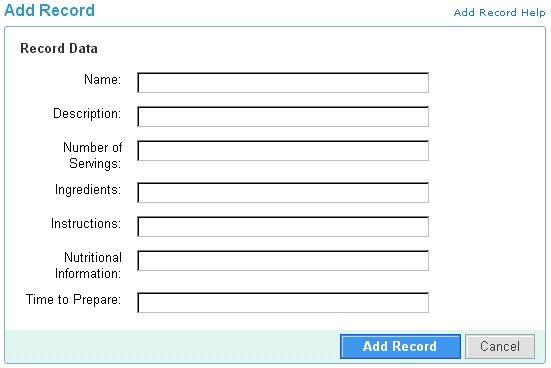
- Recipes:
- Fill in the information and click the add record button.

- Td Tagger # 1:
- This is some of the information shown under this category.
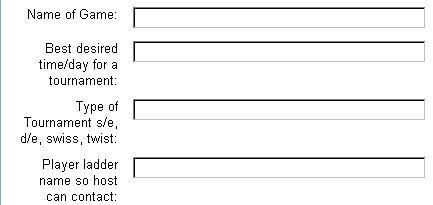
- Td Tagger # 2:
- Fill out the information shown for your tour and click the add record button.