
In this section you will learn how to jump/play in a tour, how to check-in for a tour, and how to withdraw from a tour.
- Jump/Play in Tours
There are 3 different ways you can jump/play in a tour:
- Tour Calendar
- In the picture below, if you look at the 1st tour listed on the 1st line is the tour time and host of tour. You click on that line which will take you to the actual tour page.
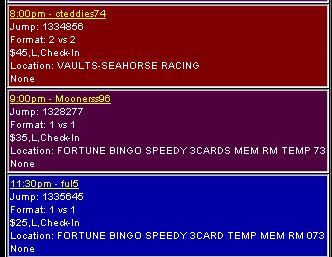
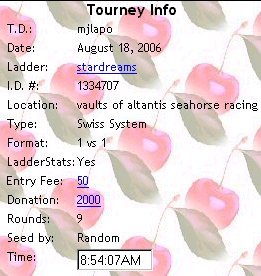
Once at tour page you will see links as well as the tour information. The top picture below shows the tour info (from top - bottom):
- T.D.- who is hosting the tour
- Date - When the tour is
- Ladder - League's Name
- I.D.# - Same as jump #
- Location - Game & room tour is in - on the main page of the league site, there are links to each game room we host in. They are backdoor links and can be used to get to rooms, especially for rooms that are full, for ex. Lottso.
- Type - Single Elimination, Double Elimination, Swiss System, True Swiss System
- Format - 1 vs 1, 2 vs 2
- Ladderstats - If your rank will change on ladder: yes/no
- Entry Fee - Amount of bux needed to play in tour
- Donation - Amount of bux host has donated for tour winner
- Rounds - Number of rounds in tour **Please note that in s/e, d/e, & regular swiss the # of rounds will adjust down at start of tour according to # of jumpers. For True Swiss the number of rounds stay as is.
- Seed By - This should say Random or Reg. Number. This determines how matches will be paired.
- Time - This is tour time. Hosts go by this clock to start their tours.
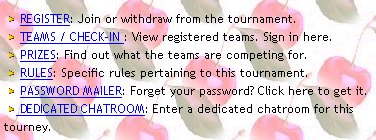
Now in the next picture below, to jump in a tour you click on the register link.
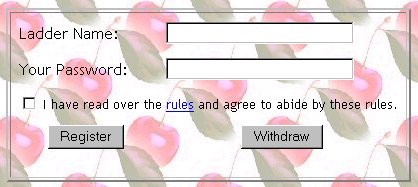
After you click on register you will see a page as in the picture below. You type in your name, your password, and check the box for rules read. Once you have done that, you click the register button.
You have now jumped in the tour and should see what is in the picture below.
To see who else has jumped in tour you can click on the teams/check-in link.
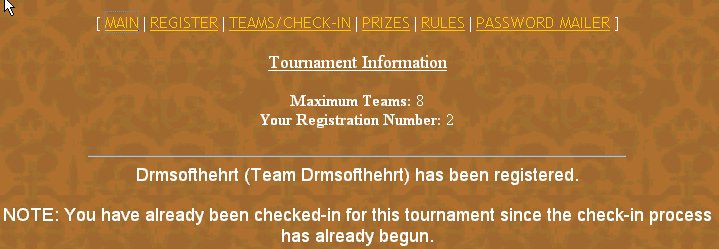
- Easy Jump Link
- In the picture below is the Easy Jump Link. This can be found at the league site once the main page is fully loaded. It is located on the top on the left hand side of the page. You put in you name, your password, and the tour jump #. The tour jump # can be found under the tour time and host of the tour on the calendar.
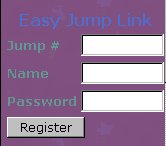
Once you have filled in all of the information and click the register button, you will have a new window open with a page just like in the picture below.
You have now succesfully jumped the tour. To see who else has jumped in tour you can click on the teams/check-in link.
- Tourney Jump Box
- In the picture below is the Tourney Jump Box. This can be found at the league site once the main page is fully loaded. It is located about 1/2 way down on the left hand side of the page. You put jump # into the blank box. The tour jump # can be found under the tour time and host of the tour on the calendar.

Once jump # is in box, hit enter on your keyboard. This will open up in a separte window the tour page like shown below. Click on the register link.
After you click on register you will see a page as in the picture below. You type in your name, your password, and check the box for rules read. Once you have done that, you click the register button.
You have now jumped in the tour and should see what is in the picture below.
To see who else has jumped in tour you can click on the teams/check-in link.
2.How to Check-in
Now lets say you have registered but now you need to check-in for the tour. Once you have brought up the tour page like in steps 1 or 3 for jumping/playing tours, you will see a teams/check-in link just below the registration link. Click on that link and it will bring you to what you see in the picture below.
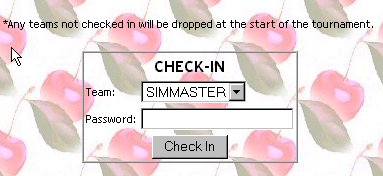
You find your name from the drop down menu. Highlight/click your name so it is showing in the window like simmaster's name in picture. Put in your password. Then click the check-in button. You have now checked-in. **Please take note, if you register for a tour but are not checked-in when the host closes registration, you will be dropped from the tour.
3.How to Withdraw from Tour
**Please note that in swiss tours a player can be removed from tour in between rounds by the host if you cannot stay for the whole tour. Just let the host know in chat.
Now lets say you have registered but now you need to withdraw from the tour. Once you have brought up the tour page like in steps 1 or 3 for jumping/playing tours, you will see the registration link. Click on that link and it will bring you to what you see in the picture below.
You type in your name, your password, and check the box for rules read. Once you have done that, you click the withdraw button. Once you have clicked the button, you will see the page in the picture below. Click the yes to withdraw and the no if you want to stay in tour.
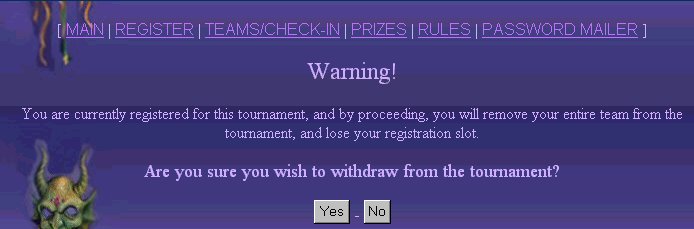
After you click the yes button, you will see a page as in picture below. You have now succesfully withdrawn from the tour.
