
 |
|||||
 |
|||||
| Thoughts of mine put in to words...Badly.That alone should be enough to worry you.Your statutory rights are not affected | |||||
Hello 32 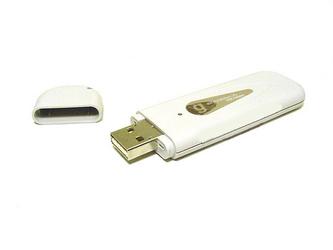 We have had set up at our house for a considerable period of time a wired network through which everyone can just plug in and gain access to the printer all the mp3s and probably most importantly the internet. I strategically placed sockets in all the places I thought one would be required and for me it seems to serve the required purposes very well. So here's the deal. Do I turn a deaf ear when the wife or the daughter ask why is there a wireless icon in my taskbar that always has a cross through it and continue about my daily business or do I succumb to the promise of a free wireless router and upgrade to AOL platinum or even rush down to PC World or somewhere of a similar ilk and part with nigh on 70 notes ? The answer ? Well I do none of the above.... After reading many articles on the internet about how to set up home networks and the like it occurred to me that a wireless 'dongle' (whoever came up with that name must have been having a laugh) has the capability to transmit as well as receive and as such may have the capabilities required to peform a similar task as a wireless router. I read nowhere that this is possible but have been bombarded by adverts for wireless routers. This seemed to provide me with a challenge and I instantly thought of the con when video recorders first became popular and all the major retailers would try to sell video copying lead kits for 30 Quid when all you really needed was a small screwdriver to adjust the output channel on the back and a 99p flylead off the market. Regular readers may recall that my daughter had a laptop for her birthday. Part of this package was a wireless dongle (snigger.. sorry can't help it) which went straight into the computer bits cupboard as being as there is no wireless network here would only have got lost, broken or used for something other than it's intended purpose in an imaginative game of some sort. So I decided to plug the dongle (titter.. there I go again) into the main server and have a look see. Now obviously this confuses the hell out of Mr. Gates' wireless set up wizard but delving into the supplied set up cd and finding the configuration settings I realised that it may just be possible for this to work. I set the encryption, named the network, switched the setting to access point from station and then created a network bridge between the lan card and the now merrily flashing dongle (snort.. sorry must really stop doing that) strange things started to happen, the light stopped flashing and Mr Gates' flagship product kindly informed me that I had limited or no connectivity and my new hardware may not work properly. Hmmm.. not wanting to believe that I closed the warning boxes and dissappeared upstairs to try and search for any available wireless network on the wifes laptop. Guess what? It found one. So I go through the set up and enter all the necessary passwords and codes required by a this time more helpful wizard and Hey Presto we have lift off. Needless to say my jaw dropped to the floor at the point when the Yahoo homepage loaded. So there you have it. Another victory for the little guy. I must say though I wouldn't recommend this solution for longer periods than about four hours as the dongle(sniff... O.K. I'm over it now) gets very hot and as such has caused a couple of stop errors. So remember if you are thinking of going wireless this low cost if not completely satisfactory solution.
2006-06-14 19:28:18 GMT
Comments (4 total)
Author:o_and_x_hunter
That's well worth knowing. I don't think I dare fiddle about with my configurations again though. I haven't done an update recently, but in conversation with an AOL advisor last night he as much as admited that the BT Voyager USB modem supplied is not fit for the job.
2006-06-14 20:07:02 GMT
This evening I officially moved back into the study - there is now a 10m phone extension lead leading up the stairs and across the landing. I'm glad I did fork out for a wireless router otherwise I'd still not be able to access the internet at home.
Author:Stu
Glad to here you are no longer conducting business from the hallway Sean. I can say though that that voyager 100 as originally supplied and the replacement 105 that Aol sent me when I suffered a few problems (not caused as they insisted by the modem) both cope very well with the multi computer network and I am quite happy with their performance
2006-06-14 21:36:45 GMT
Author:[email protected]
One secret for reasonable wireless performance is updated the drivers.
2006-06-19 10:32:35 GMT
This is a bit like a football club changing managers. It seems like you will be pulled back from the brink - only to find something else goes awry. When all said and done, the best solution is still the good old Cat 5 cable.
Author:Stu
Indeed, Give me cat 5 over wireless anyday, faster more secure, more reliable and I'm a stickler for using the latest drivers etc.
2006-06-19 13:14:26 GMT
|
|||||