Sub War has a few panels on the screen that you should understand. They are mostly pretty self-explanitory, but in case there is something in them you don't understand, all of the obvious is clearly stated right here. If you don't see the panels, press "o" to make them come. If you don't want to see them, press "p" to make them go away.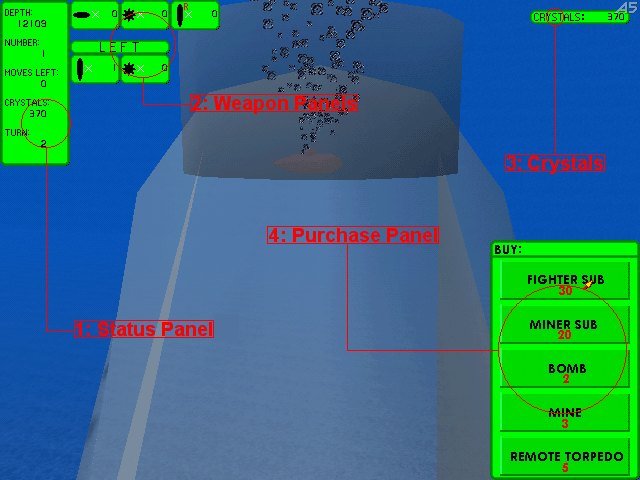 1: Status PanelThis shows the status of the currently active sub.- Depth - This tells far below the surfaace the active sub is. This is only useful if you are lost and trying to reach a certain destination, and you know the height of that destination. That can then help you guess whether to go up or down. - Number - Every sub has its own number from 1-100. If there are 100 subs already, you cannot make any more. This displays the number of the active sub. - Moves Left - This displays the number of movement points left for the active sub. This counts down while you move forward, backward, up, or down. When it reaches zero, this sub can no longer move. - Crystals - This is only valid if the aactive sub is a miner sub. If it is, it shows the number of crystals that miner sub is carrying with it. You must drop these crystals off at the master sub before they can be used. - Turn - This is the turn number. Every time the grey team finishes a turn, this number goes up by one. This number has no use, it's just there for reference. 2: Weapon PanelsThe top three of these panels show how many of different weapons you have left. The first one shows your remaining bombs, the second your mines, and the third shows remote torpedos. The bottom two panels show how many times you can use weapons until your next turn. The first is torpedos, bombs, and remote torpedos, and the second is mines. Look up the different types of subs to see how many of these each can use per turn.3: CrystalsThis displays the number of crystals your master sub is carrying.4: Purchase PanelThis panel is only shown when the master sub is active. As well is the purchase panel, a mouse pointer appears when you are using the master sub. Click on the buttons to buy things. The red numbers on the buttons are the number of crystals required to make it. |