| Window
Shopping
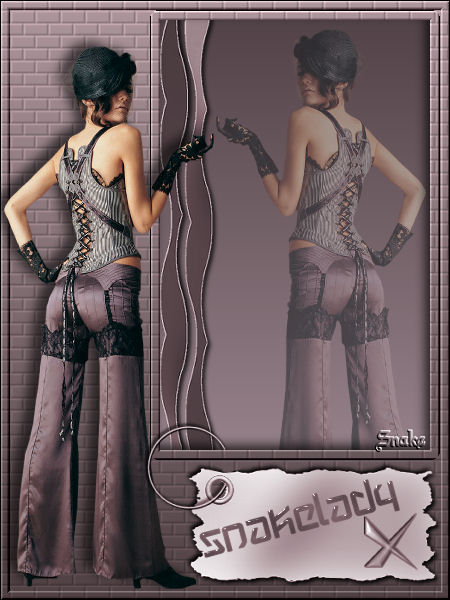
What do you need:
Filter Bordermania
Filter Eye Candy 3.
All the materials "Here"
the tube I used is from http://groups.yahoo.com/group/top_design_tubes.
Pick a dark foregroundcolor and a light backgroundcolor
from your tube.
Make a lineair gradient, angle 0, repeats 0.
Open a new image 450x600 transparent and fill with the
gradient.
Activate selectiontool - custom selection:
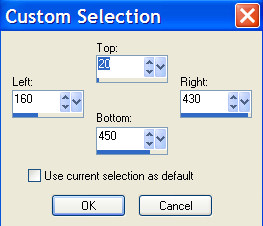
Push your delete button once.
Selections - modify - expend 10 pixels.
Effects - Filter Bordermania - frame #2. (
10-10-110-130)
Selections - modify - contract 10 pixels.
effects -cutout - vertical-5 horizontal -5, opacity 70,
blur 15, color black.
Selections - select none.
Layers - new rasterlayer.
Layers - move down.
Your bottomlayer is activated now.
Invert your gradient, the dark color is on top And fill
the bottomlayer with your gradient.
Copy Snakerand2 and paste as a new layer.
Move to the leftside of the window.
Effects - dropshadow 2-2-75-5 black.
Copy your tube( mh_cros_back_corset) and paste as a new
layer.
Move to the right and find a nice place in the window.
Layer opacity 45.
Activate your toplayer.
Effects - texture effects - texture - bricks:
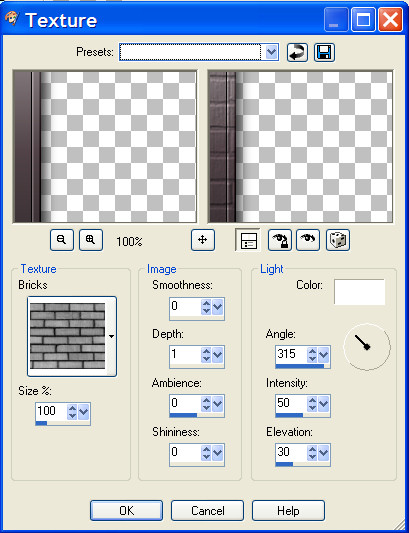
Effects - bordermania frame#2 ( 5-5-110-130)
Paste your tube again as a new layer.
Image - mirror - and move to the left and bottom.
effects - 3d effects-dropshadow ( hor. and vert. -5, opacity 60,
blur 15,black. )
Copy the nameplate (snakemetal) and paste as a new layer.
Move below the window.
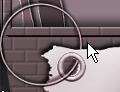
Activate your erasertool.
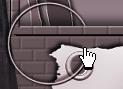
Erase a little bit of the ring, so it looks like its
going through the wall.
Layers merge - merge
all.
Activate the texttool.
I use the font: wintermute size 30,vector.
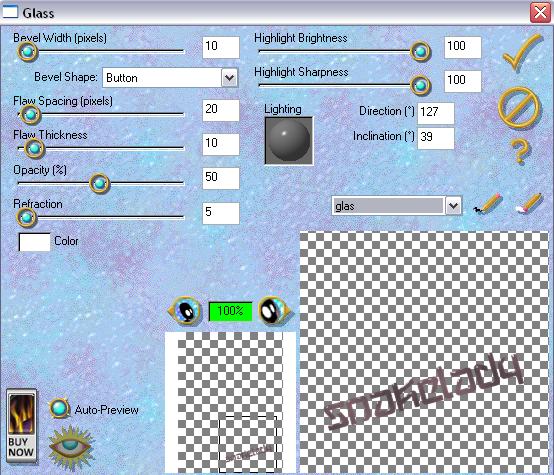
To let the name look like its made of glass, use filter
eyecandy 3 - glass:
Dont forget your watermark and resizing.
Have fun.
Please leave the names and watermarks of the tubes
intact.
Don't copy without my permission.
Snakelady.
"Home"
|