|
Vanilla

What do you need:
a nice tube
Filter dsb flux.
All the materials are
All the materials are
"here".
here".
Put the brushes into the brushes folder.
Open the tubes in psp.
Pick a dark foregroundcolor and a light backgroundcolor
from the backgroundtube.
Make a rectangular gradient, angle 0, repeats 4.
Open a new image 600x500 transparent and fill this with
your gradient.
Filters - pluginn filters - dsb flux - tiler, with these
settings:
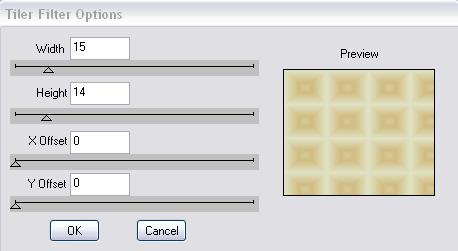
Copy your backgroundtube and paste as a new layer.
Layer opacity 75.
Layers merge - merge all.
Selections - select all - modify - contract 10 pixels.
Effects - dropshadow with these settings:
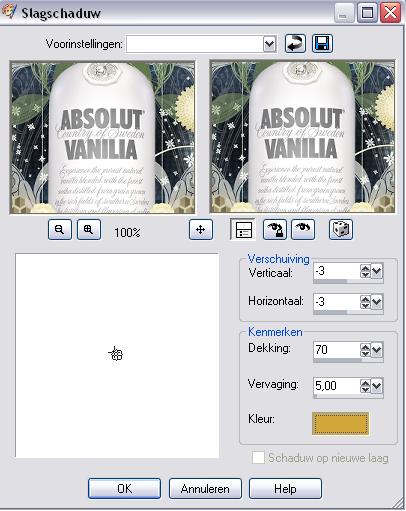
repeat with horizontal and vertical
3.
Selections - modify- contract 20 pixels.
Effects - cut out, with these settings:
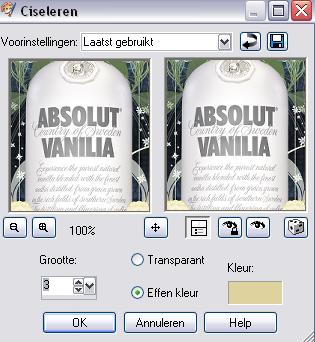
Selections - select none.
Copy your tube ( height 430 pixels) and paste as a new
layer,move it to the left and bottom.
Blendmode - luminance legacy. Sometimes if you use
another tube it maybe not so nice to use luminance
legacy.
Then its better to leave it like this.
Effects - dropshadow - hor and vert -3, opacity 70, blur
5, black.
Put your foregroundcolor on black.
Activate your brush, find agi-cherish brush, See my
example where to stamp it.
Copy the Snakevanillarand and paste as a new layer, move
to the right.
Layers merge - merge all.
Image - add borders - 3 pixels with your dark color.
Place your name and watermark and resize your image if
neccessary.
Don't copy anything without my permission.
Have fun making my tut.
leave the names and watermark of the tubes intact.
Snakelady.
Home
|