| Sweetness

What do you need:
Filters unlimited.
All the materials are
"here".
open the tubes in psp. Put the brushes into the brushes
folder.
Open a new image 600x500 transparent.
Selections - select all.
Copy background 1 and paste into selection.
Selections - modify - contract 10 pixels.
Copy background 2 and paste into selection.
Selections modify - contract 25 pixels.
Copy background 3 and paste into selection.
Selections - select none.
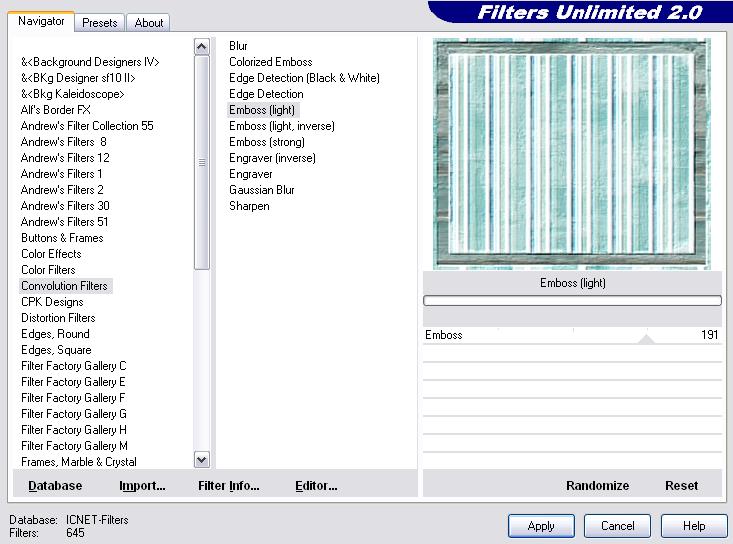
Effects - Filters unlimited2 - Convolution filter - Emboss
light.
Copy SnakeStitch and paste as a new layer.
Move down to the right corner.
Layers duplicate - image rotate to the left 90*.
Move to the right corner.
Layers duplicate - mirror image - flip image.
Layers merge - merge all.
Copy the mantube and paste as a new layer.
Move to the right.
Layers - blendmode - luminance legacy, opacity 60.
Copy the womantube (PatryTubes) and paste as a new layer.
Move a little bit to the left.
Effects - dropshadow : 3-3-70-10 black.
Repeat with -3.
Copy the button and paste as a new layer. Give it a nice
place on the right.
Paste again as a new layer, move it also.
And again paste as a new layer and give it a nice place,
Put your foregroundcolor on a nice color from your tube.
Activate your brush, find sweetness05_danetta and stamp it
left on your tag.
Layers merge - merge all.
Place your name and watermark.
The font I used is called: SlashHmk, size 36 vector.
Leave the names and watermarks of the tubes intact.
Don't copy anything without my permission.
Snakelady.
Home
|