|
Summer Blue
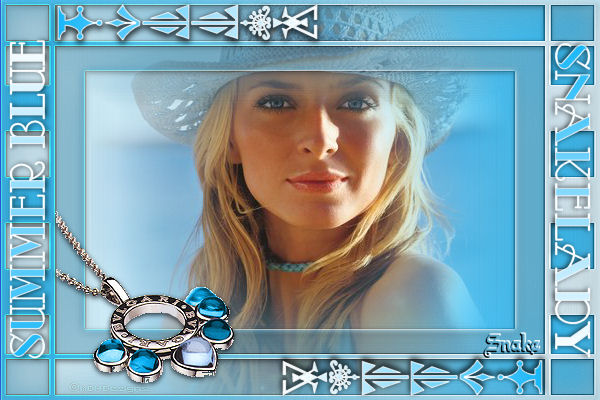
What do
you need?
filter FM Tile Tools
The mask I used is from the beautiful site of Cris
Taylor.
All the materials "Here"
Put the mask in the mask folder.
Open the tubes in Psp.
Put your foregroundcolor on white and pick a nice color
(#19b7f9) from your tube as backgroundcolor.
Make a lineair gradient, angle 90. repeats 0. The
blue color is on the right.
Open a new image 600x400 transparent and fill with your
gradient.
Layers - new rasterlayer.
Invert your gradient, blue is now on the left and fill
your layer with the gradient.
Layers - load mask from disk - find mask CrisTaylor_m12.
Invert transparency marked.
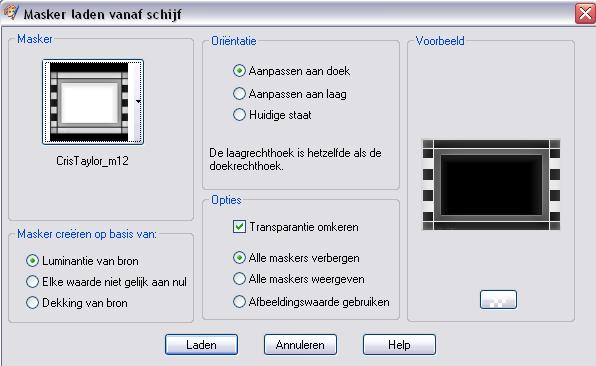
Layers merge - merge group.
Effects - Filters - FM Tile Tools - Blendemboss, click
apply.
Effects - edge effects - enhance.
Effects - dropshadow: vert.2 , horizontal 0, opacity 75,
blur 8, black.
Activate your bottomlayer.
Copy your tube (snakesummer) and paste as a new layer.
Activate your toplayer.
Copy Snakerand4 and paste as a new layer, mover to the
left top.
Effects - dropshadow, same settings.
Layers duplicate - image mirror - image invert.
Layers merge - merge all.
Activate your text tool to put your name on the tag.
I used the font Odalisque, size 36.
Type your name and put it on the right side.
Type the text Summerblue ( or any other text ) and put
it on the left side.
Effects - dropshadow, same settings.
Copy SnakeNecklace and paste as a new layer.
Move to the left, see my example.
Use the same dropshadow.
Layers merge - merge all.
Dont forget your watermark and to resize your image.
Have fun.
Don't copy without my permission.
Leave the names and watermarks of the tubes intact.
Snakelady.
Home
|