|
Romance

All the materials "Here"
The tubes I used are from the groups High_Standerd_Tubes
and Top_Design_Tubes.
Open the tubes in Psp.
Put the selection into your selections folder.
Pick a dark and a light color from your tube and make a
radial gradient with these settings.
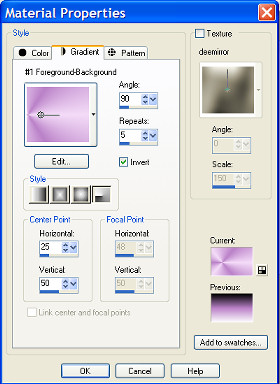
Open a new image 600x450 transparent and fill this with
your gradient.
Adjust - Blur - Radial blur:
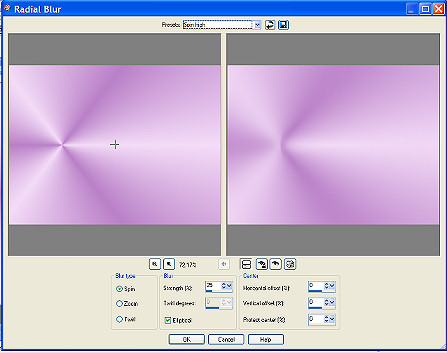
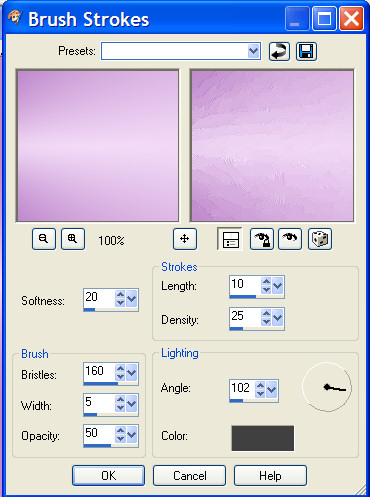
Effects - art media effects -
brushstrokes:
Selections - Load saved selection - load selection from
disk- find the selection SnakeSelectieRomance.
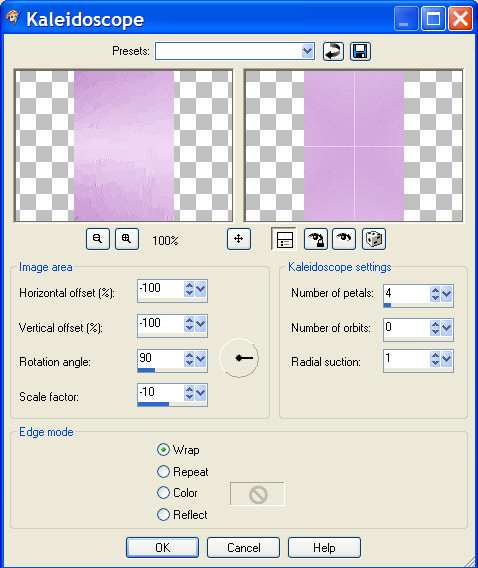
Effects - reflection effects - kaleidoscope:
Effects - edge effects - enhance.
Selections - select none.
Your background is ready.
Now we are going to open a new image 600x450 transparant
and fill this with your gradient.
Adjust - blur - radial Blur - same settings.
Effects - art media effects - brush strokes, same
settings.
Copy your tube ( Misted Fashionlady) and paste as a new
layer.
Move a little bit to the right and top.
Copy the flower ( Blauwe Regen) and paste as a new layer.
Move to the upper left corner.
Layer opacity 65.
Copy the tube rw_Romance and paste as a new layer.
Move to the left bottom corner.
Layers - blend mode - luminance legacy.
Layers opacity 50.
Layers merge - merge all.
Image - resize image- 550 pixels wide, bicubic.
All layers marked.
Copy your image.
Get your background and paste your image as a new layer.
Effects - dropshadow : 3-3-85-2, black.
Repeat with -3.
Copy SnakeStrik and paste as a new layer.
Move to the upper left corner.
layers duplicate and move to the right lower corner.
Layers merge - merge all.
Change your foregroundcolor to black.
Layers - new rasterlayer.
Activate Your text tool, typ your name and give it a
nice place.

Layers - blend mode - luminance legacy, layer opacity
65.
Layers merge - merge all.
Image - add borders - 2 pixels black.
Dont forget to put your watermark on it.
Please leave the names and watermarks of the tubes
intact.
Do not copy without my permission.
Snakelady.
Home
|