| Laced

What do you need:
a goldpattern
a nice tube 500 pixels heigth.
All the materials "Here"
Put the brush into your brushes folder.
Open the tubes in Psp.
Pick a dark foregroundcolor and a light backgroundcolor
from your tube.
Make a gradient, sunburst, angle 0 repeats 0. Tick
invert. The light color is in the middle.
Open a new image 600x500 transparent and fill this with
your gradient.
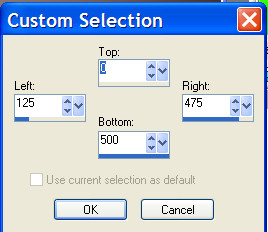
Selections - using your selectiontool, click on custom
selection, use these settings:
Copy your tube
(JWalcott-laced02-shel) and paste into selection.
Effects - dropshadow - 5-5-85-15 black.
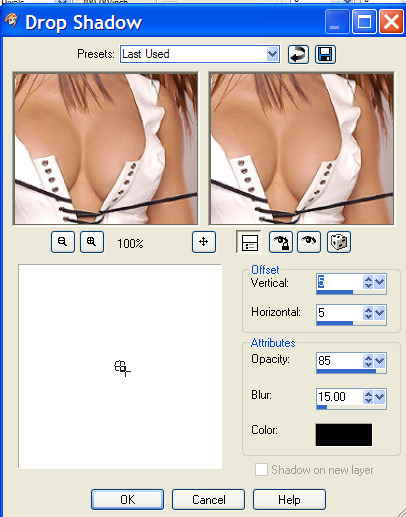
Repeat this with -5.
Selections - modify - select selectionborders 5.
Layers - new rasterlayer - fill the border with your
gradient.
Selections invert.
Layers - new rasterlayer.
Selections - modify - contract 2.
Find your goldpattern and fill the 3 areas.
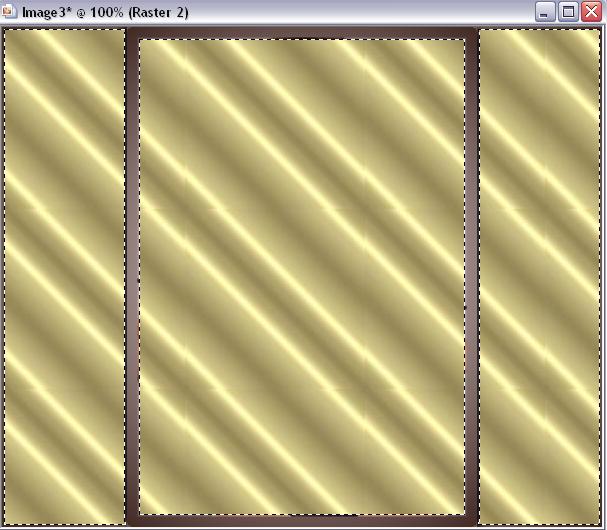
Selections - modify - contract 2.
Push your delete button.
Selections - select nothing.
Activate layer 2.
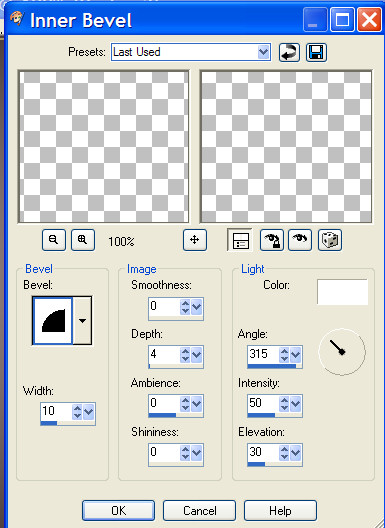
Effects - Inner bevel:
Activate the toplayer (3).
Copy Snakerand8 and paste as a new layer.
Move to the left.
Layers duplicate - Image mirror.
Layers duplicate - move this to the left.
Layers duplicate - image mirror.
Layers - merge all.
Activate your brush and stamp your brush(
aDR-Teenytext4) several times with your dark
foregroundcolor,
on the left and the right side.
Image - add borders - 2 pixels with your goldpattern.
Place your name and watermark and resize your image.
Have fun making this tut.
Please leave the names and watermarks intact.
Do not copy without my permission.
Snakelady.
Home | 