|
Annika

What do you
need:
Filter Simple
All the materials are "here".
Open a new image 550x400 transparent and fill this with
black.
Copy your facetube and paste as a new layer. Move it to the
right.
Copy the metal plates and paste as a new layer. Move to the
left.
Copy the metalrand and paste as a new layer. Move to the
bottom.
Is everything okay?
Layers merge - merge all.
Image - add borders - 5 pixels white.
Select the border with the magic wand and fill it with your
silverpattern.
Effects - Inner bevel with these settings:
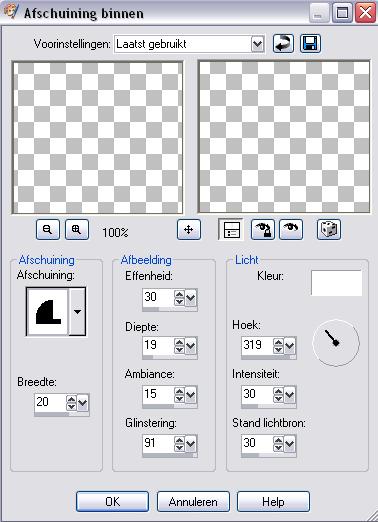
Selections
- select none.
Image - add borders - 20 pixels black.
Copy the Metalcorner and paste as a new layer. Move it to
the upperleft corner.
Effects - Plug inn filter - Simple - top left mirror, click
ok.
Effects - dropshadow : 2-2-60-15 white.
Layers merge - merge all.
Image add borders - 5 pixels white.
Select the border with the magic wand and fill with the
silverpattern.
Effects - inner bevel - same settings as before.
Reduce your image to 600 pixels width.
Place your name and watermark and you are finished.
Have fun making this tut.
Do not copy anything without my permission.
Leave the names and watermarks of the tubes intact.
Snakelady.
Home |