|
Some Tips from a fellow downloader: |
| #1 Get your own idrive account ((http://www.idrive.com)) -- I recommend getting two or three [there
is a 150mb/24hr/account download limit; if you sideload all of the files into one account,
and there are more than 150mb of data for all of the files, you are stuck until the next
day] #2 Get the file path to where the files are
located [this can be found by sourcing the site (it will usually be next to the download
link in the html coding]... If you cannot source the site, or cannot find the account in
the html sourcing, try contacting the webmaster, of that site, and see if he will share
his link (java-script prevents sourcing, sometimes). #3 Go to *YOUR* idrive account. Click on
"Friends" then "New Friend" --> Make up a first/last name and place
the link to the files in the "idrive" line. Note, the address will look like
this [https://www.idrive.com/accountname/files/shared] -- /files/shared isn't mandatory to
use. #4 Click on the link to access the files,
from your "friends" category and the files will appear. #5 Send the files to your own account, and
download them. |
| How To Download From IDrive (One Song At A Time) |
| Step 1: Left-Click on the link
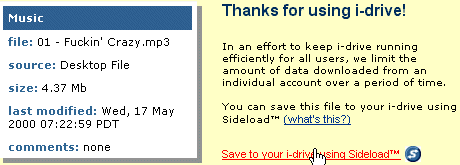
from the artistes' page Step 2: Right-Click on the link from the new window (Idrive) & choose 'Save Target As' or 'Save Link As'. You show be able to download if you see the default filename as blabla.mp3. However, if you see the default filename as blabla.htm, then there are too many people downloading from that account at the same time. In that case, goto Step 3. Step 3: Left-Click on the song you would like to download. You'll be brought to a page similar to the screenshot below. Simply click on the 'Save to your i-drive using Sideload' link. However, you'd need to have an account at Idrive. If you haven't applied for one, apply now! |
 |
| How To Save Entire Album To Your IDrive Account (Using Sideload) |
| Note: You must
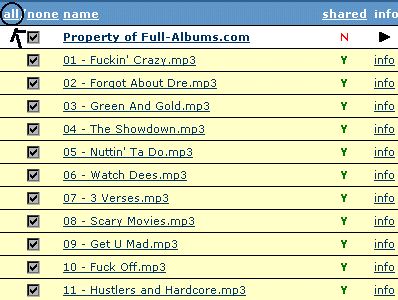
login to your idrive account beforehand! Step 1: Left-Click on the link from the artistes' page Step 2: Click on the 'all' link to select all files. |
 |
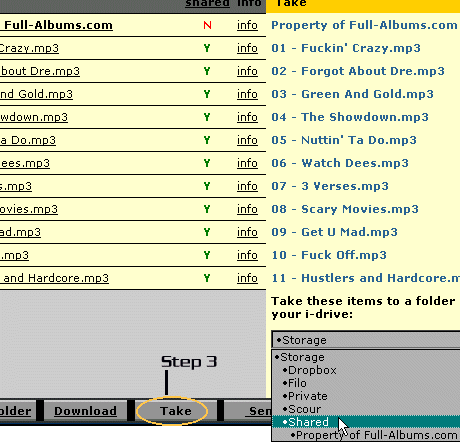
| Step 3: Click on 'Take' from the bottom. Then choose the folder you'd like the mp3s to be in, eg Shared |
 |
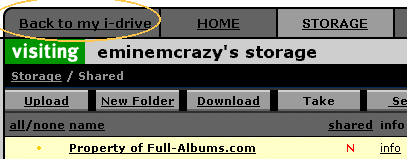
| Step 4: Click on 'Back
to my idrive' link at the top of the page, and you'd be able to return
to your account, where you can download the whole album at your leisure pace by
right-clicking on the links. If the album is hosted at 2 or more different accounts,
simply repeat Steps 1-4. Note: With the 150mb download limit from each account per day, I'd recommend that you have a few accounts at hand, so that you may alternate these accounts and spread your downloads over the days. |
 |
|

