|
Tutorial
Difficulty: Newbie2xpert Topic: Patching Flash
Softwares Required: g3nolite v1.7 By: g3ggo (not v1.7b) (other Version is Buggy) Your unmoded Flash v5.57 (Optional Higher Version) The newbie software "SlidEdit 1.02 by: Joox" is the easiest tools for editing slideshow. |
:: g3nolite ::
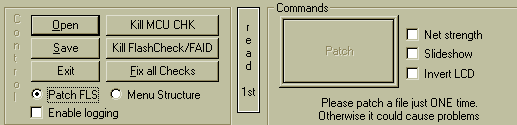
Open your flash and select your choices Net strength, slideshow, invert LCD. Once your flash is patched you
can't undo the changes, you better save the flash in different file name. The Net strenght and Invert LCD is
self explainatory. The slideshow is what we're going to learn. After you click the slideshow and patch it will
display the offsets like the sample below. But each flash has it's own summary mean differ from other flash.
After you patch the file just save it and check all CRC's but first copy the summary in notepad.
:: Slideshow ::
This is only a sample summary but you can follow the procedure on what to do to edit the bitmaps of your slide
show using Hexgraph is my best tool for editing slideshow. There are some other tools you can use. I did'nt use the Poodriver co'z I don't have that software. You can also use the SlidEdit v1.02 by: Joox.
:: Editing the Patched Slideshow ::
|
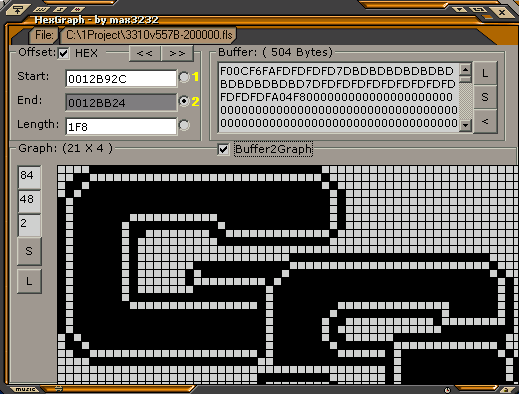
Click>File>Set>Browse your flash
On Buffer Window Click L (load) then check the Buffer2Graph it will display the frame1 patch logo. To replace the logo with your selected logo (like Picture Message size you can get some on the Net and covert it to BMP or Capture from Logo Manager). On Graph Window Select L (load) browse for the Bitmaps, it will load up the image then on the Buffer window click the < (convert to hex) after that click S (save) the offset to your flash. Next for the frame2 just click the Start: radiobutton1 to unlock the End: window and copy the End: frame2 hex unlock again to Start: and on the End: paste the frame3 hex. And so as the other frame. |
On the last frame4 has no other frame# serve as ending offset, you need to enter the Higher number of 0012BF14 which is 0012C110 The Hex Counting is different like. 0 1 2 3 4 5 6 7 8 9 A B C D E F example 9 next is 10 (on hex next is A next is B and so on..) How to run the slideshow? After you flash it on your phone just press *#sim clock# that is *#746025625#
For expert moders a technic that you can add slideshow in your menu for easy access without key in the sim clock. ( click here ) Using genolite menu structuring. |