|
Tutorial
Difficulty: Newbie Topic: Import/Export Ringtones
Softwares Required: PPMedit by Tnp Your unmoded Flash My moded Flash (click here) to download |
Importing/Importing Bitmaps
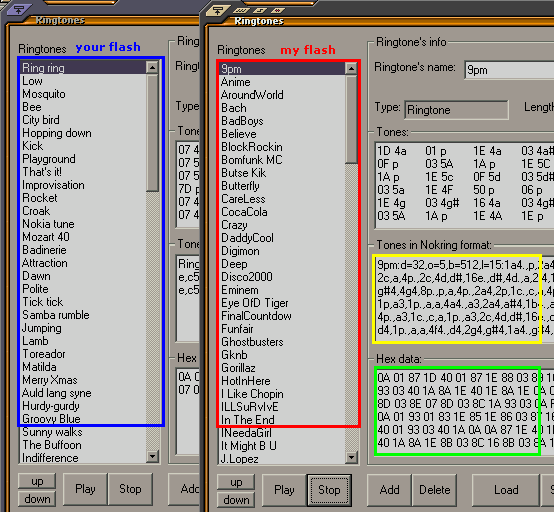
Using PPMedit Open my moded Flash File and Click the Ringtones Button, as you can see in my ringtones where your going to copy and paste it to your unmoded flash. Open another PPMedit and open your unmoded flash click the Ringtones button arange the window for easy job. see the sample.
|
Copy / Paste: After you arange the window's you can see in my flash are the tones what your going to copy and paste it on your flash just select any tones you like from my flash, after you select, the nokring format will be displayed in the yellow window and so as the green in hex data window. Right click from my nokring format window>select all> and copy. Then click your flash nokring window right click> select all and paste, click update next to it. Do same as my Hex data window to your Hex data window click update, now we have the same set of ringtones. Do same as the other tones.
|
Click Play to hear the ringtones if it is right. After all the tones transferred click ok and save your file. HINT: MCU_Ringtone17 is the Alarm Clock Tone MCU_Ringtone22-30 are the games tones MCU_Ringtone57-60 are the Message tones Warning Do not attempt to edit other MCU tones or else... |