:: g3nolite 2 Patch :: |
|
|
|
|
|
|
|
|
|
Genolite Script Mania
WARNING: Before upgrading always create FUBU (Full Backup) of your phone. Not just partial flash.
IF YOU FOLLOW ANY OF THE INSTRUCTIONS BELOW, IT IS DONE SO COMPLETELY AT YOUR OWN RISK! we cannot be held responsible for any negative effects resulting from the following of this instruction guide |
:: g3nolite 2 Patch :: |
|
|
|
|
|
|
|
|
:: Other Aps Patch :: |
|
|
Note: Some patch are not working properly on heavy moded flash. So start patching on clean flash.
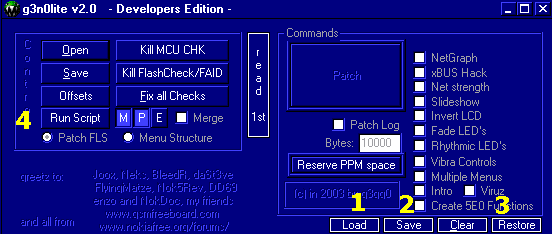
:: g3n0lite Buttons ::
1 Load the gsc Script 2 Save the gsc Script 3 Restore or Undo Changes 4 Run the gsc Script
|
|
:: Patching the Realtime 7Bar Signal and Battery ::
 Open your flash file
Click then Load Script
Select 7bars.gsc
Run the script, wait for loading...
ERROR are displayed at the end, just scroll down. No Errors that is success.
:: Succes message ::
## Everything seems to be patched now. Flash your phone and
## have fun or report bugs on www.nokiafree.org/forums...
:: 16 Empty Tones Patch :: This patch works only on 3310/3315
Open your flash file
Click then Load Script
Select 16tones.gsc
Run the script, wait for loading...
ERROR are displayed at the end, just scroll down. No Errors that is success.
Click Fix all checks
After flashing Restore Factory Settings Required
note: some images are missing.
:: Fast Invert Patch :: 2 files
Open your flash file
Click then Load Script
Select keymain.gsc
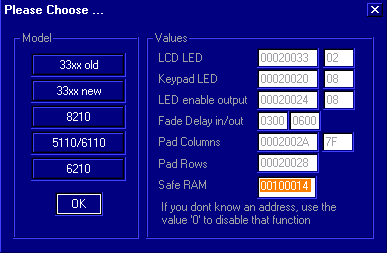
Run the script, Please Choose window will pop-up, Click 33xx new and set Safe
Ram 00100014. OK Loading..
:: Succes message ::
This tricky thing was done =)
Click then Load Script
Select fastinvert.gsc
Run the script, Question window will pop-up.
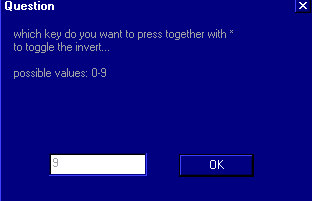
Select 0-9 and click OK. Please Choose window will pop-up, Click 33xx new and
set Safe Ram 00100014. OK Loading..
ERROR are displayed at the end, just scroll down. No Errors that is success.
Click Fix all checks
:: Succes message ::
nice... it's ready. report bugz & wishes. otherwise have fun.
:: The Clock Patch ::
The Clock Patch is realy hard you need to creat new menu and submenus. I will explain this soon or you can visit Forums for more info
:: Other Apz Patches :: SecCode for 3310/3315
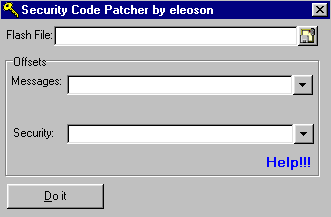
Run SecCode Program
Open your flash file 
Run Genolite Program
Open your flash file
Click Menu structure, Under Language Box put ENGL Click Read Menu Structure
Locate the Offsets copy Message offset and paste it on SecCode Message offet

Locate the Offsets copy Phone Security offset and paste it on SecCode Phone
Security offet
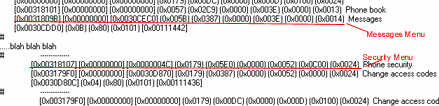
Click Do it, Loading, and save the flash file, don't forget to fix all checks.
Internet Explorer 6 or above recommended and macromedia flash 6 plugin for best result
© 2001 - 2004 SmaRkieS Interactive
For comments and suggestions email to [email protected]