Tutorial
Difficulty: Newbie
Topic: g3n0lite v2.0
Softwares Required:
g3n0lite v2.0
Your Flash
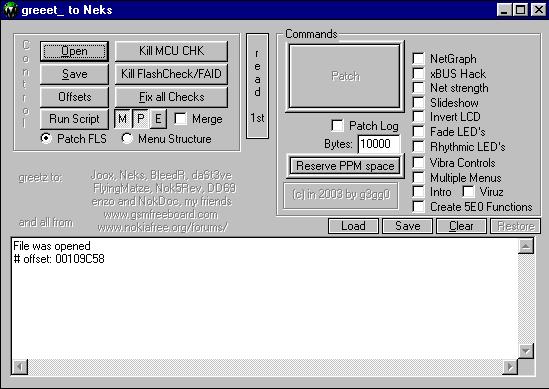
|
|
|
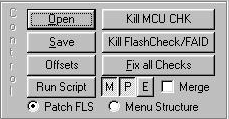
 Now select the Patch that you like and click �Patch� button
SOME TIPS AND TRICKS BEFORE YOU PATCH
Try to patch your flash file g3n0lite v2.0 choose patch option that
you like (Netstrengt,Netgraph,fade,invert,rhytmic,vibra,mul tiplemenu,intro,viruz,create
5e0 function) but with conditional term below:
For 3310/3330/8210/8250/5110/6110/5510 (you may choose all of Option
except "netstrength")it wont show you an error screen)
 for 3210 (you may choose all of Option except "netstrength"
and "FADE LED'S")
for 3210 (you may choose all of Option except "netstrength"
and "FADE LED'S")
for 3350 (you may choose invert, fade,vibra, multiple,viruz,and
5e0 function)
for 7110 (just choose rhytmic option, cause 5e0 function doesn't
work so we can't control it by menu but it's okay cause Rhytmic
will automaticly in "Active" mode so at least we can enjoy
it)
for 6210/6250 (just choose invert,fade, rhytmic,vibra option, cause
"5e0 function doesn't work so we can't control it by menu it's
okay cause Invert and Rhytmic will automaticly in "Active"
mode so at least we can enjoy some of them)
for 6150 may be it same with 6110 cause i don't have this flash
file in my HDD so i can't test it.
If g3n0lite v2.0 show "Please
Choose Model Of Phone" screen, just choose any kind of it doesn't
matter (e.g. your flash 3310 VXX.XX you can choose 3310 old/new,5110/6110,8210,or
6210 option, but you have to change SAFE RAM value to "00100014")
it will work, and the result will same and most working
TRICK TO USE G3N0LITE v2.0 with 6210/6250/7110
Sometimes after we open 6210/6250/7110 flash file in g3n0lite and
try to patch with option that i have told above we will get error
screen and if we try to patch the result in text box will contains
like this:
found 0048 bytes for function own_get_ram at 0x00304200
bl: 0030420E -> 001BC6E8: F6 B8 FA 6B
ERROR: own_get_ram function #1 not defined yet
found 0048 bytes for function own_set_ram at 0x00304230
bl: 0030423E -> 001BC6E8: F6 B8 FA 53
ERROR: own_set_ram function #1 not defined yet
found 0060 bytes for function own_get_led at 0x00304260
found 0132 bytes for function own_set_led at 0x0030429C
THE SOLUTION ARE :
load clean flash file (ppm+mcu) of 3310/3330/8210/8250/5110 (e.g
3310ppm+mcu file)
then check all option of patch except net strength (Netgraph, fade,invert
,rhytmic, vibra, multiplemenu, intro, viruz , create 5e0 function)
and click "Patch" button, but you have to change SAFE
RAM value to "00100014" ). don't save this flash file
cause we only want tricky g3n0lite to work with 6210/6250/7110 without
error.
now open 6210/6250/7110 flash file, check patch option ((just choose
invert,fade, rhytmic and vibra for 6210/6250, i suggested to choose
invert and rhytmic cause it automaticly in active mode and if we
want fade effect use nfader. and just choose only rhytmic led's
option for 7110) click "patch" button and choose anything
model of phone, change SAFE RAM value to "00100014 and press
"Ok". wait for a second and BAAAAAAAAANG........ it doesn't
show error screen and result in text box doesn't contains ERROR
anymore:
found 0048 bytes for function own_get_ram at 0x0031B3A8
bl: 0031B3B6 -> 001C2C90: F6 A7 FC 6B
bl: 0031B3C2 -> 001A52E4: F6 89 FF 8F
found 0048 bytes for function own_set_ram at 0x0031B3D8
bl: 0031B3E6 -> 001C2C90: F6 A7 FC 53
bl: 0031B3F2 -> 001A52E4: F6 89 FF 77
found 0032 bytes for function own_get_keypress at 0x0031B408
found 0060 bytes for function own_get_led at 0x0031B428
found 0132 bytes for function own_set_led at 0x0031B464
At last save and flash to your phone. (and hope it will work)
Now we can enjoy Rhytmic Backlinght in 6210/6250/7110
I suggested to choose all option that supported by flash flie in
g3n0lite even we do not want those option. cause we will get working
patch
|
|
|
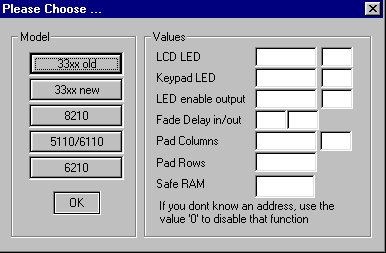
Then press OK button and you
will see:
|
|
|
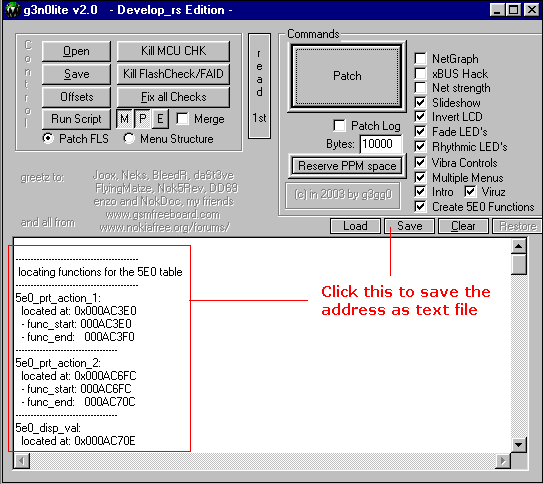
for genolite error messages