 |
| Sig Tag with bubbles |
| This tutorial is made in PSP7.04 Other versions will work . You will need Dsb Flux |
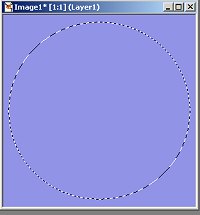
| Let's start: 1. Open new file 300x300 transparent. Flood fill with the color you want. I used #9193E7 Go to selection tool/ellipse. Draw an ellipse like this: |
 |
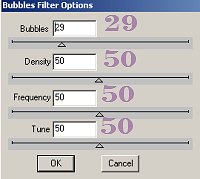
| 2. Copy and paste as a new image. Resize with 85%, all layers unchecked. Add noise, 10% uniform. 3. Go to Dsb Flux/bubbles with these settings: |
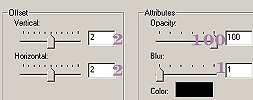
| 4. Add a dropshadow with these settings: |
 |
| 5. Add a new layer. Now you can decorate your Tag as you wish! Enjoy !! |
 |
 |
 |
 |