. : : ABOUT HUB : : .
What is this Hub?
Well funny you ask, this is what this page is supposed try and answer.
The Hub is basically our own "Mini - Napster". You basically load the
Hub Software, connect with the address, and you have accessed a huge
library of Live Recordings, both video and audio.
Where do I get this "software" that you are talking about?
You may here download the version that suits your needs.
Ok I got me the software and installed it now what do I do ?
Now that you have the software installed you have to load it up and go
through the setup process which it has. It is very similar to any other
kind software installation.
I set everything up but it says I need an address to connect
with?
Yup, the address is what separates this Hub from all of the other Hubs
out there. The address is snakepitus.no-ip.org
What do the icons next to the people's names mean ?
Well it all depends on which version of the Hub you are
using. For the most used version of the Hub, the Direct Connect version
here is the table located on the FAQ page of the Direct Connect page.
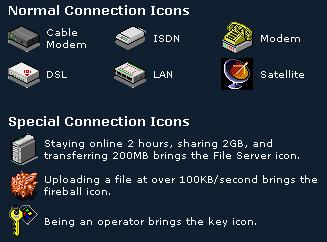
Why is it that when I try to connect to someone and
the connection keeps on saying " Closing Connection"?
Most likely the person's Slots are Full. Sometimes
It wont say that the person has no more slots open. It just says
"Closing Connection".
If the person I was downloading from logged off will
my download resume?
Yes your download will resume when that person returns. You may also
search other people and see if they have the same file so you can get it
from more than 1 person.
If someone is downloading from me but I have to go,
will it totally kill their download ?
No, but make sure that you try to come back to the Hub later on so that
they can try and resume their download. It always sucks when you're
almost finished with getting a file and the person logs off and they
never come back.
 |
. : : HUB QUESTONS : : .
Q: Everyone on Direct Connect™ can connect to me, but I cannot connect
to anyone. How can I fix this?
A: All you have to do to make Direct Connect™ work
is tell Direct Connect™ to operate in passive mode. This involves simply
clicking "Use Direct Connect™ in passive mode" on the connection tab in
the settings.
Q: Direct Connect™ says that not everything works in passive mode. What
doesn't work in passive mode?
A: Users of passive mode cannot connect to other
users who are in passive mode. The ping times will be left blank in the
search results, and multi-hub searching will not work.
Q: When I search for something, the search window appears and there are
no results. The name is obvious, there is a lot of data shared, and I
should have received some results. What could be wrong?
A: Are you on a shared Internet connection? In any
case, try setting Direct Connect™ to passive mode under the settings.
Then restart Direct Connect™ and try again.
Q: How can I tell if the user I am trying to connect to has any free
slots?
A: In the download status area at the bottom of
the Direct Connect™ window, a new list item will be added to the
download status list when a connection is established with another user.
If that user has no free slots, then the list item will display "No Free
Slots" in the status column.
Q: When I am downloading from someone in Direct Connect™, do I have to
keep their file list open like I had to in previous versions of Direct
Connect™?
A: No, if the file list window is closed, the
transfer will remain active.
Q: I want to run a Direct Connect™ Hub, but my IP address changes every
time I sign online. What can I do?
A: You will need to use a service like Dynip.
Q: What language are the Direct Connect™ Hub Scripts written in?
A: VbScript.
Q: How do I install a hub script?
A: Put the .script file in the /script sub
directory of the directory the hub exe file is in
Q: How do I give my script a custom icon?
A: Put an .ico file in the /script folder with it
that has the same name. To give autobot.script an icon, you would put a
file autobot.ico in the /script folder.
Q: How can I let bots connect to my hub?
A: Before sending the ValidateNick Message the bot
must send $Key [BotPass]| where [BotPass] is equal to the bot password
specified in the hub.
Q: I am an Op, how can I access the Op menu.
A: Hold control, while right-clicking on a users
name
Q: I am an op, and I can select ten users at a time in the nick list.
Can I kick all ten users at once?
A: No, while this feature would be extremely easy
to implement, it was left out to protect hubs from disgruntled Ops.
Q: What do the different icons that are next to user's names mean?
A: Those icons denote the type of connection the
user has to the Internet.
Any Question About Help
HERE
|
