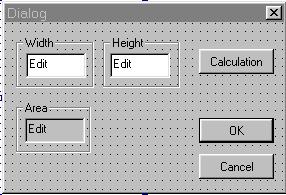
|
ชนิดของ Control
|
Caption
|
หมายเลข ID
|
ลักษณะเพิ่มเติม
|
|
Edit box
|
Width | IDC_WIDTH |
-
|
|
Edit box
|
Height | IDC_HEIGHT |
-
|
|
Edit box
|
Area | IDC_AREA |
read only
|
|
Button
|
Calculation | IDC_CAL |
-
|
class CMyApp:public CWinApp
{
public:
	BOOL InitInstance();
};
|
#include <afxwin.h>
#include "myapp.h"
#include "maindialog.h"

CMyApp myapp;

BOOL CMyApp::InitInstance()
{
	CMainDialog maindlg;
	m_pMainWnd = &maindlg;
	maindlg.DoModal();

	return FALSE;
}
|
class CMainDialog:public CDialog
{
	public:
		int width; // ตัวแปรชนิด integer ใช้เก็บค่าใน Edit box width, height, area
		int height;
		int area;

		CMainDialog();	// function constructor

	protected:
		void DoDataExchange(CDataExchange* pDX); // ประกาศฟังก์ชั่น DoDataExchange เพื่อ Override
		afx_msg void OnCal(); // ประกาศ ฟังก์ชั่น OnCal()

	public:

		DECLARE_MESSAGE_MAP()
};
|
#include <afxwin.h>
#include "maindialog.h"
#include "resource.h"
BEGIN_MESSAGE_MAP(CMainDialog,CDialog)
ON_BN_CLICKED(IDC_CAL,OnCal) // เรียกใช้ฟังก์ชั่น OnCal() เมื่อมีการคลิ๊กปุ่ม IDC_CAL
END_MESSAGE_MAP()
// function constructor ซึ่งจะถูกเรียกใช้โดยอัตโนมัติ เมื่อมีการสร้าง object ของคลาส CMainDialog
CMainDialog::CMainDialog():CDialog(IDD_DIALOG1,NULL)
{
width = 0; // กำหนดค่าเริ่มต้นให้กับตัวแปร width, height, area
height = 0;
area = 0;
}
|
#include <afxwin.h>
#include "maindialog.h"
#include "resource.h"

BEGIN_MESSAGE_MAP(CMainDialog,CDialog)
 ON_BN_CLICKED(IDC_CAL,OnCal) // เรียกใช้ฟังก์ชั่น OnCal() เมื่อมีการคลิ๊กปุ่ม IDC_CAL
END_MESSAGE_MAP()

// function constructor ซึ่งจะถูกเรียกใช้โดยอัตโนมัติ เมื่อมีการสร้าง object ของคลาส CMainDialog
CMainDialog::CMainDialog():CDialog(IDD_DIALOG1,NULL)
{
	width = 0; // กำหนดค่าเริ่มต้นให้กับตัวแปร width, height, area
	height = 0;
	area = 0;
}

// ฟังก์ชั่นนี้จะถูกเรียกใช้ โดยอัตโนมัติเมื่อมีการเรียกใช้ฟังก์ชั่น UpdateData()
void CMainDialog::DoDataExchange(CDataExchange* pDX)
{
	DDX_Text(pDX,IDC_WIDTH,width); // เชื่อมโยงตัวแปรเข้ากับ Edit box
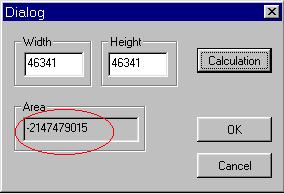
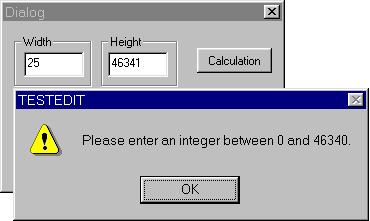
	DDV_MinMaxInt(pDX,width,0,46340); // ตรวจสอบให้ตัวแปรชนิด int ชื่อ width ให้มีค่าอยู่ระหว่าง 0-46340
	DDX_Text(pDX,IDC_HEIGHT,height);
	DDV_MinMaxInt(pDX,height,0,46340); // ตรวจสอบให้ตัวแปรชนิด int ชื่อ height มีค่าอยู่ระหว่าง 0-46340
	DDX_Text(pDX,IDC_AREA,area);

	CDialog::DoDataExchange(pDX);
}

// ฟังก์ชั่นนี้ ถูกเรียกเมื่อมีการคลิ๊กปุ่ม Calculate (IDC_CAL)
void CMainDialog::OnCal()
{
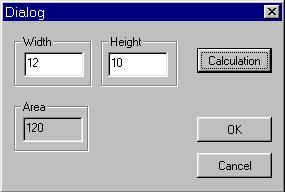
	UpdateData();  // นำค่าจาก control ไปเก็บในตัวแปร

	area = width*height; // คำนวณหาพื้นที่จาก ความกว้าง X สูง

	UpdateData(FALSE); // นำค่าจากตัวแปร ไปแสดงออกที่ control
}
|
| DDV_MinMaxByte | ตรวจสอบว่าตัวแปรชนิด BYTE มีค่าอยู่ในช่วงที่กำหนดหรือไม่ |
| DDV_MinMaxInt | ตรวจสอบว่าตัวแปรชนิด int มีค่าอยู่ในช่วงที่กำหนดหรือไม่ |
| DDV_MinMaxLong | ตรวจสอบว่าตัวแปรชนิด long มีค่าอยู่ในช่วงที่กำหนดหรือไม่ |
| DDV_MinMaxFloat | ตรวจสอบว่าตัวแปรชนิด float มีค่าอยู่ในช่วงที่กำหนดหรือไม่ |
| DDV_MinMaxDouble | ตรวจสอบว่าตัวแปรชนิด double มีค่าอยู่ในช่วงที่กำหนดหรือไม่ |
| DDV_MaxChars | ตรวจสอบว่าตัวแปรชนิด Char มีจำนวนตัวอักขระมากกว่าค่าที่กำหนดหรือไม่ |
| DDV_Function(CDataExchange* pDX , value , minVal , maxVal ); | |
| โดย Function | คือฟังก์ชั่นดังแสดงในตารางข้างบน |
| pDX | คือตัวชี้ไปยัง วัตถุเป้าหมายของคลาส CDataExchange |
| value | คือตัวแปรที่ต้องการตรวจสอบ |
| minVal | คือ ค่าต่ำสุดที่ยอมรับได้ |
| maxVal | คือ ค่าสูงสุดที่ยอมรับได้ |
| DDV_MaxChars( CDataExchange* pDX, CString const& value, int nChars ); | |
| โดยที่ pDX | คือตัวชี้ไปยัง วัตถุเป้าหมายของคลาส CDataExchange |
| value | คือตัวแปรที่ต้องการตรวจสอบ |
| nChars | คือจำนวนตัวอักขระ ที่มากที่สุดที่ยอมรับได้ |
| DDX_Control( CDataExchange* pDX, int nIDC, CWnd& rControl ); | |
| โดยที่ pDX | คือตัวชี้ไปยัง วัตถุเป้าหมายของคลาส CDataExchange |
| nIDC | คือ ID ของ control ที่ต้องการ |
| rControl | คือ วัตถุเป้าหมาย ของคลาสของ control ที่เกี่ยวข้อง |
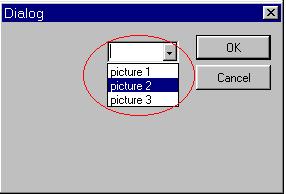
| int AddString( LPCTSTR lpszString ); | |
| โดยที่ lpszString | คือ ตัวชี้ ไปยังข้อความ (string) ที่ต้องการเพิ่มเติมเข้าไปในรายการของ Combo box |
| ฟังก์ชั่นนี้จะ ส่งคืนค่าตำแหน่ง (index) ของข้อความที่เพิ่มเข้าไปในรายการของ Combo box กลับมา | |
BOOL  CMainDialog::OnInitDialog( )
{
   CDialog::OnInitDialog( ); // เรียกฟังก์ชั่น OnInitDialog() ของ Base class

   // รับค่าตัวชี้ไปยัง Combo box IDC_MYCOMBO มาเก็บไว้ที่ตัวแปร mycombo;
   CComboBox*  mycombo = (CComboBox*) GetDlgItem(IDC_MYCOMBO);

   // ใช้ฟังก์ชั่น AddString เพิ่มข้อความลงไปในรายการ ของ Combo box
   mycombo -> AddString("picture 1");
   mycombo -> AddString("picture 2");
   mycombo -> AddString("picture 3");
  }
|
class CMainDialog: public CDialog
{
  protected:
          //  (1)ประกาศ object ของคลาส CComboBox ไว้ในตอนประกาศคลาศของ Dialog box
          CComboBox  mycombo;

          // ประกาศตัวแปร แบบ protected อื่น ๆ
          // ..........................................................
   public:
          CMainDialog( );
          void DoDataExchange(CDataExchange*  pDX);
          DECLARE_MESSAGE_MAP( )
};
|
void CMainDialog:: DoDataExchange(CDataExchange* pDX)
{
   // (2) เชื่อมโยง object ชื่อ mycombo เข้ากับ Combo box ที่มีหมายเลข ID เป็น IDC_MYCOMBO
   DDX_Control(pDX, IDC_MYCOMBO, mycombo);

   // ฟังก์ชั่น DDX & DDV สำหรับ control ตัวอื่น ๆ
   // ............................................................................

   CDialog:: DoDataExchange(pDX); // เรียกฟังก์ชั่น DoDataExchange() ของ base class
}

BOOL  CMainDialog:: OnInitDialog( )
{
   CDialog::OnInitDialog( ); // เรียกฟังก์ชั่น OnInitDialog( ) ของ base class

   // (3) เรียกใช้ฟังก์ชั่น AddString( ) ของ คลาส Combo box
   mycombo.AddString("picture 1");
   mycombo.AddString("picture 2");
   mycombo.AddString("picture 3");
}
|
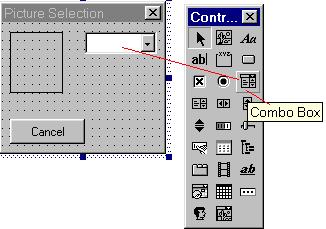
|
ชนิดของ Dialog และ control
|
หมายเลข ID
|
| dialog หลัก (caption = "Picture Selection") | IDD_DIALOG1 |
| picture control | IDC_PIC |
| combo box | IDC_COMBO1 |
class CMyApp:public CWinApp
{
public:
	BOOL InitInstance();
};
|
#include <afxwin.h>
#include "myapp.h"
#include "maindialog.h"

CMyApp myapp;

BOOL CMyApp::InitInstance()
{
	CMainDialog dlg;
	m_pMainWnd = &dlg;

	dlg.DoModal();

	return FALSE;
}
|
class CMainDialog:public CDialog
{
protected:
	CComboBox  m_combo; // ประกาศ object ของคลาส CComboBox เพื่อใช้ควบคุม combo box ต่อไป
	int index;                                // ตัวแปรที่ใช้เก็บค่าตำแหน่ง index ของ รายการที่ถูกเลือกใน combo box
  CStatic   pic;                        // ประกาศ object ของคลาส CStatic เพื่อใช้ควบคุม picture control

public:
	CMainDialog();
	BOOL OnInitDialog();     // ประกาศฟังก์ชั่น OnInitDialog() เพื่อใช้ในการ Override
	void DoDataExchange(CDataExchange* pDX); // ประกาศฟังก์ชั่นที่จะถูกเรียกใช้ในกระบวนการ DDX&DDV
	void OnSelection();       // ประกาศฟังก์ชั่นที่จะถูกเรียก เมื่อมีการเลือกรายการใน Combo box

	DECLARE_MESSAGE_MAP()
};
|
#include <afxwin.h>
#include "maindialog.h"
#include "resource.h"

BEGIN_MESSAGE_MAP(CMainDialog,CDialog)
  // ดักจับแมสเสจ CBN_CLOSEUP แล้วเรียกใช้ฟังก์ชั่น OnSelection
  ON_CBN_CLOSEUP(IDC_COMBO1,OnSelection)
END_MESSAGE_MAP()

CMainDialog::CMainDialog():CDialog(IDD_DIALOG1,NULL)
{
	index = 0;   // กำหนดค่า index ของรายการเลือกของ combo box ให้เป็น 0
}

// ฟังก์ชั่นนี้จะถูกเรียกโดยอัตโนมัติ เมื่อมีการเรียกฟังก์ชั่น UpdateData()
void CMainDialog::DoDataExchange(CDataExchange* pDX)
{
	CDialog::DoDataExchange(pDX);

	DDX_Control(pDX,IDC_COMBO1,m_combo);  // เชื่อมโยง object m_combo เข้ากับ Combo box (IDC_COMBO1)
	DDX_CBIndex(pDX,IDC_COMBO1,index);        // เชื่อมโยง ตัวแปร index เข้ากับ Combo box (IDC_COMBO1)

  DDX_Control(pDX, IDC_PIC, pic);                        // เชื่อมโยง object pic เข้ากับ picture control (IDC_PIC)
}

// ฟังก์ชั่นนี้จะถูกเรียกโดยอัตโนมัติ เมื่อมีการสร้าง dialog box
BOOL CMainDialog::OnInitDialog()
{
	CDialog::OnInitDialog();     // เรียกใช้ฟังก์ชั่น OnInitDialog( ) ของ base class

	m_combo.AddString("picture 1"); // เพิ่มข้อความ เข้าไปใน Combox box control
	m_combo.AddString("picture 2");
	m_combo.AddString("picture 3");

	return TRUE;
}

// ฟังก์ชั่นนี้จะถูกเรียกทุกครั้ง เมื่อ Maindialog ได้รับแมจเสจ CBN_CLOSEUP จาก Combo box
void CMainDialog::OnSelection()
{
	UpdateData();  // นำค่าจาก control ไปเก็บไว้ในตัวแปร


	CDC *picDC = pic.GetDC(); // รับค่า Device context ของ picture control ไปเก็บในตัวชี้ picDC
	CDC memDC;                          // สร้างวัตถุเป้าหมาย ของคลาส CDC ขึ้นมา
	CBitmap picbitmap;               // สร้างวัตถุเป้าหมาย ของคลาส CBitmap ขึ้นมา

	memDC.CreateCompatibleDC(picDC); // สร้าง Device context ที่เหมือนกับ DC ของ picture control มาเก็บไว้

  // เปรียบเทียบค่า index ของรายการ combo box ที่ถูกเลือก เพื่อโหลดภาพ bitmap ที่สัมพันธ์กัน
	switch(index)
	{
		case 0:	picbitmap.LoadBitmap(IDB_BITMAP1);
				break;
		case 1: picbitmap.LoadBitmap(IDB_BITMAP2);
				break;
		case 2: picbitmap.LoadBitmap(IDB_BITMAP3);
	}

	memDC.SelectObject(&picbitmap); // นำภาพบิตแมปไปเก็บไว้ใน memDC
	picDC->BitBlt(0,0,50,65,&memDC,0,0,SRCCOPY); // ย้ายภาพจาก memDC ไปยัง picture control
}
|
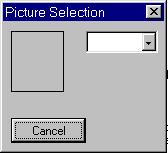
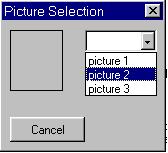
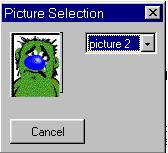
|
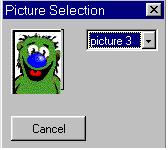 |
เป็นยังไงบ้างคะ เพื่อน ๆ บทความตอนนี้ อาจจะดูยุ่งเหยิงอยู่บ้าง เพราะ หนูแจ๋วต้องการจะสรุปเนื้อหา เกี่ยวกับ DDX และ DDV ให้จบ ภายในตอนนี้ ให้ได้ แต่ถ้าเพื่อน ๆ อ่านอย่างละเอียด และศึกษาจาก MSDN เพิ่มเติมแล้ว หนูแจ๋วคิดว่าเพื่อน ๆ จะสามารถเข้าใจ เนื้อหาในบทนี้ ได้อย่างไม่ยากเลยค่ะ
แล้วพบกันใหม่นะคะ
หนูแจ๋ว (คนหน้าเดิม)