Visual C++
Control ภาคสอง (Check box, Radio button, Edit box)
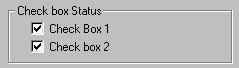
check box ทำหน้าที่เป็นตัวเก็บสถานะของ ตัวแปรชนิด Boolean ไว้ ซึ่งเป็นตัวแปร ที่มีค่าได้ 2 แบบ คือ จริง (TRUE) หรือเท็จ (FALSE) โดย เราสามารถนำ check box หลาย ๆ ตัว มาจัดวางรวมกัน เป็นกลุ่ม ได้ โดยที่ เราสามารถ เลือก หรือ คลิ๊กให้มี เครื่องหมาย บน check box หลาย ๆ ตัว ได้ในคราวเดียว กันก็ได้
4. radio button
radio button เป็น control ที่มีคุณสมบัติคล้าย กับ check box มาก มีรูปร่างดังแสดงข้างล่าง
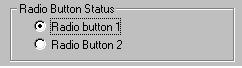
แต่ radio button จะต่างกับ check box ตรงที่ เราจะสามารถเลือก radio button ในกลุ่มเดียวกัน ได้เพียง 1 ตัวเท่านั้น ดังนั้น radio button จึงเหมาะสำหรับการเลือก หัวข้อเลือกเพียงตัวใด ตัวหนึ่ง ในหลาย ๆ ตัวเลือก
การใช้งาน Check box และ Radio button
control ทั้ง 2 แบบนี้ ต่างก็ จัดอยู่ในกลุ่มของ ปุ่มกด ซึ่งมีคลาส CButton เป็นแม่แบบ ทั้งสิ้น ซึ่งฟังก์ชั่นที่ใช้ ในการกำหนด สภาวะให้ control ทั้งสอง ก็คือ ฟังก์ชั่น SetCheck() ซึ่งเป็น ฟังก์ชั่นสมาชิก (member function) ของคลาส CButton นั่นเอง ซึ่งมีวิธีการ เขียนโค้ดโปรแกรม ดังต่อไปนี้
    CButton* mycheckbox1 = (CButton*) GetDlgItem(IDC_MYCHECKBOX1);

                       mycheckbox1->SetCheck(1);
โดยในตอนแรก เราจะใช้ฟังก์ชั่น GetDlgItem() ซึ่งจะคืนค่า ตัวแปร pointer ของคลาส
CWnd ของ control ที่มี ID เป็น IDC_MYCHECKBOX1 กลับมาให้ จากนั้น เราจะทำการแปลง
(casting) ชนิดของ ตัวแปร pointer ของ คลาส CWnd ไปเป็น ตัวแปร pointer ของคลาส
CButton ซึ่งค่าที่แปลง แล้วนี้ จะเก็บไว้ยัง ตัวแปร pointer ชื่อ mycheckbox1
ซึ่งรูปแบบของ ฟังก์ชั่น GetDlgItem( ) มีดังต่อไปนี้|
CWnd*
GetDlgItem( int nID ) const;
|
||
| โดยที่ | nID | คือ ค่า ID ของ control ที่ต้องการ |
| และค่าที่ส่งกลับ จะเป็นตัวแปร pointer ของคลาส CWnd | ||
เมื่อได้ ตัวแปร pointer ชนิด CButton ของ control ตัวที่เราต้องการ มาเรียบร้อยแล้ว เราก็จะทำการ กำหนดสภาวะ ให้กับ control ด้วย ฟังก์ชั่น SetCheck(); ซึ่งมีรูปแบบ ดังนี้
| void SetCheck( int nCheck ); | |||
| ถ้า nCheck= | 0 | ทำให้ control อยู่ในสภาวะ uncheck (ไม่มีเครื่องหมาย อยู่ภายใน) | |
| 1 | ทำให้ control อยู่ในสภาวะ check (มีเครื่องหมายอยู่ภายใน) | ||
| 2 | ทำให้ control อยู่ในสภาวะ indeterminate | ||
ส่วนการ อ่านค่าสภาวะของ check box และ radio button เราสามารถทำได้ดัง ตัวอย่าง โค้ดต่อไปนี้
      int check_status;
     CButton* mycheckbox2 = (CButton*) GetDlgItem(IDC_MYCHECKBOX2);
                      check_status = mycheckbox2 -> GetCheck();
โดยตอนแรก ให้เรากำหนด ตัวแปร ชื่อ check_status ซึ่งเป็นชนิด Boolean ไว้สำหรับ
เก็บค่า สภาวะของ check box ที่ต้องการ จากนั้น ก็โดยใช้ฟังก์ชั่น GetDlgItem()
รับค่าตัวแปร pointer ของ control ที่ต้องการ มาเก็บไว้ใน ตัวแปร pointer ชื่อ
mycheckbox2 จากนั้น ก็ใช้ ฟังก์ชั่น GetCheck() รับค่า สภาวะ ของ check box
มาเก็บไว้ใน ตัวแปรชื่อ check_status ซึ่งฟังก์ชั่น GetCheck() มีรูปแบบ ดังนี้| int GetCheck( ); | |||
| โดยฟังก์ชั่นนี้ จะคืนค่า กลับมาได้ 3 แบบ คือ | |||
|
0
|
แสดงว่า control อยู่ในสภาวะ uncheck (ไม่มีเครื่องหมายอยู่ภายใน) | ||
|
1
|
แสดงว่า control อยู่ในสภาวะ check (มีเครื่องหมายอยู่ภายใน) | ||
|
2
|
แสดงว่า control อยู่ในสภาวะ indeterminate | ||
*** ในกรณีของ Radio button นั้น ก็สามารถใช้ฟังก์ชั่น ข้างต้น ในการ หาสภาวะ
ว่า Radio button ตัวไหน ที่อยู่ในสภาวะ Check ได้ เช่นกัน แต่เนื่องจาก เรารู้อยู่แล้วว่า
Radio button ในกลุ่มเดียวกัน จะมีเพียง Radio button เพียงตัวเดียว เท่านั้น
ที่จะอยู่ในสภาวะ Check ดังนั้น สมมติว่า เรามี Radio button 3 ตัว อยู่ในกลุ่มเดียวกัน
ถ้าเราใช้ ฟังก์ชั่น GetCheck() ในการหาสภาวะ ว่า Radio button ตัวไหน อยู่ในสภาวะ
check เราจะต้องเขียน โค้ด แบบนี้
 int checked_button;
 CButton* myRadioButton1 = (CButton*)GetDlgItem(IDC_RADIO1);
CButton* myRadioButton2 = (CButton*)GetDlgItem(IDC_RADIO2);
CButton* myRadioButton1 = (CButton*)GetDlgItem(IDC_RADIO1);
int Radio1_status = myRadioButton1->GetCheck();
int Radio2_status = myRadioButton2->GetCheck();
int Radio3_status = myRadioButton3->GetCheck();
if(Radio1_status)
 {
  // Radio button1 ถูก check
  }
else if(Radio2_status)
  {
    // Radio button2 ถูก check
   }
else if(Radio3_status)
 {
  // Radio button3 ถูก check
  }
else
 {
  // ไม่มี Radio button ใดถูก check เลย
  }
จะเห็นได้ว่า ต้องเขียนโค้ดคำสั่ง ให้รับค่าตัวแปร pointer ของ Radio button ทั้ง 3 ตัวเสียก่อน จากนั้น จึงใช้ ฟังก์ชั่น GetCheck() อ่านค่า สภาวะ ของ Radio button แต่ละตัว แล้วนำมา ดำเนินการ ต่อไป ซึ่งต้องเขียนโค้ดคำสั่ง หลายบรรทัด แต่ถ้าเราใช้ ฟังก์ชั่นอีกฟังก์ชั่น ที่ชื่อว่า int GetCheckedRadioButton( ); แทน เราสามารถ เขียนโค้ด เพื่อหาว่า Radio button ใดถูก check ได้ ดังต่อไปนี้
int Checked_Button = GetCheckedRadioButton(IDC_RADIO1,IDC_RADIO3);

if(Checked_Button == IDC_RADIO1)
{
    // Radio button 1 ถูก check
  }
else if(Checked_Button == IDC_RADIO2)
  {
    // Radio button2 ถูก check
   }
else if(Checked_Button == IDC_RADIO3)
 {
  // Radio button3 ถูก check
  }
else
 {
  // ไม่มี Radio button ใดถูก check เลย
  }
โดยรูปแบบ ของฟังก์ชั่น GetCheckRadioButton(); จะเป็นดัง ต่อไปนี้| int GetCheckedRadioButton( int nIDFirstButton, int nIDLastButton ); | |||
| โดยค่า ที่ส่งคืนกลับมาจากฟังก์ชั่นนี้ คือ ค่า ID ของ Radio button ที่ถูก checked นั่นเอง แต่ถ้าไม่มี Radio button ตัวใดถูก checked เลย ค่าที่ส่งกลับมา จะเป็น 0 | |||
| nIDFirstButton | คือค่า ID ของ Radio button ตัวแรกในกลุ่ม | ||
| nIDLastButton | คือค่า ID ของ Radio button ตัวสุดท้ายในกลุ่ม | ||
| *** หมายเหตุ ค่า ID ของ Radio button ในกลุ่ม จะต้องเรียงลำดับกัน จึงจะใช้ฟังก์ชั่นนี้ได้ | |||
4. Edit box หรือ Text box
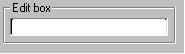
Edit boxหรือ Text box เป็น control อีกตัวหนึ่ง ที่มีที่ใช้งานกันมาก เพราะ ใช้สำหรับรับ ข้อความ หรือค่าต่าง ๆ จากผู้ใช้ โดย Edit box จะมีรูปร่าง หน้าตา ดังแสดงในรูป
Edit box มีคุณสมบัติ ต่าง ๆ ที่น่าสนใจ หลายประการ โดยเราสามารถกำหนด คุณสมบัติให้ Edit box ได้ โดยการ คลิ๊กเมาส์ขวา ที่ Edit box control จะได้ Edit box properties ขึ้นมา ดังแสดงในรูป
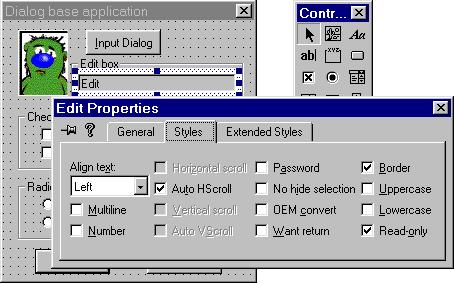
ใน แทป Styles มีหัวข้อเลือก ที่น่าสนใจอยู่หลายหัวข้อ เช่น Password
ซึ่งถ้า เลือกหัวข้อนี้ จะทำให้ข้อความ ที่พิมพ์เข้าไป กลายเป็นตัวอักษร password
หมด (จะกลายเป็น ******** หรือตัวอักษรอื่น ที่เราสามารถ ปรับตั้งได้) หรือหัวข้อ
Read-only จะทำให้ ไม่สามารถพิมพ์ ข้อความเข้าไป
ใน Edit box ได้ แต่สามารถ กำหนดข้อความ ที่จะแสดง ออกมาได้ โดยใช้คำสั่ง SetDlgItemText();
คลาสที่ใช้ ควบคุม edit box นี้ คือ คลาส CEdit ซึ่งมีฟังก์ชั่นสมาชิก อยู่มากมาย
แต่ที่สำคัญคือ ฟังก์ชั่น SetWindowText(); และ GetWindowText();ซึ่งเป็นฟังก์ชั่น
ที่สืบทอดมาจาก คลาสแม่ของมัน คือคลาส CWnd ซึ่งมีรูปแบบ การใช้งานดังต่อไปนี้
ฟังก์ชั่น ในการกำหนดข้อความที่จะให้ไปแสดงผลใน Edit box
| void SetWindowText( LPCTSTR lpszString ); | |||
| โดยที่ | lpszString | คือ ข้อความที่ต้องการให้ ปรากฏบน Edit box ซึ่งอาจเป็น object ของ คลาส Cstring หรือ ข้อความชนิด Null-terminate string ก็ได้ | |
ตัวอย่าง
CEdit* my_edit_box = (CEdit*)GetDlgItem(IDC_EDIT1);
my_edit_box ->SetWindowText("This is my text");
ฟังก์ชั่น ในการอ่านค่าข้อความ จาก Edit box | int GetWindowText( LPTSTR lpszStringBuf, int nMaxCount ) ; | |||
| โดยที่ | lpszStringBuf | คือ ตัวชี้ไปยัง Buffer ที่จะใช้เก็บข้อความที่อ่านได้จาก Edit Box | |
| nMaxCount | คือ จำนวนตัวอักษรสูงสุด ที่จะอ่านมาเก็บ | ||
| ฟังก์ชั่นนี้จะคืนค่า จำนวนของตัวอักษรทั้งหมดใน Edit box ที่อ่านเข้ามาได้ แต่ถ้า Edit box นี้ไม่มีข้อความอยู่เลย ฟังก์ชั่นนี้ จะ คืนค่า 0 กลับมา | |||
ฟังก์ชั่น GetWindowText() ยังมีอีกรูปแบบหนึ่ง คือ
| void GetWindowText( CString& rString ); | |||
| โดยที่ | rString | คือ object ของคลาส CString ซึ่งจะใช้เก็บข้อความที่อ่านไว้ | |
| ฟังก์ชั่นนี้ ไม่มีการคืนค่าใด กลับมา | |||
ตัวอย่าง
CString  str; // กำหนด str ให้เป็น Object ของ คลาส CString;
CEdit*  my_edit1 = (CEdit*)GetDlgItem(IDC_EDIT1); // รับค่า pointer ของ Edit box 1 มาเก็บไว้ในตัวแปร my_edit1
CEdit*  my_edit2 = (CEdit*)GetDlgItem(IDC_EDIT2); // รับค่า pointer ของ Edit box 2 มาเก็บไว้ในตัวแปร my_edit2

my_edit_box1->GetWindowText(str); //รับข้อความจาก Edit box 1 มาเก็บไว้ใน str
my_edit_box2->SetWindowText(str); // นำข้อความจาก str ไปแสดงออกทาง Edit box 2
นอกจากนี้แล้ว ยังมีฟังก์ชั่น ของคลาส CWnd ที่ช่วยให้การ รับข้อความ หรือแสดงข้อความ ทำได้ง่ายขึ้นคือฟังก์ชั่น SetDlgItemText(); และ GetDlgItemText(); ซึ่งมีรูปแบบของฟังก์ชั่นดังต่อไปนี้
ฟังก์ชั่นที่ใช้กำหนดข้อความให้กับ Control
| void SetDlgItemText( int nID, LPCTSTR lpszString ); | |||
| โดยที่ | nID | คือ หมายเลข ID ของคอนโทรลตัวที่ต้องการ | |
| lpszString | คือ buffer ของตัวอักษร หรือ object ของคลาส CString ของตัวอักษร ที่จะนำไปแสดงบน control ที่ต้องการ | ||
ฟังก์ชั่นที่ใช้อ่านข้อความจาก Control
| int GetDlgItemText( int nID, LPTSTR lpStr, int nMaxCount ); | |||
| โดยที่ | nID | คือ หมายเลข ID ของคอนโทรลตัวที่ต้องการ | |
| lpStr | คือ Buffer ของตัวอักษร ที่จะใช้เก็บข้อความที่อ่านมาจาก control | ||
| nMaxCount | คือ จำนวนสูงสุด ของตัวอักษร ที่จะอ่านเข้ามา | ||
| ฟังก์ชั่น นี้จะคืนค่า จำนวน ตัวอักษรที่อ่านมาเก็บไว้ใน lpStr | |||
| int GetDlgItemText( int nID, CString& rString ); | |||
| โดยที่ | nID | คือ หมายเลข ID ของคอนโทรลตัวที่ต้องการ | |
| rString | คือ object ของคลาส CString ที่จะใช้เก็บตัวอักษรที่อ่านเข้ามา | ||
| ฟังก์ชั่น นี้จะคืนค่า จำนวน ตัวอักษรที่อ่านมาเก็บไว้ใน rString | |||
ตัวอย่างโค้ด ถ้าเขียนให้ได้ผลลัพธ์ แบบเดียว กับที่แสดงข้างต้น
CString str; // กำหนด str ให้เป็น Object ของ คลาส CString;
GetDlgItemText(IDC_EDIT1, str);   //รับข้อความจาก Edit box 1 มาเก็บไว้ใน str
SetDlgItemText(IDC_EDIT2, str);  // นำข้อความจาก str ไปแสดงออกทาง Edit box 2
จะเห็นว่า การใช้ฟังก์ชั่น GetDlgItemText() และ SetDlgItemText() ช่วยให้ การอ่านข้อความ หรือเขียนข้อความ กับ Edit box ทำได้ สะดวกขึ้นมาก ต่อไป เราจะลองเขียน โปรแกรม เพื่อทดสอบการ ใช้งาน Check box, Radio button และ Edit box ดังต่อไปนี้
ลงมือเขียนโปรแกรม
โดยเราจะ ใช้โปรแกรม ที่เขียนขึ้น ในบทที่แล้ว มาเพิ่มเติม Control และ เขียนโค้ดคำสั่ง เพื่อทดสอบ การใช้งานกัน
ซึ่งบทที่แล้ว เราได้ทำการ สร้าง Dialog box ไว้ 2 ชุด โดยมี Dialog หนึ่งทำให้ ที่เป็น Dialog หลัก (หน้าต่างหลัก) ของโปรแกรม ส่วน Dialog ชุดที่สองเราจะนำมาทำเป็น Dialog เพื่อรับข้อมูลจากผู้ใช้งาน เมื่อเราคลิ๊ก OK ที่ Dialog ชุดที่สอง ก็จะมีการ นำข้อมูลจาก Dialog ชุดที่สอง กลับมาแสดงใน Dialog หลักของโปรแกรม ต่อไป โดยมีขั้นตอน ดังต่อไปนี้
1. เปิด Dialog หลักของโปรแกรม ซึ่งมีหมายเลข ID เป็น IDD_DIALOG1 ขึ้นมา แล้วเพิ่ม Control ลงไป ดังแสดงในรูป
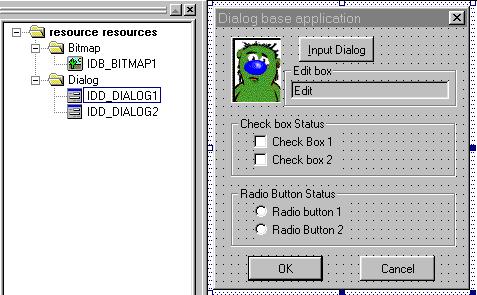
จากนั้น ให้แก้ไข เปลี่ยนแปลงค่า caption และค่า ID ของ control ดังต่อไปนี้
|
ชนิด control
|
caption
|
ID
|
style เพิ่มเติม
|
| Static control | Edit box | IDC_STATIC |
-
|
| Static control | Check box Status | IDC_STATIC |
-
|
| Static control | Radio button Status | IDC_STATIC |
-
|
| Edit Box | - | IDC_EDIT1 |
Read only
|
| Check box | Check Box1 | IDC_CHECK1 |
-
|
| Check box | Check Box2 | IDC_CHECK2 |
-
|
| Radio button | Radio Button1 | IDC_RADIO1 |
-
|
| Radio button | Radio Button2 | IDC_RADIO2 |
-
|
จะเห็นว่า Group box ทั้ง 3 ตัว คือ ที่มี Caption เป็น Edit box, Check box Status, และ Radio Button Status ต่างก็มี หมายเลข ID เหมือนกัน คือ IDC_STATIC ที่เป็นเช่นนี้ เพราะ Group box เหล่านี้ ใช้เป็นเพียง ตัวกำหนด "กรอบ" ให้กับ control ตัวอื่น ๆ เท่านั้นเอง และไม่ได้ มีหน้าที่พิเศษ อื่นใดอีก จึงกำหนดเป็น IDC_STATIC เหมือน ๆ กัน
2. เปิด Dialog box ชุดที่สอง ที่มี ID เป็น IDD_DIALOG2 ขึ้นมา ทำการเพิ่ม Control ลงไปดังในรูป
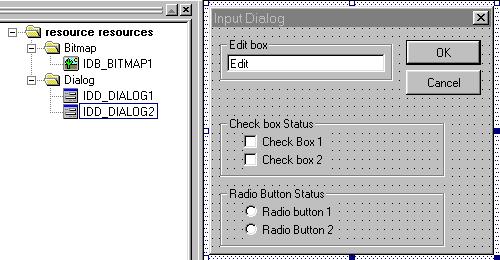
แล้วคลิ๊กเมาส์ขวา ที่ control แต่ละตัว เลือกหัวข้อ properties แล้วกำหนด หมายเลข ID ของ control แต่ละตัว ตามตารางด้านล่าง
|
ชนิด control
|
caption
|
ID
|
style เพิ่มเติม
|
| Static control | Edit box | IDC_STATIC |
-
|
| Static control | Check box Status | IDC_STATIC |
-
|
| Static control | Radio Button Status | IDC_STATIC |
-
|
| Edit box |
-
|
IDC_EDIT2 |
-
|
| Check box | Check Box 1 | IDC_CHECK3 |
-
|
| Check box | Check Box 2 | IDC_CHECK4 |
-
|
| Radio button | Radio button 1 | IDC_RADIO3 |
-
|
| Radio button | Radio button 2 | IDC_RADIO4 |
-
|
3. ในไฟล์ ที่ทำหน้าที่ควบคุม การทำงานของโปรแกรมเรา คือ ไฟล์ myapp.h และ myapp.cpp ไม่มีการแก้ไข อะไรเพิ่มเติม ดังต่อไปนี้
myapp.h
class CMyApp:public CWinApp
{
  public:
       BOOL InitInstance( );
   };
|
myapp.cpp
#include <afxwin.h>
#include "myapp.h"
#include "mydialog.h"

CMyApp app;	// create application instance

BOOL CMyApp::InitInstance()
{
	CMyDialog dlg;
	m_pMainWnd = &dlg;
	dlg.DoModal();

	return FALSE;
}
|
4. ส่วนไฟล์ ที่ควบคุม Dialog หลักของโปรแกรมเรา คือ ไฟล์ mydialog.h และ mydialog.cpp มีการเพิ่มเติม ตัวแปร และฟังก์ชั่น ต่าง ๆ ดังต่อไปนี้
mydialog.h
#include <afxwin.h>
#include "resource.h"

class CMyDialog:public CDialog
{
private:
	CString datastring;               // สร้าง object ของคลาส CString โดยให้มีชื่อเป็น datastring
	BOOL checkbox1_status; // กำหนด ตัวแปร ชนิด BOOL ให้เก็บสภาวะของ Check box1 และ 2
	BOOL checkbox2_status; // ของ Dialog box หลักของโปรแกรม

	int  radio_index;                  // กำหนด ตัวแปรชนิด int ใช้เก็บหมายเลข ID ของ Radio button ที่ถูกเลือก

public:
	CMyDialog();

	BOOL OnInitDialog();      // ประกาศ ฟังก์ชั่น OnInitDialog(); เพื่อจะทำการ override ฟังก์ชั่นนี้ภายหลัง

	afx_msg void OnOK();
	afx_msg void OnCancel();
	afx_msg void OnInputDialog();  // ประกาศ ฟังก์ชั่น OnInputDialog(); เพื่อจะเรียกใช้ Dialog ชุดที่สอง

	DECLARE_MESSAGE_MAP()
};
|
mydialog.cpp
#include "mydialog.h"
#include "inputdialog.h"  // เพิ่ม ไฟล์ header ของ Dialog box ชุดที่สอง เพื่อให้สามารถอ้างถึงได้

BEGIN_MESSAGE_MAP(CMyDialog,CDialog)
	    // ดักจับการกดปุ่ม IDC_INPUT เพื่อจะเรียกใช้ฟังก์ชั่น OnInputDialog()
      ON_BN_CLICKED(IDC_INPUT,OnInputDialog)
END_MESSAGE_MAP()

CMyDialog::CMyDialog():CDialog(IDD_DIALOG1,NULL)
{
}

// รายละเอียดของฟังก์ชั่น OnInitDialog ซึ่งฟังก์ชั่นนี้จะถูกเรียกใช้ทุกครั้ง เมื่อมีการสร้าง Dialog box หลักนี้ขึ้นมา
BOOL CMyDialog::OnInitDialog()
{
	checkbox1_status = 0;     // กำหนดค่าเริ่มต้นให้กับ ตัวแปรที่เก็บสภาวะของ Checkbox1 และ 2
	checkbox2_status = 0;
	datastring = " ";                   // กำหนดค่าเริ่มต้น ให้กับ object ที่เก็บข้อความใน Edit box1 ในที่นี้ให้เป็น ค่าว่าง ๆ
	radio_index = 0;                 // กำหนดค่าเริ่มต้นให้กับ ตัวแปรที่เก็บค่า ID ของ Radio button ที่ถูกเช็ค (checked)

	CDialog::OnInitDialog(); // เรียกใช้ฟังก์ชั่น OnInitDialog(); ของคลาสแม่ของ dialog เรา คือคลาส CDialog นั่นเอง

	return TRUE;                      // ฟังก์ชั่น OnInitDialog จะต้อง คืนค่า TRUE กลับมาทุกครั้ง เพื่อให้ Dialog box ทำงานต่อไปได้
}


afx_msg void CMyDialog::OnOK()
{
	MessageBox("Dialog can't close");
}

afx_msg void CMyDialog::OnCancel()
{
	UINT confirm_data;
	confirm_data = MessageBox("Do you want to exit?","Exit",MB_YESNO);
	if(confirm_data == IDYES)
		CDialog::OnCancel();
	else
		return;
}

// ฟังก์ชั่นนี้จะถูกเรียก ให้ทำงาน เมื่อมีการกดปุ่ม Input Dialog
afx_msg void CMyDialog::OnInputDialog()
{
	CInputDialog d1;    // สร้างวัตถุเป้าหมาย ของคลาส dialog box ชุดที่สอง (ของ Dialog box IDD_DIALOG2)
	d1.DoModal();        // เข้าสู่การทำงานของ Dialog box ชุดที่สอง ฟังก์ชั่นนี้จะไม่คืนค่ากลับมา จนกว่า dialog 2 นี้ถูกปิดไปเสียก่อน

 // นำค่าสภาวะของ checkbox 1และ 2 ใน Dialog2 มาเก็บในตัวแปร checkbox1 และ 2 ของ Dialog หลักของโปรแกรม
	checkbox1_status = d1.check1_status;
	checkbox2_status = d1.check2_status;

 // นำข้อความจาก CString ใน Dialog2 มาเก็บไว้ในตัวแปร CString ของ Dialog หลักของโปรแกรม
	datastring = d1.inputstring;

 // นำหมายเลข ID ของ radio button ที่ถูกเช็ค (checked) ใน Dialog 2 มาเก็บไว้ในตัวแปร radio_index
	radio_index = d1.radio_index;

 // สร้างตัวแปรชนิด pointer ที่จะชี้ไปยัง control ที่มี ID เป็น IDC_CHECK1 และ IDC_CHECK2 ซึ่งคือ check box1 และ 2
 // ของ Dialog หลักของโปรแกรมเรานั่นเอง
	CButton* checkbox1 = (CButton*) GetDlgItem(IDC_CHECK1);
	CButton* checkbox2 = (CButton*) GetDlgItem(IDC_CHECK2);

 // ทำการ check หรือ clear check box  ใน Dialog หลัก ตามค่า สภาวะ ของ checkbox ที่อ่านได้จาก Dialog 2
	checkbox1->SetCheck(checkbox1_status);
	checkbox2->SetCheck(checkbox2_status);

 // นำข้อความ CString ที่อ่านได้จาก Dialog 2 มาแสดงที่ Edit box ของ Dialog หลัก
	SetDlgItemText(IDC_EDIT1,datastring);

 // สร้างตัวแปรชนิด pointer ที่จะชี้ไปยัง control ที่มี ID เป็น IDC_RADIO1 และ IDC_RADIO2 ซึ่งคือ radio button 1 และ 2
 // ของ Dialog หลักของโปรแกรมเรานั่นเอง
	CButton* radio1 = (CButton*)GetDlgItem(IDC_RADIO1);
	CButton* radio2 = (CButton*)GetDlgItem(IDC_RADIO2);

	switch(radio_index) // ตรวจสอบค่า ID ของ radio button ที่ถูก check จาก Dialog 2
	{
      // ถ้าเป็น radio button 1 ของ dialog2 ให้ check radio button1 และ clear radio button 2 ใน Dialog หลัก
		case IDC_RADIO3:	radio1->SetCheck(1);
					radio2->SetCheck(0);
					break;

      // ถ้าเป็น radio button 2 ของ dialog2 ให้ clear radio button 1 และ check radio button2 ใน Dialog หลัก
		case IDC_RADIO4:	radio1->SetCheck(0);
					radio2->SetCheck(1);
					break;
     // ถ้านอกเหนือจากนี้ ให้ clear radio button ทั้ง 2 ตัว ใน Dialog หลัก
		default:		radio1->SetCheck(0);
				radio2->SetCheck(0);
	}
}
|
5. จากนั้นสร้างไฟล์ใหม่ ขึ้นมา 2 ไฟล์ คือไฟล์ inputdialog.h ซึ่งใช้ ประกาศคลาสที่ใช้ควบคุม Dialog box 2 ที่เราสร้างขึ้น และไฟล์ inputdialog.cpp ซึ่งเขียนรายละเอียดของคลาส ของ Dialog box 2 คือ คลาส CInputDialog นั่นเอง ดังแสดงต่อไปนี้
inputdialog.h
// file inputdialog.h

#include <afxwin.h>
#include "resource.h"

class CInputDialog:public CDialog
{
public:
	CString inputstring; // กำหนดตัวแปร inputstring เป็นชนิด CString

 // กำหนดตัวแปร ที่ใช้เก็บสภาวะของ checkbox 1 และ 2 ของ Dialog 2
	BOOL check1_status;
	BOOL check2_status;

 // กำหนดตัวแปร ใช้เก็บหมายเลข ID ของ radio button ที่ถูก check ของ Dialog 2
	int radio_index;

	CInputDialog();  // function constructor ของ Dialog 2

	afx_msg void OnOK();
	afx_msg void OnCancel();

	DECLARE_MESSAGE_MAP()
};
|
*** จะเห็นว่า ตัวแปรสมาชิก ของคลาส CInputDialog นี้จะถูกประกาศเป็นแบบ public
ทั้งหมด เพื่อให้ คลาสอื่น ๆ สามารถเข้าถึง ตัวแปรสมาชิก ของคลาส Dialog 2
นี้ได้ ไม่เช่นนั้น เราจะไม่สามารถเขียน โค้ดคำสั่ง ดังต่อไปนี้ได้ (โค้ดนี้อยู่ในส่วนของ
คลาส CMyDialog หรือ คลาสของ Dialog หลักของโปรแกรมนี้เอง
// ฟังก์ชั่นนี้จะถูกเรียก ให้ทำงาน เมื่อมีการกดปุ่ม Input Dialog
afx_msg void CMyDialog::OnInputDialog()
{
	CInputDialog d1;    // สร้างวัตถุเป้าหมาย ของคลาส dialog box ชุดที่สอง (ของ Dialog box IDD_DIALOG2)
	d1.DoModal();        // เข้าสู่การทำงานของ Dialog box ชุดที่สอง ฟังก์ชั่นนี้จะไม่คืนค่ากลับมา จนกว่า dialog 2 นี้ถูกปิดไปเสียก่อน

 // นำค่าสภาวะของ checkbox 1และ 2 ใน Dialog2 มาเก็บในตัวแปร checkbox1 และ 2 ของ Dialog หลักของโปรแกรม
	checkbox1_status = d1.check1_status;  // จะเขียน โค้ดแบบนี้ไม่ได้ ถ้าไม่ประกาศให้ตัวแปรของ CInputDialog เป็นแบบ public เสียก่อน
	checkbox2_status = d1.check2_status; // ************************************************************************************
ส่วนไฟล์ inputdialog.cpp จะมีรายละเอียดดังนี้inputdialog.cpp
#include "inputdialog.h"

// message map
BEGIN_MESSAGE_MAP(CInputDialog,CDialog)

END_MESSAGE_MAP()

// function constructor
CInputDialog::CInputDialog():CDialog(IDD_DIALOG2,NULL)
{

}

// ฟังก์ชั่นนี้ จะถูกเรียกใช้ เมื่อมีการคลิ๊กปุ่ม OK บน Dialog 2
afx_msg void CInputDialog::OnOK()
{
  // อ่านข้อความจาก Edit box ของ Dialog 2 มาเก็บในตัวแปร inputstring
	GetDlgItemText(IDC_EDIT2,inputstring);

 // สร้างตัวแปร pointer ที่ชี้ไปยัง checkbox 1และ 2 บน dialog box 2
	CButton* check1 = (CButton*)GetDlgItem(IDC_CHECK3);
	CButton* check2 = (CButton*)GetDlgItem(IDC_CHECK4);

 // อ่านค่าสภาวะของ check box 1 และ 2 ว่า เป็น check หรือ clear แล้วเก็บค่านี้ไว้ในตัวแปร ที่ประกาศไว้
	check1_status = check1->GetCheck();
	check2_status = check2->GetCheck();

 // อ่านค่า ID ของ radio button ที่ถูก check ใน Dialog 2 แต่ถ้าไม่มี radio button ใด ถูก check เลย
 // ฟังก์ชั่นนี้จะคืน ค่า 0 กลับมาให้ตัวแปร radio_index
	radio_index = GetCheckedRadioButton(IDC_RADIO3,IDC_RADIO4);

	CDialog::OnOK();
}

afx_msg void CInputDialog::OnCancel()
{
	CDialog::OnCancel();
}
|
6. จากนั้น save ไฟล์ทั้งหมด แล้วลอง Build โปรแกรม แล้วลอง run ดู จะได้หน้าตา ของ dialog หลักของโปรแกรมดังแสดงในรูป
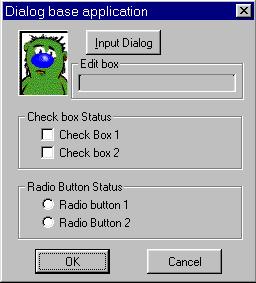
เมื่อเราคลิ๊กที่ปุ่ม Input Dialog จะได้ Dialog box อันที่สองขึ้นมา ให้เราลองป้อนค่าลง ไปยัง Edit box และ check เครื่องหมาย ลงบน Check box และ radio button ตามใจชอบ ดังรูป
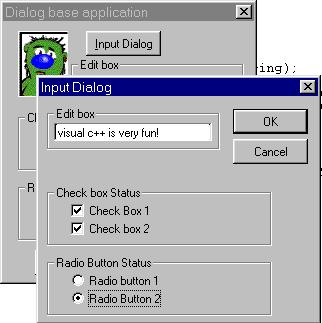
ถ้าเราคลิ๊กปุ่ม OK ก็จะเห็นว่า ข้อความที่อยู่ใน Edit box และ สภาวะของ check box และ radio button ของ dialog box อันที่สอง จะถูกส่ง ไปแสดงที่ Dialog หลักของโปรแกรมเราแล้ว ดังรูป
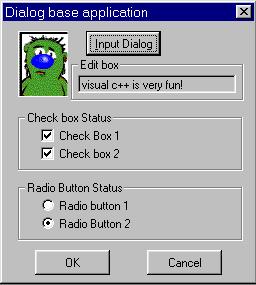
จะเห็นว่า การเขียนโค้ด ให้อ่านค่าจาก control และ ส่งค่าไปให้ control นั้น
ต้องเขียนโปรแกรม ในการจัดการกับ control แต่ละตัว ถ้าในโปรแกรมเรา มี control
อยู่ไม่กี่ตัว ก็ไม่ลำบากเท่าไหร่นัก แต่ถ้าเมื่อไหร่ เพื่อน ๆ ต้องจัดการกับ
control มาก ๆ แล้ว การเขียนโค้ด เพื่อจัดการกับ control ทีละตัวนี้ จะเป็นเรื่องลำบากมาก
และเกิดความผิดพลาดได้ง่าย ดังนั้น การเขียนโปรแกรมด้วย MFC จึงมีการนำ กลไกแบบหนึ่งขึ้นมา
เพื่อจัดการกับการ แลกเปลี่ยนข้อมูลกับ control โดยเฉพาะ กลไกนั้นคือ DDX
(Dialog Data eXchange) และ DDV (Dialog Data Validation) นั่นเอง ซึ่งเราจะพูดถึง
ในตอนต่อไปนะคะ
หนูแจ๋ว