Aijutitut
Keyboard
Mac OSX
Inuktitut Unicode Keyboard Layout
This version of Aijutitut is a
keyboard layout for Mac OSX 10.2+ that is usable with a Unicode
Inuktitut syllabic font such as NunacomU, Pigiarniq, etc. It
has a similar layout as Nunacom Inuktitut keyboard (Indonesian)
with some improvements. The major advantage that Aijutitut has
is the Apostrophe Dead Key which acts as a shortcut key to access
the dotted characters.
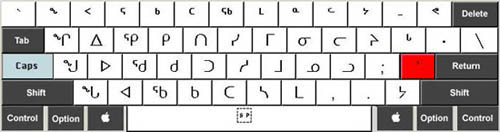
CAPS LOCK key is used to switch
between the Unicode Syllabics and Roman. CAPS LOCK key must be
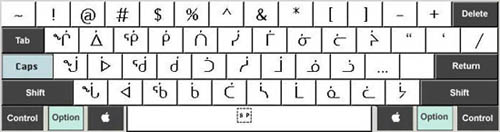
ON (IN) for Syllabics and OFF (OUT) for Roman. The right "Option"
key or the "APOSTROPHE" key can be used
to get the dotted characters as in Aujaq-titut Keyboard for the
Macintosh.
Aijutitut can be used to type the
"Old" Symbols using the Apostrophe dead key. They are
in the following key locations:
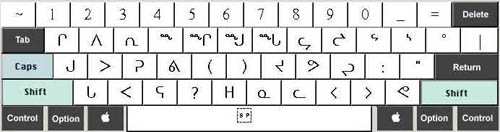
Each picture below shows the tables
accessible using the modifier keys. The modifier keys required
to access each table are shown in light grey. The key shown in
red (apostrophe) is the "Dead Key".
Aijutitut
Keyboard Layout
The Dead Key (Apostrophe)
The Apostrophe Dead Key acts as a shortcut key to access the
dotted characters. Instead of using "Option" key you
can do the same thing with the Dead Key. This makes the whole
process faster, and makes Aijutitut ideal for speed typing in
Syllabics, as you don't have to remove your hands from the keys
to get the dotted characters. You just press the Apostrophe key
first then the corresponding character key. When typing in Roman
the Dead Key can also be used to type the "Barred L".
Type Apostrophe first then "l" for the lower case "Barred
l" and Apostrophe and Shift "L" for the upper
case "Barred L". The Dead Key is also used to type
the "Old" Symbols.
- Download Mac OSX Aijutitut
Keyboard --> 
Notice: The materials in this package have been
developed for the purpose of promoting and enhancing Inuktitut.
All materials in this package may be freely copied but may not
be sold for profit.
Norman Keenainak
Yellowknife, NT
September 2004

|