如何设置英文windows2000的中文环境
I got it work under Windows 2000 Advanced Server:
1. First, I need to add Chinese to the language settings of my system.
Go to Windows status bar and click "Start | Settings | Control Panel".
Double click the icon "Regional Options".
2. On the "Regional Options" window, check the box before "Simplified
Chinese" under section "Language settings for the system".
Then click the "Set Default..." button.
3. Select "Chinese (PRC)" as the system locale. Then click the
OK button. Setting "Chinese (PRC)" as the default language is
a very important step.
4. After clicking the OK button, Windows will prompt you to insert your
Windows 2000 installation CD. Insert the CD-ROM and click OK button. Then
reboot Win2k system.
5. After Windows is restarted, an language input icon will be displayed
on your Windows status bar. Move the cursor on top of "EN" icon,
click the right mouse button, then click the "Properties" button.
6. On the "Input Locale Properties" window, select the input
method you prefer. If you know PinYin, you can choose "Chinese (Simplified)
-QuanPing" and click OK button.
......
I can now enter Chinese into this forum.
偷看ASP原码的6种方法 --- 蓝森林
在没有打Services Pack6补丁的NT server上,至少有6种方法可以看到ASP程序的源代码,它们是:
1、http://www.someserver.com/msadc/Samples/SELECTOR/showcode.asp?source=/msadc/Samples/SELECTOR/showcode.asp
解决方案:删除showcode.asp
2、http://somewhere/something.asp::$DATA
解决方案: 装sp3
3、http://somewhere/something.asp%2e
解决方案: 装sp4
or http://somewhere/something.asp.(加一个点)
解决方案: 装sp4
4、http://somewhere/something%2e%41sp
或者 http://somewhere/something%2e%asp
解决方案: 装sp4
5、http://somewhere/something.asp%81
解决方案:装sp6或者打补丁
6、http://somewhere/iissamples/exair/howitworks/code.asp?source=xxx.asp
最大的危害莫过于asp文件可以被上述方式读出;数据库密码以明文形式暴露在黑客眼前.
Windows XP安装注意事项(网上搜集和朋友的经验):下载下来的ISO是不能启动的(可以修改成可以启动)不要从老的Windows升级,最好从DOS引导安装;安装完不能登入,是因为未 activate,要进去 safe mode,修改 :
[HKEY_LOCAL_MACHINE\SOFTWARE\Microsoft\Windows NT\CurrentVersion\Winlogon]"Activation
Required"
成为 0 即可。使用中文有些bug,现象是无法选非unicode默认语言为Chinese,致使部分地方的中文无法显示(IE的问题到不大)。临时解决办法:设置代码映射表,在编号1
0008前打勾;安装时可能出现这个 file error,不用理他 :
MSXML.DLL or MSCMS.DLL
安装完成后还要执行这个 :
regsvr32.exe -u regwizc.dll
去掉Comments的方法:
将下面这些编辑成.reg文件然后用鼠标双击它(运行)
Windows Registry Editor Version 5.00
[HKEY_CURRENT_USER\Control Panel\Desktop]
"LameButtonEnabled"=dword:00000000
"LameButtonText"=""
制作 Windows XP 的可启动安装光碟
由於NT/2000系统的Boot Image和一般的软磁碟片开机的不同,制作NT/2000启动式光碟,
可用德国公司『Golden Hawk Technology』推出的『CDR Win』,
因这个软件支援让用家使用自定义的Boot Image档,而且操作介面并不过於困难。『CDR Win』软件网页:
http://www.goldenhawk.de/
将要烧录进光碟的所有档案,包括『I386』资料夹储存在一个资料夹内。
启动CDR Win软件後选『File Backup and Tools』。
在『Backup/Tool Operation』内选择『Build and Record an ISO9660 Image』,
即制作一个光碟影像档(ISO 档)及烧录到光碟上。
在『File Backup List』内设定来源资料夹。
在『ISO9660 Image File』栏内输入光碟影像档名称。
光碟影像档下载
按『Advanced Options』键来执行进阶设定。
在『Volume Descriptor』的『Volume Label』输入光碟的标签(Volume Label)。
在『Bootable Disc』选取『Make Bootable Disc』选项。
在『Media Emulation』内选『Custom』及在『Image File Name』内设定Boot Image档。
必须要在『Load Sector Count』内设定数值为『4』。返回主页按『Start』键便可开始。
如何破解不让使用鼠标右键的网站
现在有好多网站不能使用鼠标右键,当你点击右键时就弹出一个窗口说些莫名其妙的话。当你看到网页上有精美图片或者精彩文字想保存时,一按鼠标右键就弹出那个窗口,很是讨厌。
其实这只是利用JAVA语言实现的一个很简单的锁住鼠标右键的功能,同样也很简单就能使它失效,具体做法如下:
1:在页面目标上按下鼠标右键,弹出窗口,这是不要松开右键。
2: 将鼠标移到窗口的确定按钮上,同时按下左键。
3:现松开鼠标左键,这时窗口消失。
4:再将鼠标移到目标上松开鼠标右键,OK,你想要得功能全出来了。
近来又发现一种锁住鼠标右键的网站。在这种网站你一点鼠标右键就出现添加到收藏夹的窗口,用以上的方法不能破解,因为你用鼠标左键点取消的同时旧失去了右键的目标的焦点,不过要破也不难,如下方法:
1:在目标上电鼠标右键 ,出现添加到收藏夹的窗口,这时不要松开右键,也不要移动鼠标。
2:使用键盘的TAB键,移动焦点到取消按扭上。按下空格键,窗口消失。
3:松开右键,OK,你要得功能全出来了。
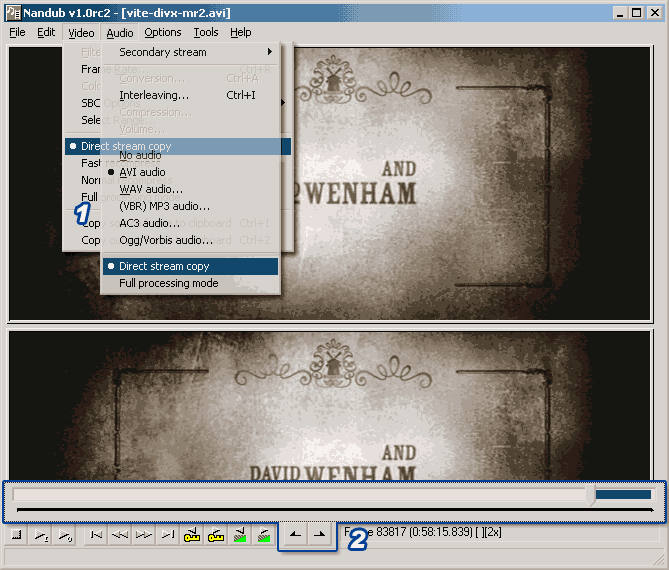
DivX Dvdrip 用什么软件切去一段?
1 Video及Audio 选 Direct stream copy
2 用时间轴及MarkIn/Out button 指定要删去的部份, 按delete删除
3 按F7另存档成AVI
www.nandub.org