M Tutorial (part 5/5)
$QUERY(<var>,<direction>) or $Q(<var>,<direction>)
$ORDER was used to set a particular subscript with the preceding or succeeding subscript (or null if the beginning or end of the array had been reached).
$QUERY returns the preceding or succeeding branch of the global or null when at the end or the beginning.
GLB019�;Program demonstrates arrays and globals -
Chris Bonnici - Mar 1998
�;M Web Magazine @ http://www.geocities.com/SiliconValley/7041/mwm.html
�;You are using this program at your own risk
�;
�N I,SUB,EXIT,DIR
�K ^GLB
�F I=1:1:50 D
�.I $R(10)#2=0 S ^GLB(I)="LEVEL 1:"_I
�.I $R(10)#2=0 S ^GLB(I,"A")="LEVEL 2:"_I
�.I $R(10)#2=0 S ^GLB(I,"A","DATA")="LEVEL 3:"_I
�.Q
�S EXIT=0
�F D Q:EXIT
�.R !,"Enter Subscript: (0 - Exit) ",SUB
�.I SUB=0 S EXIT=1 Q
�.R !,"Go <U>p or <D>own: ",DIR#1
�.S DIR=$S(DIR="U":-1,1:1)
�.W !,"Node: ",$Q(^GLB(SUB),DIR)
�.Q
�Q
The program GLB019 demonstrates how the $QUERY functions. It tells you the next node that contains data. For example if we have a global ^GLB consisting of:
^GLB(1)
^GLB(2,5,9)
$Q(^GLB(1)) gives ^GLB(2,5,9). With $ORDER (assuming we do not know the data nodes) we have to go through the different subscripts and use $DATA. GLB020 benchmarks the two functions.
Before you run this program, backup your database.
GLB020�;Program demonstrates arrays and globals -
Chris Bonnici - Mar 1998
�;M Web Magazine @ http://www.geocities.com/SiliconValley/7041/mwm.html
�;You are using this program at your own risk
�;
�N ANS,I,OTIME1,QTIME1,OTIME2,QTIME2
�W #,"$O and $Q benchmarker"
�W !!,"You should make a backup of you database before you continue with this
program."
�W !,"It creates a large global called ^GLB and may cause problems if it runs out
of"
�W !,"disk space"
�R !,"Press <Y>+<enter> to continue ",ANS
�Q:ANS'="Y"
�K ^GLB
�F I=1:1:20000 D
�.W /CUP(20,1),"Creating Record: ",I,"/20000"
�.I $R(10)#2=0 S ^GLB(I)="LEV 1:"_I
�.I $R(10)#2=0 S ^GLB(I,"A","X")="LEV 3:"_I
�.I $R(10)#2=0 S
^GLB(I,"A","X","Y","Z")="LEV 5:"_I
�.Q
�S OTIME1=$$PROCO
�S QTIME1=$$PROCQ
�S QTIME2=$$PROCQ
�S OTIME2=$$PROCO
�W !!,"USING $O: ",OTIME1
�W !!,"USING $Q: ",QTIME1
�W !!,"USING $O: ",OTIME2
�W !!,"USING $Q: ",QTIME2
�K ^GLB
�Q
�;*** EOR ***
PROCO()�N SUB1,SUB2,SUB3,SUB4,SUB5,STIME
�S STIME=$P($H,",",2)
�S (SUB1,SUB2,SUB3,SUB4,SUB5)=""
PA10�S SUB1=$O(^GLB(SUB1)) Q:SUB1="" $P($H,",",2)-STIME
�I $D(^GLB(SUB1))#10=1 W !,^GLB(SUB1)
PA20�S SUB2=$O(^GLB(SUB1,SUB2)) G:SUB2="" PA10
PA30�S SUB3=$O(^GLB(SUB1,SUB2,SUB3)) G:SUB3="" PA20
�I $D(^GLB(SUB1,SUB2,SUB3))#10=1 W !,^GLB(SUB1,SUB2,SUB3)
PA40�S SUB4=$O(^GLB(SUB1,SUB2,SUB3,SUB4)) G:SUB4="" PA30
PA50�S SUB5=$O(^GLB(SUB1,SUB2,SUB3,SUB4,SUB5)) G:SUB5="" PA40
�W !,^GLB(SUB1,SUB2,SUB3,SUB4,SUB5)
�G PA50
�;*** EOR ***
PROCQ()�N REF,STIME
�S STIME=$P($H,",",2)
�S REF="^GLB"
�F S REF=$Q(@REF) Q:REF="" W !,@REF
�Q $P($H,",",2)-STIME
Notes on GLB020:
- With fast underlying hardware (especially the disk subsystem) the difference will be minimal.
- We are using indirection @REF. We will not be delving into this topic today.
Before we conclude this section, we would like to point out that what we have just said for globals applies to memory based arrays (with the exception of naked references).
 Globals and $PIECE
In MWM006 we talked considerably about the $PIECE function. Combining these two into a logical and consistent manner makes it possible to for us to write programs that store information within a global using $PIECE to separate the fields. With large amounts of data (a global entry can contain up to a maximum of 511 characters) we may have to split the data into multiple nodes. Try writing a program that places data within a database and one that reads it.
In MWM008 we will be taking on from here.
^%GS and ^%GR
If you are trying out the programs accompanying this tutorial you must have used ^%RR (Routine Restore). We talked about these command in MWM001. The programs ^%GS (Global Save) and ^%GR (Global Restore) allow you to transfer globals to/from the operating system.
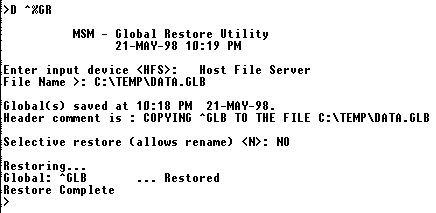
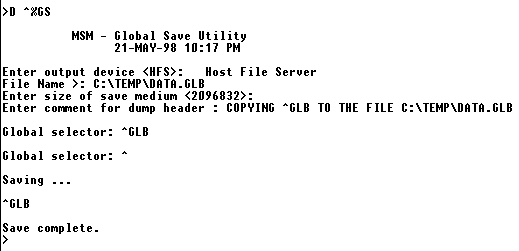
Pressing ? next to any of the prompts will display what should be entered at that prompt.
^%FGS and ^%FGR
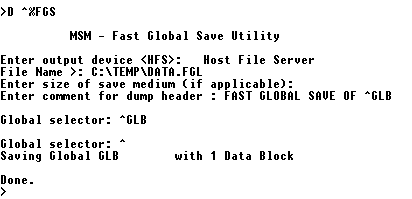
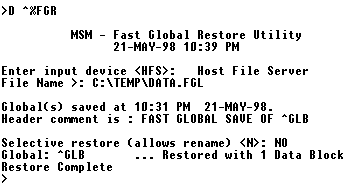
With large globals ^%GS and ^%GR may take a considerable amount of time. Micronetics’ ^%FGS (Fast Global Save) and ^%FGR (Fast Global Restore) speed up this process considerably although:
- Note that the globals saved this way cannot be read by implementations of M by other vendors.
- The resulting file is larger.