
M Tutorial (part 1/5)
We now have two M tutorials per issue. This column deals with M running on character based interfaces, the other is a tutorial about MSM-Workstation (the native Windows 95 GUI implementation of the language). M is M irrelevant of the platform on which the language is being executed; and therefore the material presented here is important if you are new to M. In the GUI tutorial it is assumed that you are already familiar with the core (syntax) of the language (which is discussed here).
The programs in this tutorial can be run on the student version of Micronetics Standard M (MSM/Student). In order to download a copy of this program check out Chris Bonnici's Download M section. Before you leave this page be sure to bookmark it so that you can find your way back with ease. If you would like to know more about the host of products and services Micronetics provide, check out their web site at http://www.micronetics.com. Micronetics is listed in our Thank You page. Drop them an e-mail to let them know that you appreciate the fact that they are helping MWM.
Back issues of this page can be viewed by going to the index.
If you have any comments or questions we are here to help. Your input could be in the form of general comments giving us the green light, hitting the expand-topic button and even taking us back a step or two. No two people will generate the same solution to a problem. We welcome any code you send in, be it different approaches to what we present here or other code of your choice.
Click here to download this issue's routines.
In this issue our major topics are arrays and globals. The latter term is used to describe database files in M. As with routines, globals reside within the database. This form of encapsulation allows M’s file system to be probably one of the simplest around (unlike other programming languages).
The Array
In M a variable can only store one value at any one time. The value of the variable may change but at any one instance there is only one value. Last time we talked about how one could "partition" so as to store more than one value, but ultimately we were always dealing with a single variable. Intrinsic functions such as $PIECE and $EXTRACT are simply string manipulation capabilities of M.
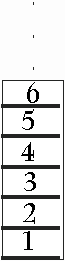 The array
is a data structure allowing for many independent values to be stored in one structure. If
we think about the variable as a cottage, the array would be an apartment block.
The array
is a data structure allowing for many independent values to be stored in one structure. If
we think about the variable as a cottage, the array would be an apartment block.
As with an apartment block, the structure itself (array) will have a common name and the different apartments would have a number to identify them. The value which identifies a particular element of an array is called the subscript.
The program below demonstrates how to create a simple array and manipulate it. The FOR command performs a numeric loop that fills subscripts 1 to 50 with the word vacant. The next chunk than uses another FOR loop to "occupy" some elements (check out previous issues of MWM for an explanation of this form of the FOR command). Finally we selectively display the vacant apartments.
GLB001�;Program demonstrates arrays and globals -
Chris Bonnici - Mar 1998
�;M Web Magazine @ http://www.geocities.com/SiliconValley/7041/mwm.html
�;You are using this program at your own risk
�;
�; The building
�N APT,I
�F I=1:1:50 S APT(I)="VACANT"
�; Some apartments are taken
�F I=50,1,15,18,2,41,3,48,4,5,6,47,7,8,46,10,45,17,9,31,21,23,24,27,
32,44,12,22,36,33,34,35 S APT(I)="TAKEN"
�; Those that are vacant
�W #,"Apartments still empty",!
�F I=1:1:50 W:APT(I)="VACANT" !,I
�Q
The array data structure is not something unique to M (in fact, practically all other programming languages provide this compund data type). What makes M unique is the ease with which arrays can be created an extended (some languages, for example require that you define the bounds of the array before you can use it).
GLB002�;Program demonstrates arrays and globals -
Chris Bonnici - Mar 1998
�;M Web Magazine @ http://www.geocities.com/SiliconValley/7041/mwm.html
�;You are using this program at your own risk
�;
�; The building
�N APT,I
�F I=1:1:50 S APT(I)="VACANT"
�; Some apartments are taken
�F I=50,1,15,18,2,41,3,48,4,5,6,47,7,8,46,10,45,17,9,31,21,23,24,27,
32,44,12,22,36,33,34,35 S APT(I)="TAKEN"
�; Those that are vacant
 �W #,"Apartments
still empty",!
�W #,"Apartments
still empty",!
�F I=1:1:50 W:APT(I)="VACANT" !,I
�; Add more space
�F I=51:1:50 S APT(I)="VACANT"
�; Display the entire array again
�Q
In M, arrays need not have numeric subscripts only. This is also something somewhat uncommon in other development environments. In fact an array can contain within it both numeric and string subscripts. GLB003 demonstrates setting up subscripts as numbers, strings, expressions (using either the literal or a variable).
GLB003 ;Program demonstrates arrays and globals -
Chris Bonnici - Mar 1998
;M Web Magazine @ http://www.geocities.com/SiliconValley/7041/mwm.html
;You are using this program at your own risk
;
N ARR,DATA
S DATA=1
S ARR(DATA)="ONE"
S DATA="NUMBER TWO"
S ARR(DATA)=2
S ARR("THREE")=2+1
S ARR(2*2)="SHOULD BE 4"
W #,ARR(1)
W !,ARR("NUMBER TWO")
W !,ARR("THREE")
W !,ARR("4") ; <------
Q
Notice the last WRITE command (we marked it with the arrow). We set it up as a number, yet refer to it as a string. A few issues back we had talked about how M is an untyped language in which everything is in fact a string with numbers being assigned their special properties only when needed.
GLB003 is an interesting program, it raises one question: How do you process such an "undisciplined" structure? If someone fills in an array similar to that in GLB003 how can one process it.
$ORDER(<arraysubs>,<direction>) or $O (<arraysubs>,<direction>)
This function allows you to get the previous (if <direction> is -1) or next (when <direction> is either not specified or set to 1) subscript of the array. A null value is used to indicate both the beginning and the end of this structure.
GLB004�;Program demonstrates arrays and globals -
Chris Bonnici - Mar 1998
�;M Web Magazine @ http://www.geocities.com/SiliconValley/7041/mwm.html
�;You are using this program at your own risk
�;
�N ARR,SUBS,DATA,I
�F I=1:1:10 D
�.R !!,"Enter Subscript :",SUBS
�.R !,"Enter Data :",DATA
�.S ARR(SUBS)=DATA
�.Q
�; Reading the array front to back
�W !!
�S SUBS=""
�F S SUBS=$O(ARR(SUBS)) Q:SUBS="" D
�.W !,"Subscript ",SUBS," = ",ARR(SUBS)
�.Q
�; Reading the array back to front
�W !!
�S SUBS=""
�F S SUBS=$O(ARR(SUBS),-1) Q:SUBS="" D
�.W !,"Subscript ",SUBS," = ",ARR(SUBS)
�.Q
�Q
GLB004 should explain how one can deal with arrays, whose subscripts are unknown. What we are doing is using $O to traverse the array one value at a time starting from the beginning (we set SUBS="") to the end (when SUBS again becomes null). By specifying the direction we move up or down.
From the program above observe that arrays are sorted according to their subscript. The way you entered the subscripts is not necessarily the order the array got listed (i.e. unless your subscripts were ordered at input). This property does come handy when one has to sort a list.
