
The Source: SWIM*M
From M to Windows: One Step or Two? (Part 1/2)
by Max Rivers
Abstract: This paper postulates the need for a new transitional technology between M code written for character-based displays, and code designed for graphical-user interfaces. One solution is described in detail.
Windows has finally arrived. Why won’t my customers use it?
There is a great deal of concern about the future of M. While it still excels in database management and fast development, its reputation continues to focus on its one major drawback: M doesn’t do windows.
Nearly all of the major vendors are currently offering state-of-the-art Windowing solutions. So why is it that not one of my customers has plans to convert their systems?
It is because they perceive the conversion as too complex, too costly and too dangerous. They have been told they will have to switch from the simple M environment they are all currently using, to the more complex world of the client/servers; that they need to buy a new version of M and in many cases will need new networking hardware; that they may have to hire new people to install and then maintain these new networks; and that they will either have to either hire new programmers who know languages other than M, or go through the time and expense of retraining their existing staff.
And this is prior to the really frightening part of the conversion: they will have to rewrite their thousands (or millions) or lines of mission critical code. All of this, just to pop up a few windows.
No wonder M continues to be windowless!
Converting Legacy Systems vs New Development
Continuity vs Innovation
I have not hesitated to recommend the new vendor-windowing solutions to customers who are considering developing new M systems from scratch. However converting existing M applications involves a completely different set of issues, and therefore a very different technology - a transitional conversion technology.
The primary concern of any institution which is dependent on its existing computer systems for doing business is that their applications continue to perform without interruption, even during the implementation of new technologies. The need for continuity creates a very conservative atmosphere, even in the most forward-thinking IS departments.
This means that the most important aspect of any conversion technology is that it must allow for small, incremental changes, while all unchanged routines which are part of the same application must be able to continue running as they always have. The perception by management that this transition can be accomplished without threatening the well-being of their mission-critical software cannot be overstated. Basically, any conversion whose risks (real or perceived) outweigh the rewards will cause the conversion project to never get off the drawing board.
Since existing systems which are candidates for conversion generally do the job they were intended for, conversion is seen as an enhancement, rather than a replacement. As a result, the budgets in terms of time and costs tend to be much more limited than budgets allotted for new development. This severely limits access to new hardware, software licenses and training.
Therefore, an ideal CHUI to GUI conversion solution would:
- Utilize existing hardware, O/S and M implementations
- Allow conversion of small amounts of code at a time
- Allow unconverted software to continue to run as is
- Be optimized for easy of learning
- Be inexpensive
The Missing Link: A Transitional Technology
In order to satisfy this very real-world set of concerns, we set out to write a programming utility designed specifically for converting existing systems from character interaction to windows.
The two primary considerations in designing this Application Programmer’s Interface (API) were: 1) it needed to be simple enough for any M programmer to use without a lot of new training, and 2) it had minimize the amount of code that needed to be changed in order for an existing M program to pop up a window.
The API was designed as a simple set of function calls written in standard M so that programmers would be completely familiar with the format, and so that the API could run on all existing M implementations.
A windows executable program was designed to run in the background, which would handle all interactions with the window. As a result there is no need to learn any window-specific programming language, and no need to port code up to the window. The windows are designed as very-smart-dumb-terminals, or very-thin-clients, which handle all the interaction with the user without any programming necessary.
Because the API is written in M, it was designed as a graceful extension to M’s functionality. So data returned from the user’s interaction with the Window comes in the form of a local M array. Another example of this M-centric approach is that only the name of a global is needed to pass a list of data to the window, the API handles the $Ordering for the application programmer.
All control of interaction with the user (prompts, syntax checking, help prompts) is to be handled from inside the M environment. In most cases, the original code which accomplished this for the character-based interaction can be used by changing the user interaction from READ and WRITEs to calls to the DRAW function.
One of the trickiest parts of writing this type of API is the age old trade-off between complexity and flexibility. We wanted the novice GUI M programmer to be able to create fully functioning windows with as little as a single line of code, while enabling the more advanced GUI programmers to have access to the full, exciting, and complex range of attributes available in the Windows Toolbox.
To this end, the API defaults every attribute, allowing the application programmer to set only those qualities that are absolutely necessary to their application, with the most prominent attributes (location, size, etc.) readily available as arguments to the function call. Then, for the more sophisticated GUI programmer, the final argument in every function allows for direct calls into the Windows Toolbox.
One Example of The Transition Technology Implemented
When designing any piece of software, a report for instance, it is always a good idea to start with the final product, and then work backwards through the flow of data: report to data structures to data collection. In this same way, by focusing on the target users, namely application programmers involved in conversion of legacy systems, we were able create a design specification which uses a very different approach from windowing solutions that were designed with new development in mind.
To this end, we have developed a CHUI-based windowing utility which we call Simple Windows In M (SWIM). SWIM is:
- A set of 10 standard function calls: one for each widget type (window items like buttons and text fields are all called widgets in the Windows parlance);
- Two functions for communicating between M and the Window: one for requesting data back from a window (RTN), and one for sending data to a window (SET);
- A windows executable program, SWIMMER.exe, which runs in the background, and
- A set of auxiliary functions for advanced GUI programming such as managing multiple windows at the same time.
Creating A Window with SWIM: SET BUT1=$$BUTTON^%SWIM()
Every widget function call has seven arguments which allow the programmer to define: its place in the window (X,Y), its size (WIDE,HI), label parameters (LABEL, LABEL POSITION) and its action (COMMAND) (which determines what information, if any, this widget returns to M).
A typical function call would look like this:
SET VAR=$$WIDGET^%SWIM(X,Y,LABEL,LABELPOS,WIDE,HI,COMMAND)
where WIDGET can be either:
BUTTON,
TEXT,
LABEL,
CHECKBTN,
RADIOBTN,
DROPLIST,
LOOKUP,
LINE,
BOX or
PIX (for picture).
Calls to any function returns the Window Toolbox’s internal name for that widget. The application programmer need never know what this value is, because they have this data stored in a local variable of their choice.
Each call to a widget defines, but does not display the widget. Once the whole window is defined, the application program calls the DRAW function, which alerts the background job to display the window, and interact with the user.
So a functioning window can be created with the program:
SET BUT1=$$BUTTON^%SWIM(10,10,"Hello
World.")
SET x=$$DRAW^%SWIM()
Notice that there is no need to specify the window’s dimensions or attributes (though this is possible with the WINDOW function). SWIM automatically creates and sizes the window for all the widgets defined, in an effort to minimize what the application programmer has to include in order to create the window they desire.
Interacting with a Window: RTN and SET
If the COMMAND argument of any widget is set to RTN, that widget will return its name (and the names and values of any other widgets specified) to M in the %rtn array. This data, now in a local M variable, can then be processed exactly as if it had been input through a read statement in a character-based interface.
To make our Hello World program interactive, let’s include an RTN command:
set BUT1=$$BUTTON^%SWIM(10,10,"Hello World.",,,,"RTN")
Sending data back to the window is done with the SET function. Let’s add a text field to receive our data (we’ll store the name of this text widget in the variable "T1"):
set T1=$$TEXT^%SWIM(10,50,"M answers:")
Since the name of that new field is in the M variable T1, the following code will write "Hi Back!" into that text field:
set
x=$$SET(T1,"Hi Back")
set x=$$DRAW^%SWIM()
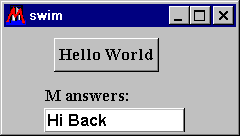 |
figure 1. |
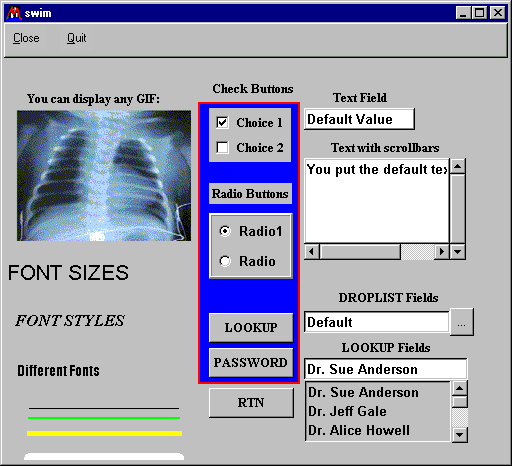
With only a handful of functions, SWIM can product all the major widgets (see figure 2): displaying any GIF image, lines of any size or color, boxes, text fields with scrollbars, push buttons, checkbuttons and radiobuttons, pop-up fields and lookup fields, menus, as well as encoded password windows, help and error windows, and multiple windows at the same time.
|
figure 2. |
Contact Information |
| M Rivers Consulting 79 Baker Road Shutesbury, MA 01072 USA fax:1-413-259-1760 E-mail: [email protected] |
| SWIM*M is an MPowerment Product
of M Rivers Consulting. (c) 1997,1998 Max Rivers. Patent Pending Price: $69.95 |
