
MSM-Workstation Tutorial (part 5/5)
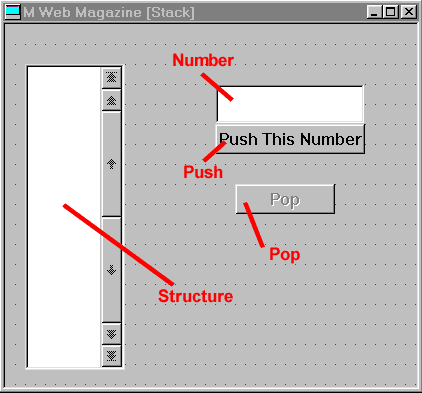
Window — CommonCode
;Program demonstrates program
development using MSM-Workstation - Chris Bonnici - Jan 1998
;M Web Magazine @ http://www.geocities.com/SiliconValley/7041/mwm.html
;You are using this program at your own risk
;
; The Variable StackCnt will store within it the number of entries in the stack
; It has been arbitrarily decided to limit the size of the stack to 20 (stored in MaxCnt)
entries
Init S StackCnt=0,MaxCnt=20
D Focus(StackCnt)
Q
; When Cnt is 0 the Pop button will be disabled, when it is MaxCnt the Push area will
not be allowed to function
Focus(Cnt) I Cnt=0 %%Disable(Pop)
E %%Enable(Pop)
I Cnt=MaxCnt D
.%%Disable(Push)
.%%Hide(Add)
.Q
E D
.%%Enable(Push)
.%%Show(Add)
Q
; Calling Module would have set up Array
UpdSel N I
S I=1
F S I=$O(Array(I)) Q:I="" K Array(I)
%%SetSel(Structure,Array)
D Focus(StackCnt)
Window — Create
%%Hide(CompSci.)
DO Init
Window — Exit
%%Show(CompSci.)
Control Add — Push
N Array,I
; Don't push an invalid entry
Q:var'?1N.N
%%GetChoice(Structure,Array)
S I=""
F S I=$O(Array(I),-1)
Q:I=""
S Array(I+1)=Array(I)
S Array(1)=var
%%ResetChoice(Structure,Array)
S StackCnt=StackCnt+1
D UpdSel
Q
Control Number — Create
set var=""
Control Pop — Push
N Array,I
%%GetChoice(Structure,Array)
S I=1
F S I=$O(Array(I)) Q:I=""
S Array(I-1)=Array(I)
K Array(StackCnt)
%%ResetChoice(Structure,Array)
S StackCnt=StackCnt-1
D UpdSel
Q
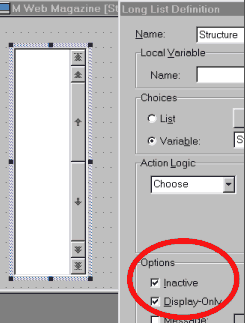 The object Structure cannot be manipulated by the
user. In fact if your fill in the array and attempt to change (or even move) the selection
or the scroll bars nothing will work. From the code, you can see that there are no events
associated with it. We have made the object inactive and set it as display only through
the dialog box that appears then its definition is selected.
The object Structure cannot be manipulated by the
user. In fact if your fill in the array and attempt to change (or even move) the selection
or the scroll bars nothing will work. From the code, you can see that there are no events
associated with it. We have made the object inactive and set it as display only through
the dialog box that appears then its definition is selected.
Goodbye
We hope you found the second issue of MSM-Tutorial useful. As you regularly do with the M Tutorial and the first issue of this page, please give us your feedback. We need it to better this tutorial. The tutorial sections of MWM are always reviewed. The review team consist mainly of programmers (some of which use other GUI products), but we would like to know your opinion:
- Did you find it useful?
- Do you like how we are explaining the various programs?
- Is there anything you can’t understand?
- Are we over stressing some points?
- Is the use of graphics over excessive, just right or too little.
These are the answers we kindly ask you to supply us. We are confident that with you feedback and suggestions we can make this your tutorial, tailored to your needs.
 1. In Add1,
try changing the radio buttons into another object.
1. In Add1,
try changing the radio buttons into another object.
2. Modify Add1, putting in a tape. Each number or operation change will insert the equation and answer into this tape. For example it would display 5+0=5. Limit the size of the tape to 100 entries. If there are more than 100, delete the oldest entry.
3. Write a version of Queue called Pqueue. This will be a priority queue. The number supplied will be the weighting. The largest numbers will have the topmost priority and will therefore be removed first. Incorporate everything into CompSci, modifying the menu accordingly.
MWM is not the only place you can learn online about MSM-Workstation. Check out the news section for other web sites where you can learn about MSM-Workstation.
