
 |
 |
 |
 |
 |
 |
 |
 |
 |
 |
 |
 |
 |
 |
 |
"Game Pause Code"
This script makes a pause menu, just copy, open a new script and paste!

script name: game_pause
creator: Mark Overmars
date: May 28, 2001
description: Displays a message on the screen and waits till the
player presses a key.
arguments: argument0 = message color
remarks:
{
// remember current values
__font_color = font_color;
__font_size = font_size;
__font_style = font_style;
__font_name = font_name;
__font_align = font_align;
// draw the text, refresh the screen and wait
font_color = argument0;
font_size = 16;
font_style = fs_bold;
font_name = 'Arial';
font_align = fa_center;
draw_text(screen_width/2,100,'Game Paused. Press any key to continue.');
screen_refresh();
keyboard_wait();
io_clear();
// restore the settings
font_color = __font_color;
font_size = __font_size;
font_style = __font_style;
font_name = __font_name;
font_align = __font_align;
}

"Character Select Code"
Many people come across this problem of character select screens. It takes a small peice of code in a controller.
In the menu where you select a character, place this in the creation of a controller, which will not appear in any other room:
{
global.character = 0;
}
Now, when you click the characters ... use a different number for each. For example, when you click 'object0' then in the left click event ... use:
{
global.character = 0;
room += 1;
}
Then, in the next room, use the following code in a controller put in the STEP EVENT:
{ if (global.character == 0) instance_create(x,y,obj0);
if (global.character == 1) instance_create(x,y,obj1);
}
and etc. for all the other characters...
"Collision Text Event"
Making a RPG? Want a character to interact with other people? This code tells the game that for example If Character comes into contact with say a Old Wize man, it will show whatever text you typed. Put this in the Create Event. (where THING is the object you collid with. ex:Old wize man)
if (place_meeting(x,y,THING))
{
speed = 0;
draw_text(screen_width/2,100,'hello everybody!');
screen_refresh();
keyboard_wait();
}
"Make Cursor Disappear"
Don't want the cursor to appear in your game? Create an object say mouse and put this in it's Step Event.
{
show_cursor = 0; change cursor
x = mouse_x
y = mouse_y
}
"Object Follows the Mouse Code"
Wanted another object to follow you like in Counter Strike? Put this code in the ball or what ever you called itin the Step Event. (BALL can be your object)
{
ball.x=mouse_x
ball.y=mouse_y
}
"Jump Code"
Mess around with it to get it the way you like it! Put this in the Step or Creation Event .
{
gravity_direction = 270;
if place_free(x,y+1)
gravity = 0.5
else
gravity = 0;
if (vspeed >12) vspeed = 12;
}
in the up key event put this:
{
if (not place_free(x,y+1)) vspeed = -10
}
"Random Appearing Objects"
Randomly places an object on the game. Create an object and put this in the Creation Event.
{
repeat (5) instance_create(random(400),random(400),ball);
}
"Timer"
Here's the way to make a timer for ex: Grenades or bombs.Ok I'm using a grenade for example so just mess with it to get it the way you want it.
In The Creation Event of object grenade put this:
'Set alarm0 to 100'
Now put this in the alarm0 event:
'Destroy yourself '
Creat Object explode at relative position (0,0)
"Set life to %"
Change lives or whatever else to %.
Put this in the Creation event of an object
string(global.lives) + '%'
"Moving background"
Here is how to have the background move.
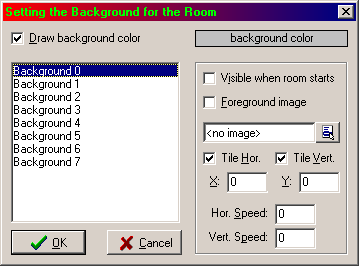
Look here at the lower right hand corner! See the horizantal and vertical SPEED!
just set them to the speed you want.
Now to have a sky move but ground stay still
First make a sky background, then a ground background the same size but make where the
sky is going to be on the ground background transparent.
So when you layer them you'll see both ground and sky.
To layer you put the ground background as Background0
and the sky Background -background1
"Screen Shots"
Always wanted to make screen shots, and now I know. Put this in the key of your choice!
{
screen_save('screenshot.bmp');
}
"Highscore fill"
script name: highscore_fill
creator: Mark Overmars
date: May 26, 2001
description: This functions tries to fill the highscore list
with 10 starting values. (but only if it is empty)
arguments: argument 0: top score to use
remarks: Place in the Game Start event of some object.
// check whether highscore contains values
if (highscore_value(1) > 0) exit;
// fill in some nice names
nnn = argument0/10;
highscore_add('top shot' ,10*nnn);
highscore_add('excellent' , 9*nnn);
highscore_add('very good' , 8*nnn);
highscore_add('good' , 7*nnn);
highscore_add('reasonable' , 6*nnn);
highscore_add('average' , 5*nnn);
highscore_add('getting better', 4*nnn);
highscore_add('poor' , 3*nnn);
highscore_add('very poor' , 2*nnn);
highscore_add('nothing' , 1*nnn);
}
"Pacman A.I."
From the pacman example. For anyone making a pacman game!!
// This script adapts the direction of the monster
// when it comes at a possible crossing
{
if (hspeed == 0)
{
if (random(3)<1 && place_free(x-4,y))
{ hspeed = -4; vspeed = 0;}
if (random(3)<1 && place_free(x+4,y))
{ hspeed = 4; vspeed = 0;}
}
else
{
if (random(3)<1 && place_free(x,y-4))
{ hspeed = 0; vspeed = -4;}
if (random(3)<1 && place_free(x,y+4))
{ hspeed = 0; vspeed = 4;}
}
}
"A Counter"
Want a counter? here you go, follow the instructions!
create an object: COUNTER
In its create event:
SET VARIABLE: global.first = 0
SET VARIABLE: global.sec = 0
SET VARIABLE: global.third = 0
SET VARIABLE: global.forth = 0
IN THE STEP EVENT
EXPRESSION: global.first == 9
START A BLOCK
SET VARIABLE: global.sec = 1 - relative
SET VARIABLE: global.first = 0
END BLOCK
EXPRESSION: global.sec == 10
START BLOCK
SET VARIABLE: global.third = 1 - relative
SET VARIABLE: global.sec = 0
END BLOCK
EXPRESSION: global.third == 10
START BLOCK
SET VARIABLE: global.forth = 1 - relative
SET VARIABLE: global.third = 0
END BLOCK
IN THE DRAWING EVENT
TEXT: 'Counter: '+string(global.forth)+'-'+string(global.third)+'-'+string(global.sec)+'-'+string(global.first)
"Highscore Draw"
script name: highscore_draw
creator: Mark Overmars
date: July 14, 2001
description: This functions draws the highscore list on the screen.
arguments: argument0: x-position
argument1: y-position
argument2: width
argument3: height (if provided)
remarks: Place in the drawing event of some object.
{
_oldalign = font_align;
_hhh = 10*string_height('AAA');
if argument3 > 0 _hhh = argument3;
for (_i=0; _i < 10; _i += 1)
{
font_align = fa_left;
draw_text(argument0,argument1+_i*_hhh/10,highscore_name(_i+1));
font_align = fa_right;
draw_text(argument0+argument2,argument1+_i*_hhh/10,string(highscore_value(_i+1)));
}
font_align = _oldalign;
}