Shelf

Open up a new canvas size
220 x 50
Select your paintbrush size 1.
In your materials palette select pattern and find one of your wood patterns
to paint with.
Pixel out the following.
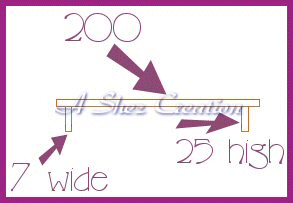
Now click inside the main shelf section.
Flood fill with your wood pattern
Selections
Float
Effects
3d
Cut out
V 1
H 1
O 100
B 8
Colour #98602E
Selections
Select none.
Now select the other 2 parts of the shelf (brackets)
Flood fill with the pattern.
Selections
Float
Effects
3d
Drop shadow
V 2
H 2
O 100
B 8
Colour #98602E
Selections
Select none.
That's your basic shelf done!
Now just add a few paint brush strokes between the bracket and shelf.
(see above picture for an idea)
ALL Tutorials
copyright of © Shez and may not be copied ,reproduced or passed out in any
way without prior consent