Pixel Cocktail

Open a new
canvas size 50 x 50
Select your paint brush size 1
Change your foreground colour to what ever colour you would like you glass
outline to be.
Then pixel out the following
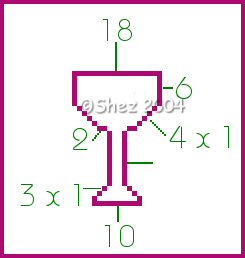
Then with a lighter shade or what ever colour you want your drink colour in
the inside of your glass leaving a 1 pixel gap between the top rim.
Then colour this 1 pixel area under the rim with white
Now add a new raster layer
Chose a colour of your choice for your straw
Then pixel out the following
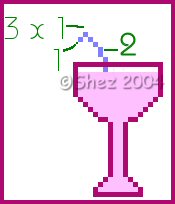
This part is optional
Add a new raster layer
Paintbrush size 1
Stroke colour #B68B64
Pixel out the following in brown then change your stroke colour to any
colour you would like your decoration thing to be.
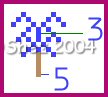
This doesn't have to be exact but in any pattern you like.
Position near the edge of your glass.
Once happy merge all layers and save in psp format for future use.
Tutorial copyright of © Shez and may not be copied ,reproduced or passed out in any way without prior consent