Pencil

Open up anew 100 x 40 transparent canvas.
Select your paint tool.
Brush size 1
Chose your stroke colour to black.
Draw out this picture on your canvas.
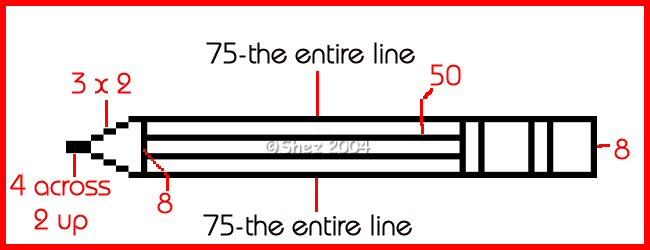
Now in your materials palette select colour: #FFFF40
With your magic wand select inside the main area of the pencil and flood
fill with the yellow.
Keep selected.
Effects
3d
Cut out
V: 3
H: 3
Opacity: 67
Blur: 7
Shadow colour: #F3F007
Fill interior with colour checked with colour #F1F081
Selections
Select none
Now change your stroke colour to #DBB6AA
Paint in your rubber at the end of the pencil and the pencil point (not the
actual nib)
Now with your magic wand select the rubber area only.
Effects
3d
Inner bevel
Bevel round
Width 7
Smoothness 42
Depth 3
Ambience 24
Shininess 54
Colour white
Angle 325
Intensity 50
Elevation 20
Selections
Select none.
Now set your stroke to #C0C0C0
Paint the remaining unfilled areas of your pencil
Then set your stroke back to black and draw 2 lines in the main part of your
pencil. (as in Guide pic)
Then your done.
You can now add any wording to your pencil
Now just save
This tutorial was wrote by Shez and remains property of Shez's psp tuts and
may not be removed for any purpose without permission from me