Hanging Light

Open up a new canvas size 60 x 60 transparent.
Select your paintbrush size 1 round.
Chose white as your colour.
Draw a line going downwards 23 pixels long.
Then change your colour to #808080 and pixel out the following
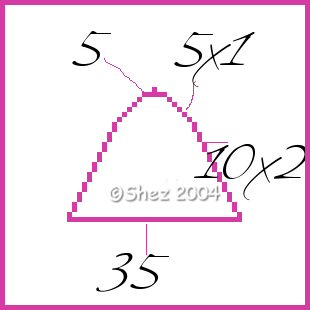
Now select inside your light shade
and flood fill with light grey.
Selections
Float
Effects
3d
Cut out
V -3
H -3
O 100
B 14
Shadow colour #808080
Selections
Select none.
That's your light finished.
now save as a tube and use anyway you wish.
Tutorial © Of Shez and may not be removed, reproduced or copied and passed out in anyway without prior consent from myself
©Shez 2004