Coffee Cup

Open up a new canvas size 100 x 100 transparent.
Select your paintbrush size 1
Select the colour black and draw the following outline.
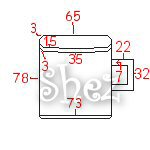
Now select inside your cup (main section-not including the handle) with your
magic wand.
Flood fill with #D41010
Selections
Float
Effects
3d
Cut out
V 2
H 2
Opacity 100
Blur 8
Shadow colour #B30909
Selections
Select none.
Now select the bottom section of your cup.
Flood fill with light grey.
Effects
3d
Inner bevel
Use the preset Pillow
selections
Select none.
Now select the handle of your cup and flood fill with #D41010
Effects
3d
Inner bevel
Preset Pillow
Selections
select none.
Now select the ridge part of your cup (the squiggly shape)
Flood fill with #9A0B0B
Add the pillow inner bevel again
Selections
Select none.
Now select the inside area of the cup (where the tea/coffee would go)
Flood fill with #943C3C
Selections
Float
Effects
3d
Cut out
Use the same settings as before but change the shadow colour to #5F2929
Selections
Select none.
That's your basic cup done ,Add any detail you like then save in psp format
for future use
ALL Tutorials copyright of © Shez and may not be copied ,reproduced or passed out in any way without prior consent