Cherries

Open up a new
canvas size 25 x 25
Zoom in so you can see very clearly!
Select your paintbrush
Brush size 1 and chose square
Then in your materials palette set your stroke to #BB0F0F
And copy the following image
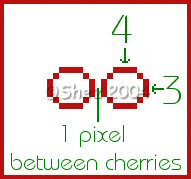
Now using your magic wand set at 0
Select inside your cherry
Flood fill with white
Selections
Float
Effects
3d
Cut out
V 0
H 0
O 100
B 10
shadow colour Colour #BB0F0F
Selections
Select none
Now add a new raster layer
Select your paint brush with the same settings as before
Then change your stroke colour to #004000
And pixel out the following
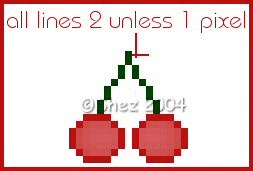
Merge all layers
Save in psp format for future use and your done!
ALL Tutorials copyright of © Shez and may not be copied ,reproduced or passed out in any way without prior consent