|
Deciding how to display your collected photos can be the hardest part of creating a scrapbook page. Here are some ideas to get you started.
Using Photocopies
Photocopies of photographs allow you to play with the sizes and shapes of the images: enlarge some areas and cut them into silhouettes; shrink others to fit inside stamped frames; or trim away uninteresting portions of backgrounds to make unusual shapes. Plus, photocopies allow some creative room to work with color Polaroid photos. Black-and white Polaroid photos can be cropped, but color Polaroids will separate into thin layers.
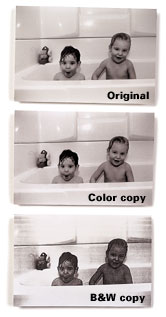
When making photocopies of your photos -- color, sepia-tone, or black-and-white -- do it on a color photocopier. The detailing in the black-and-white photo is all but lost when copied on a black and white photocopier. The middle tones go very light or very dark, and you lose all the fine detailing. See how much more closely the color copy, right center, resembles the original, while the black-and-white copy appears muddy.
Creating Design Impact
Template Fun
Use plastic templates and cookie cutters for patterns to crop photos into interesting shapes such as clouds, bubbles, raindrops, footballs, and apples. Plastic templates come in a variety of shapes and sizes: hearts, stars, ovals, and rounds. Or you can cut your own template designs from cardboard or plastic coffee-can lids. Layer the cut photos with colorful background papers cut in the same shape but slightly larger.
Silly or Serious Silhouettes
To give a subject impact or use it in an imaginative scenario, cut away the entire background. Put children into a newspaper cartoon. Or make them look as though they are sitting on top of a skyscraper, riding a dinosaur, or lifting a building.
Save Your Snippets
Save picture trimmings and cut them into shapes such as flowers, borders, letters, and numbers. Or use your scraps to make a background collage.
Place Your Pictures
Cropping: Think twice, cut once!
With a few well-placed snips of your scissors, you can make your photos dance, jump, and sail off the page.
Creative cropping can strengthen a picture's impact by eliminating unwanted backgrounds and spotlighting the primary subject.
Before you crop your photo, play with the page layout. Start by making several copies of your snapshots on a black-and-white photocopier. Cut the photocopies in a variety of shapes, then experiment with different ways to position and use them on the page.
When cropping a photo, be careful not to cut away important bits of history. An old family car, portions of clothing, or a piece of furniture in the background could prove sentimentally invaluable in the years to come.
Submitted by Nobie
|