Overview
|
|
Terra Fracta is a strategy game of ancient worlds conquest.
It looks like the classic Risk/Risiko board game but the main feature is that you can play on 256 maps of 5 different sizes (1280 maps in total).
You play on a map of your choice and the main goal is to rule over the entire world. Manage your armies well, defend your empire and find a strategy to expand it conducting victorious battles against other empires.
Spread your power with sea battles between warships and use ships to transport units toward distant lands.
You can play against computer opponents or your friends at a single mobile phone, after all the game is turn based.
You can save the game at any time and continue it later.
|
|
 |
Game Controls
|
You can mainly control the game action with a directional joystick if present on your mobile phone, or with the keys that your device has pre-configured as directional keys and fire button. This configuration will typically be:
      up
       2
left 4 + 6 right    5 fire button
       8
     down
This will control the "Cursor Mundi", the cursor that will let you scroll the world map and select targets. Other actions, the game commands, can be selected with "soft buttons", the two buttons that lie nearby the immediate bottom of the display and that execute commands or menus shown in the display, right above.
In addition, the keys [0], [5] and [#] will speed up the game events, unless used by the device game directional key configuration. In a traditional keypad the [5] key will be used as fire button, so you can use [0] or [#], but in "unusual" keys layout like nokia 3650 you will find the [5] key very comfortable as speed-up key because [0] key is too near the joy and [#] key is overridden as fire button by the following joy-alternative configuration:
      up       nokia 3650
       1
left 2 + * right    # fire button
       3
     down
|
How to Play
|
The game starts showing a splash screen. Press any key to access the Main Menu, then start a new game!
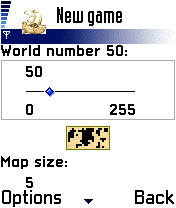
This is the New game option screen (image 1), here you find a lot of parameters that will offer the player the opportunity to play each time a very different game tuning up the difficulty level that the chosen settings will create:
- World number: choose the world map that you like. You can see the little map below this option updating.
- Map size: choose the size of the map, maybe a smaller one if you want a quick game. Changing this option will also cause the little image of the world map to change.
- Map zoom: you can choose the initial zoom of the map but remember you can zoom the map at any time during the game.
|
1 |
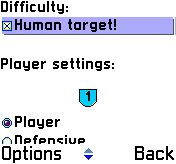
- Difficulty: by selecting the "Human target!" option you will definitely increase the difficulty level. The more opponents you have the harder the game will be! because this option will attract the wrath of each artificial intelligence (AI) controlled player. Select this only once you feel that you are a very good player.
- Player settings: in this section you can choose the behaviour of each AI player, which player you and eventually other friends control and the total number of players in the game. For example, if you want to let an AI player start the turn first you can select the (None) option to the Player 1 assigned by default to Player (human), and choose a different number. Conceding other players to play turns before you can be considered an initial difficulty.
Then select the OK command to start and the creation of the game map will begin.
A progress indicator will show the percent of the rendering process, this will take a short time depending on how large the map is.
|
2 |
Building up the initial Empire
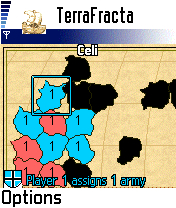
Tha game will begin with an initial phase in which each player will receive a certain amount of armies to place. The larger the map the more armies each player will have to place initially.
Move the cursor to examine the world in which you will play. The map will show dark shapes of land. Now it's time to choose a territory. Each player will place his own armies, one per turn, building up their initial empire (3).
It can happen that the initial phase is over and some territory is still left unassigned, especially if a few players play on a large map. In this case the regular turns to play start but you can't place directly the available armies of each regular turn of play in unassigned dark territories, you will rather have to conquer them. No problem doing so, nobody will defend them, but you have to reach for them.
|
3 |
Turns of play
At the beginning of each turn you receive a certain amount of armies. The bigger your empire is the more armies you will have available at each turn. Move the cursor to the terrirory (or ship) of your color and press the fire button to assign it new armies. You can simply reinforce territories or overcharge of armies one to start an attack to beat your nearby enemies from it.
Once assigned all the available units the action starts. Plan your strategy and remember you can do two actions:
- Attack nearby enemy territories by selecting (fire button) your attacking territory and then choosing (fire button) a reachable enemy area or ship.
- Move, still using fire button to select source and destination territories, your armies from a place to the other. Move armies when you think you can't plan any more attack because this move will determine the end of your turn.
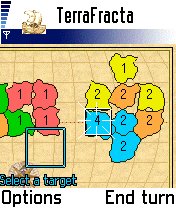
Once selected the territory from which to attack or move the display will show you (4) the directions to reachable territories or ocean. For instance, in picture 4, if you choose to start action from that blue region with 4 armies you can't directly attack that orange territory at north-east because our generals do not think that is a safe way.
All move or attack actions can have a land region or a ship as source or destination without distinction. The only difference is that you can move or attack from ships even if they have 1 army left but you cannot do the same from land regions, these territories need more than 1 army to be selected for actions.
|
4 |
Attack
When source and destination territories are set and the destination is an enemy region the battle begins:
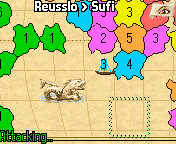
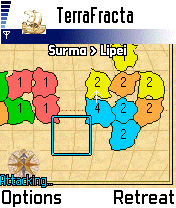
the display shows (5) the name of the two struggling regions. In this situation every time you click the fire button you attack the defending enemy armies and the number of armies of the two regions is updated, showing how the battle is going. Remember they have the defender bonus since you are attacking. After any fire click you should evaluate if it's going well or it's the case to retreat your armies. In the second case you have the Retreat command or the battle situation is immediately canceled when you have only 1 army left.
(to be continued...)
|
5 |
|

 since 11/04/2003