(back)
 (Home)
| <<SYSTEM UTILITIES MODULE TESTING >> | ||
|
Below is a list of module that are tested in the system program (The flow charts and test cases are presented in each module). |
||
| Carpark status | Parking lots | Card number |

| Test case for Carpark status Module |
|
Flowchart for Carpark status Module |
|
Cyclomatic
Complexity : V(G) = Predicate Nodes + 1 = 3 |
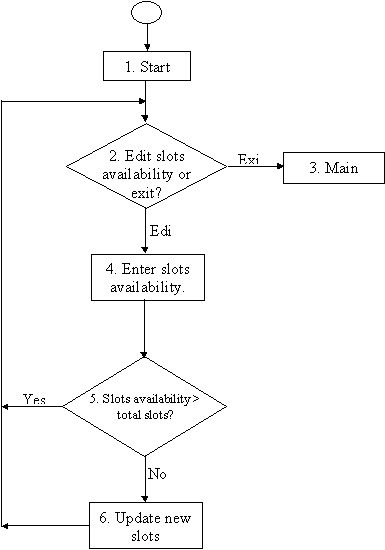
|
S/NO |
Test
cases/Data |
Expected
results` |
Actual result |
|
1.1 |
Path 1 : 1,2,3 From CarPark.form,
on Menu Bar Click : Exit |
Returns to main
menu.
|
OK |
|
1.2 |
Path 1 : 1,2,4,5 From CarPark.form,
on Menu Bar Click : Edit Enter: 15 |
Returns to main
menu.
|
OK |
|
1.3 |
Path 1 : 1,2,4,5,6 From CarPark.form,
on Menu Bar Click : Edit Enter: 9 |
Returns to main
menu. |
OK |
| Test case for Parking lots Module |
|
Flowchart for Parking lots Module |
|
Cyclomatic
Complexity : V(G) = Predicate Nodes + 1 = 2 |
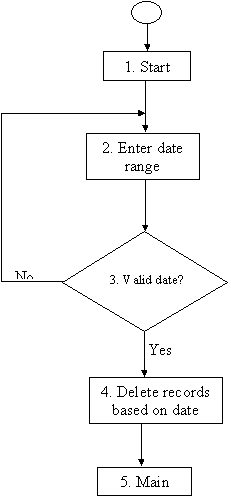
|
S/NO |
Test
cases/Data |
Expected
results` |
Actual result |
|
1.1 |
Path 1 : 1,2,3,4 From
frmParklogUtil.form, on Menu Bar Enter From:
18-03-2000 Enter To:
20-03-2000 Click : Ok |
Records deleted
from 18-03-2000 to 20-03-2000 Returns to main
menu |
OK |
|
1.2 |
Path 2 :
1,2,3,4 From
frmParklogUtil.form, on Menu Bar Enter From:
33-03-2000 Enter To:
48-03-2000 Click : Ok |
Error
Message: “Not
a valid date!” Returns
to main menu |
OK |
| Test case for Card number Module |
|
Flowchart for Card number Module |
|
Cyclomatic
Complexity : V(G) = Predicate Nodes + 1 = 5 |
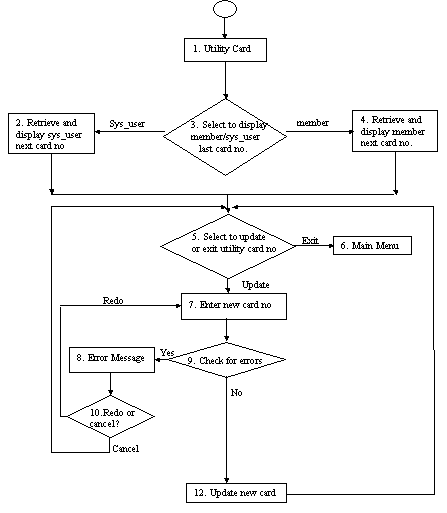
|
S/NO |
Test
cases/Data |
Expected
results` |
Actual result |
|
1.1 |
Path 1 :
1,3,2,5,6 From
frmCard.form, on Menu Bar Click
: Exit |
Returns to main
menu.
|
OK |
|
1.2 |
Path 2 :
1,3,2,5,7,9,8,10 From frmCard.form,
on Menu Bar Click: System
user->Edit Enter: 3 Click : Cancel |
Error
Message: “Number
already exists!” Returns to 5. |
OK |
|
1.3 |
Path 3 :
1,3,2,5,7,9,12 From
frmCard.form, on Menu Bar Click: System
user->Edit Enter: 3 Click: Ok |
Number is updated
as the new card. Returns to 5. |
OK |
|
1.4 |
Path 4 :
1,3,2,4,7,9,8,10 From frmCard.form,
on Menu Bar Click:
Member->Edit Enter: a Click : Redo |
Error
Message: “Invalid
character!” Returns to 7. |
OK |
|
1.5 |
Path 5 :
1,3,2,4,7,9,8,10 From frmCard.form,
on Menu Bar Click:
Member->Edit Enter: 20001234 Click : Cancel |
Error
Message: “Number
already exists!” Returns to 5. |
OK |
|
1.6 |
Path 6 :
1,3,2,4,7,9,12 From frmCard.form,
on Menu Bar Click:
Member->Edit Enter: 20000231 Click : Cancel |
Error
Message: “Number
already exists!” Returns to 5. |
OK |