(back)
 (Home)
| CAR PARK MANAGEMENT | ||
| <<MAIN SYSTEM FLOW TESTING >> | ||
|
Below is a list of module that are tested in the system program (The flow charts and test cases are presented in each module). |
||
| The same test data will be used for each module. | ||
|
|
Main
Screen flow
(supervisor) |
Main
screen flow
(normal user) |

Test case for Overall system main Module |
|
Flow chart for Overall system main module |
|
Cyclomatic
Complexity : V(G) = Predicate Nodes + 1 = 8 |
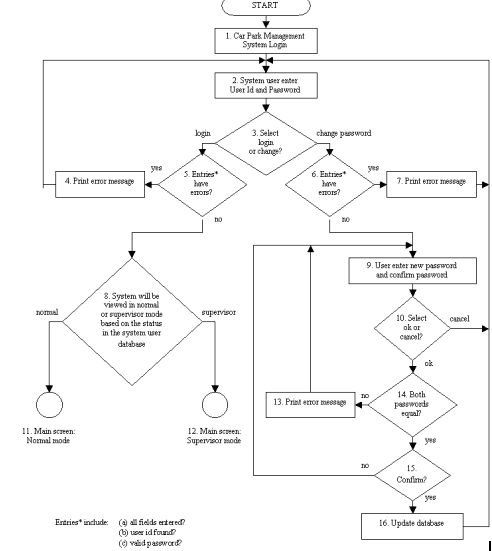
|
S/No. |
Test
Cases/Data |
Expected
Result |
Actual
Result |
|
1.1 |
Path 1 : 1,2,3,5,4,2 Form frmCheckPassword.frm, (a) Leave User ID and password blank Click : Login Click : Ok (when prompted error
message) |
Error message
: “All fields must be entered. Please retype” after Click : Login Return to car park management system
main module |
OK |
|
|
|||
|
|
(b) User ID = 0 Password = 0 Click : Login Click : Ok (when prompted error
message) |
Error message
: “User not found” after Click : Login Return to car park management system
main module |
OK |
|
|
|||
|
|
(c) User ID = 1 Password = 2 Click : Login Click : Ok (when prompted error
message) |
Error message
: “Invalid password” after Click : Login Return to car park management system
main module |
OK |
|
|
|||
|
1.2 |
Path 2 : 1,2,3,6,7,2 Form frmCheckPassword.frm, (a) Leave User ID and password blank Click : Change password Click : Ok (when prompted error
message) |
Error message
: “All fields must be entered. Please retype” after Click
: Change password Return to car park management system
main module |
OK |
|
|
|||
|
|
(b) User ID = “apple” Password = “apple” Click : Change password Click : Ok (when prompted error
message) |
Error message
: “User not found” after Click : Change password Return to car park management system
main module |
OK |
|
|
|||
|
|
(c) User ID = 4 Password = ‘z’ Click : Change password Click : Ok (when prompted error
message) |
Error message
: “Invalid password” after Click : Change password Return to car park management system
main module |
OK |
|
|
|||
|
1.3 |
Path 3 : 1,2,3,5,8,11 Form
frmCheckPassword.frm, User ID = 3 Password = ‘c’ Click : Login |
Main screen : Normal mode |
OK |
|
|
|||
|
1.4 |
Path 4
: 1,2,3,5,8,12 Form
frmCheckPassword.frm, User ID = 1 Password = ‘a’ Click : Login |
Main screen : Supervisor mode |
OK |
|
|
|
|
|
|
1.5 |
Path 5 : 1,2,3,6,9,10,2 Form frmCheckPassword.frm, User ID = 5 Password = ‘e’ Click : Change password. Form frmChangePassword.frm, New password = “ee” Confirm password = “ee” Click : Cancel |
Password remains the same in the
database Return to car park management system
main module |
OK |
|
|
|||
|
1.6 |
Path 6 :
1,2,3,6,9,10,14,13,9,10,2 Form frmCheckPassword.frm, User ID = 3 Password = ‘c’ Click : Change password Form frmChangePassword.frm, New password = “cc” Confirm password = “ccc” Click : Ok Click : Ok (when prompted error
message) Click : Cancel |
Error message
: “The passwords are different or not entered. Please retype
passwords” after Click : Ok Password remains the same in the
database Return to car park management system
main module |
OK |
|
|
|||
|
1.7 |
Path 7 :
1,2,3,6,9,10,14,15,9,10,2 Form frmCheckPassword.frm, User ID = 4 Password = ‘d’ Click : Change password Form frmChangePassword.frm, New password = “dd” Confirm password = “dd” Click : Ok Click : No (when prompt “Change
password?”) Click : Cancel |
Password remains the same in the
database Return to car park management system
main module |
OK |
|
|
|||
|
1.8 |
Path 8 : 1,2,3,6,9,10,14,15,16,2 Form frmCheckPassword.frm, User ID = 5 Password = ‘e’ Click : Change password Form frmChangePassword.frm, New password = “ee” Confirm password = “ee” Click : Ok Click : Yes (when prompt
“Change password?”) |
New password is updated into the
database Return to car park management system
main module |
OK |