
 (Home)
 (next)
Under this section we will be looking at the various diagrams used to
design our database and finally come up with the tables used
for the system.
(next)
Under this section we will be looking at the various diagrams used to
design our database and finally come up with the tables used
for the system.
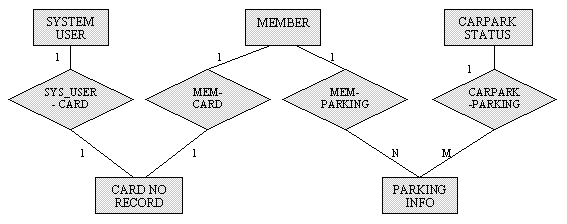 Entity Relationship diagram
The above diagram describes the relationship between the various entities existing in the system. As can be seen, a system user or member will have lots of card no because there is a possibility that the card might be lost. Therefore replacement is given upon reporting loss.
The parking information hold the member info referenced by his /her card number. The information is created every time they parked in the carpark. The carpark status is changed frequently to reflect the status of the carpark e.g. availability of slots at level 2. Therefore there is only one status at any time.
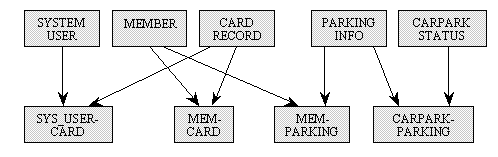 Equivalent Data Structure Diagram
The above diagram is the conversion of the Entity Relationship Diagram. This is closer to our physical design of the database as we can see later at the tables formulated.

We have created 5 tables required for the system.
 | |
| |
| |
| |
|
Note : This is not the fixed format because changes will be update as the time goes.
|
No. |
Fields / Attributes |
Type |
Description |
|
1 |
*Card_No |
Char(8) |
Card No. auto-issued by the system. Can be edited if card is lost. |
|
2 |
Name |
Char(30) |
Name of the member. |
|
3 |
Address1 |
Char(30) |
Address of member |
|
4 |
Address2 |
Char(30) |
Alternate address (if available) |
|
5 |
Contact_No |
Char(9) |
Phone no. or Pager no. |
|
6 |
Plate_No |
Char(10) |
Car’s plate no. |
|
7 |
Spouse_Name |
Char(30) |
Name of the member’s spouse |
|
8 |
Member_Type |
Char(1) |
N-Normal member, E-Employees |
|
9 |
*NRIC |
Char(9) |
Member's IC card no |
|
No. |
Fields / Attributes |
Type |
Description |
|
1 |
*User_ID |
Char(8) |
The ID that the users use to access the system. |
|
2 |
Name |
Char(30) |
|
|
3 |
Password |
Char(8) |
|
|
4 |
Status |
Char(1) |
S-Supervisor have more access rights compare to the normal user. N-Normal user. |
|
No. |
Fields / Attributes |
Type |
Description |
|
1 |
Total_Slots |
Num(3) |
Total slots in the carpark. |
|
2 |
Total_Empty_Slots |
Num(3) |
Total empty slots in the carpark. |
|
3 |
Level_1_Slots |
Num(2) |
Total slots in level 1. |
|
4 |
Level_1_Empty_Slots |
Num(2) |
Total empty slots in level 1. |
|
5 |
Level_2_Slots |
Num(2) |
Total slots in level 2. |
|
6 |
Level_2_Empty_Slots |
Num(2) |
Total empty slots in level 2. |
|
7 |
Level_3_Slots |
Num(2) |
Total slots in level 1. |
|
8 |
Level_3_Empty_Slots |
Num(2) |
Total empty slots in level 2. |
tblCardNo