Additional diagrams
(back)
 (Home)
 (next)
| State Diagrams | ||||
|
||||
| Activity Diagram | ||||
|
||||
|
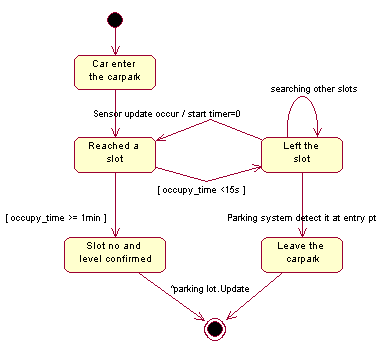
Sensor integration system : Monitor slots status (state transition diagram) |
||||
 Back
to Top Back
to TopIn this diagram, it depict what are the various states can occurred when a car has entered the carpark. The car will reached a slot but it should stay in the slot before the system can confirmed its final parking position. Therefore a timer is used to test whether it is still in the slot after detected by the sensor attached to the slot. If it is in the slot for less that 15 seconds, then it must have left the slot for other alternatives slots. It is also possible that it could leave the carpark; detect by the exit point. Only when the slots no is confirmed, the information will then be updated to the table.
|
||||
|
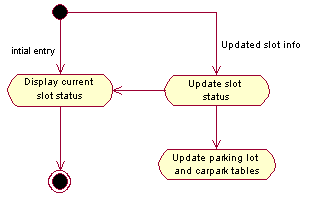
Vehicle Parking system : Display/Update slot status |
||||
 Back
to Top Back
to TopThis shows the display of current carpark status information before the entry of any car and also after the car has parked in a slot the display will be updated accordingly to the screen and tables.
|
||||
|
Vehicle Parking system : Maintain system/database |
||||
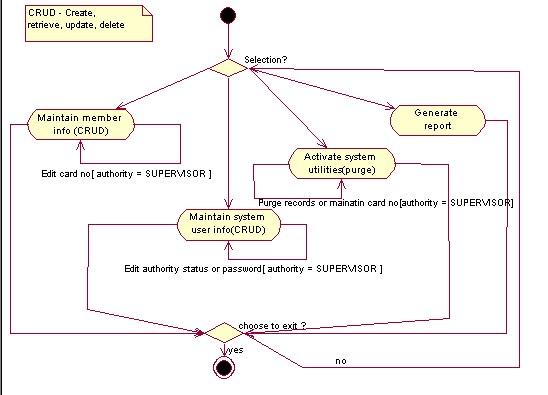 Back to Top Back to TopWhen the system user has entered into the maintenance interface of the system, the user can select the function to be executed. But from the diagram, only authorized personnel like the supervisor can access the sensitive tasks indicated. Generally, the user can select any option till he or she wish to exit from the maintenance interface.
|
