This program is written as an exercise and is not intended for
anything. You may freely use and modify the source code contained in
this product for use in your own applications including commercial
applications. However, you may not redistribute any part of this
archive or in any way derive financial gain from this demo product
without the express permission of it's author – Steven A. Frare.
Please do NOT redistribute this archive, instead refer people to my
website, where the latest version can be downloaded free!
http://www.geocities.com/sfrare
No claim whatsoever is made concerning the suitability of this
source code product for any particular task. Anyone who decides to use
code from this sample does so at their own risk and agrees not to hold
the author or anyone connected with this sample responsible for it's
success or failure.
Copyright (C) 2000, Steven A. Frare all rights reserved
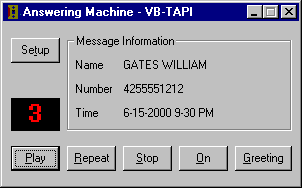
The answering machine sample is written entirely in Microsoft’s
Visual Basic 6.0 and uses TAPI version 1.4. Using VB to write the code
isn’t much more difficult than C/C++ however some parts of TAPI use
variable length structures which need a little hack to get around.
Hopefully the operation of the application is intuitive, it
operates exactly like the answering machine in my home, annoyances and
all. This one even has more features, such as CallerID.
To run the program for the first time select the Setup button.
This dialog holds some standard information, like which voice card
to use.
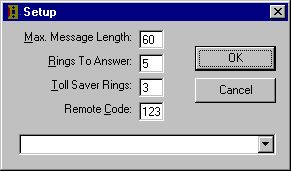
The Max. Message Length property is the maximum allowed recorded
message in seconds. If the caller goes over this time the application
simply hangs up and goes ready for the next call.
Rings To Answer is the number of rings until the application picks
up. Toll Saver Rings is the number of rings the application will pick
up the phone line when there are messages.
Remote Code is used to retrieve messages remotely, so you can just
call in anytime to get your messages.
The drop down contains a list of all modems detected on the PC. In
the case of this screen shot, none. The only selection that needs to
be set is the drop down list the application will run fine with the
rest left at the defaults. At this point choose OK to save the
settings and you will return to the main application form.
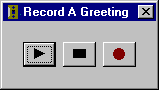
There is an included Greeting.wav file if you don’t want to record
your own. Simply choose the Greeting button on the main form to play
the greeting or record a new greeting. The maximum length of a
greeting is twenty seconds, press the center stop button if you finish
before that. Click the X to close this dialog.
Now choose the On button which puts the application in a state
waiting for a call. If most of the application buttons become disabled
and the On button now reads Off the application is working! Or at
least has a high chance of working. If you don’t have a voice capable
modem, or you don’t have a correct TAPI version installed several
error dialogs should have alerted you to this fact by now.
The application should work on Win9x, NT 4.0 and Windows 2000. Of
course you will need a voice modem, and with NT 4.0 you will need a
Telephony Service Provider (TSP) and Wave driver such as one that
comes with a Dialogic card. A regular off the shelf Voice Modem from
CompUSA is not going to work under NT 4.0.
If you are sure you have a suitable modem and it still doesn’t work
there are a few possibilities.
- The modem isn’t setup correctly
- The modem doesn’t have the correct drivers
- You are running under Windows NT 4.0 without a suitable voice
card, such as a Dialogic.
- You are using Windows 95 or Windows 95 OSR1 and do not have the
Unimodem/V drivers. You might try getting them from Microsoft.
- There could be a bug in the code! It is true! I am the only one
to have run this application so although I have tested it out on a
couple of machines and operating systems no extensive testing has
been done. I am confident there are several bugs in the code, which
I will fix as I find them.
If you have exhausted all the above possibilities and still can’t
get it to work, you could give up… Or you could fire it up in the VB
IDE and debug it! If you do find a bug let me know at [email protected]. I don’t check that
e-mail often, so don’t be upset if I don’t get back to you right
away.
 Download the App &
Code
Download the App &
Code