
 | |
|
This page is for the person who for the first time makes the web page. Like the right the web page is completed at brief. When this is possible, if then it keeps remodelling in various ways, your own web page are produced. Because it cannot point loss, thinking that it was swindled, please try making at brief! |
 You complete at brief |
Using HTML at brief, it probably will make the web page!
In beginning
WP (the web page) we would like to make!With you thought. With the beginner who the right or the left is not recognized seeing whatever, it is not understood well, don't you think?? I so was. Looking at the beginner support sight, you did not understand whether what it is written even.
But while having perused Sawayama's sight way, simple ones reached the point where you can understand little by little.
From there somehow with the seeing imitation which will be seen, because it reached the point where WP can be made, if without being hasty, slow, skill it keeps raising the one that we would like to make WP from now on, little by little it is good, probably will be.
If beginning can make the page which little by little are agreeable to your own image even with the thing imitation is pleasant, is. However, depending upon the sight way because link to secondary use prohibition and that sight working condition is, after understanding Condition of Use and the like well you probably will use.
There to be second use and the thing imitation etc, new technology and the like to be born from there, because it is to keep developing if you cannot use, the �E�gjust handful�E�h only it is technology. Become excessive nervousness, protecting Condition of Use, enjoying, it will make web page!
About H T M L
The Web page (WP) using HTML you describe.
It is something where as for this HTML using those which are called the tag, writing indication such as color and shape layout in the text, the computer reads the information, the browser (Internet Explorer and the like) with indicates. Using this tag, it makes various designs.
The basic structure of HTML
| <html> <head> <title> simple web page </title> </head> <body> <h1> the home page probably will be made simply! </h1> </body> </html> |
This is html <head>~</head> the introduction sentence and keyword of the page are written in <title>~</title> in home page name (the title which is indicated on the browser) head is closed <body>~</body> in contents As for <h1> calling the index, size of the letter which it put by the fact that it changes the number changes, (title subtitle and the like) body is closed with </body> html is closed with </html> |
Trying the above-mentioned tag with the copy & the paste, please see.
If as for method WINDOWS you start click �E��E� all programs �E��E� opening the memo pad or the word pad inside the accessory, the paste.
Retaining that, the extension when those which from .txt can be applied to .html or .htm double are clicked the browser (Internet Explorer and the like) you will stand up and probably will make the web page simply! With the letter which is said is indicated.
This way it keeps making the page by the fact that <body> ~ </body> the various tags are written in.
The point of caution starts from <�E��E��E��E�>, closes the tag which becomes opposite by all means with </�E��E��E��E�>. When you forget to close, because it is applied the all tag to after that, note!
* As for method of the copy & the paste when with while the left button of the mouse is clicked with respect to the letter which we would like to copy, it makes slide color of letter reverses. There selecting cursor the copy together with the right click.
The memo pad the right clicking at the place where at all of the word pad it is not, sticking with selection OK. Method of changing the extension selecting a change of name with the right click, designates the file which is retained with the memo pad or the word pad as index.html and the like.
When the extension is not indicated, the micro-computer pewter the tool selection �E��E� folder option selection �E��E� selecting indication with double click, it is while details setting, �E�gindicates all files and the folder check �E��E� �E�gthe extension which is registered does not indicate�E�h removes check�E�h, �E��E� �E�gin all folders application�E�h selection �E��E� �E�gapplication�E�h with selection OK.
About the style seat
If the style seat (CSS) with, it expresses you can call �E�gthe technology which defines the layout of the Web page�E�h in one word, probably will be.
Originally, was not something in order to appoint expression method, so is, but appearance and design of appointment of color and font size, utilization and composition of the table for designing (you see due to the development of Web, and so on to prosper) it seems that keeps it reaching the point where it defines.
Speaking simply, you must indicate with the individual tag by using the style seat, it reaches the point where it can be able to apply the place partly, appoint to the whole page, apply to all pages.
For example, although the wallpaper is changed every season, color and size of letter are changed, if originally you must do again to appoint all pages with the tag and the like, it is, but in the style seat it is possible to modify these simply.
If the number of pages increases, the extent which increases, it becomes necessary, probably will be. When when it applies to just that page, <head> ~ </head> describe method in, apply to all pages making the external file, there is a method such that it makes read.
Style seat use
| <html> <head> <title> simple web page </title> <style type= " text/css " > <!-- h1 { color: blue; font-style: italic } --> </style> </head> <body> <h1> the home page probably will be made simply! </h1> <h2> the home page probably will be made! </h2> <p> applying the style seat to this page. </p> </body> </html> |
This is html <head>~</head> the introduction sentence and keyword of the page are written in <title>~</title> in home page name (the title which is indicated on the browser) <style type= " text/css " >~</style> this is the style seat, (in <head> ~ </head> description) <! -- ~ --> Comment out h1 is appointed Appointing the color of letter with color Appointing the shape of letter with font-style
style is closed head is closed <body>~</body> in contents And so on you discover h1 h2, As for <p> conclusion body is closed with </body> html is closed with </html> |
The above-mentioned sample has used the style seat for only that page.
In this case in <head> ~ </head>
<style type= " text/css " ><! --Appointment of style--></style> the way you describe.
In case of the external file <head>~</head> <LINK " with rel= " stylesheet " href= half angle alphabet favorite file name .css " type= " text/css " > with you describe in.
The external file appointment of style .css please changes the entry and extension into the memo pad or the word pad.
* Everything being able to think the tag and style, etc being handwritten, because it draws up, it becomes very job. If copying each one separately, it retains the tag and style in the memo pad and the like, when liking to use, because are sufficient the copy & the paste, very it is simple.
It will decorate with the tag!
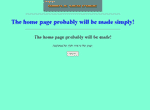
| <html> <head> <title> simple web page </title> <style type= " text/css " > <!-- body {background-color: #7fffd4; } h1 { color: blue; } --> </style> </head> <body> <center> <img src= " title.gif " width= " 300 " height= " 60 " border= " 0 " alt= " head_title " > <hr width= " 50% " > <h1> the home page probably will be made simply! </h1> <hr width= " 50% " > <h2> the home page probably will be made! </h2> <p> applying the style seat to this page. </p> </center> </body> </html> |
<img src= " picture name .gif " width= " 300 " height= " 60 " border= " 0 " " the explanation of alt= picture " > As for <center> ~ </center> centering |
Enjoying, it will make!
When this is possible, if then it keeps remodelling in various ways, your own web page are produced. Enjoying the various tags with the cut, & the paste it will make the web page!
Linking to The gate to darkness
You can link to this page freely. Please only link to http://www.geocities.com/seikou_suru1/
Thank you!
| Page's Name T , N , O - Simple Web page |
| URL |