
SeGuruCool
The Largest Independant Solid Edge Resource Outside EDS
|
SeGuruCool The Largest Independant Solid Edge Resource Outside EDS |
|
Part 2 of 2 www.geocities.com/SeGuruCool  segurucool @ indiatimes.com
 |
| |
Stay updated when new tutorials and articles are posted. (Note: Do not change first text box) |
 Garbage In - Garbage Out Garbage In - Garbage Out When creating curves, it is always recommended to use lesser number of control points on the curve. Not any more with Solid Edge. Start out with a curve having as many control points as you wish. You may also use the Add and remove points  option on the ribbon bar when a curve is selected. option on the ribbon bar when a curve is selected. Tweak the curve to your heart's desire. | 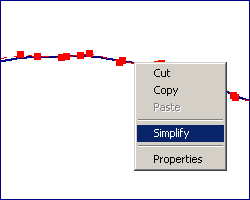 |
|
Once you are satisfied with the shape of the curve, right click on the selected curve and select Simplfy from the menu. Adjust the tolerance value in the dialog box and keep a watch on the current number of edit points and control vertices. Click OK when done. Now you have a much lighter curve. The Tolerance value determines how much detail and accuracy a curve and a surface will have. This way you can have more control points to begin with and still end-up in a much lighter (non-heavy) curve with the desired shape. Also, this will insure a smooth and geometrically clean surface. | 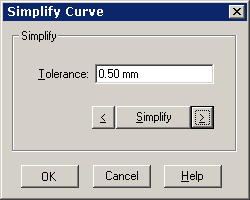 |
|
Vertex Mapping - Avoid Heavy Curves When building surfaces from curves, Solid Edge employs a mechanism called Vertex Mapping. In this, a vertex or point from one curve is matched (mapped) with a vertex or point from the other curve and a surface is laid out. Here, take care that there is no mismatch between the number of vertices on one curve and the number of vertices on the other curve. That is, do not use heavy curves along side normal curves when building a surface. Heavy curves produce large, hard to update files and often do not render quality surfaces that simplified curves do. | 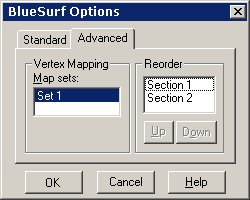 |
|
Vertex mapping is only useful for controlling or eliminating twists and discontinuities in a surface, since Solid Edge takes care of the mapping stuff internally. Take a look at the two sides of the same BlueSurf, spanning two open curves. Observe carefully, the zebra strip (Inspect > Zebra Strips) surface analysis on one side (upper figure). The curve on this side of the BlueSurf is more kinky or appears cracked without the zebra strip. From the lower figure its clear that the curve on the other side of the BlueSurf has lesser number of control points and hence appears smoother - such surfaces are always desirable. | 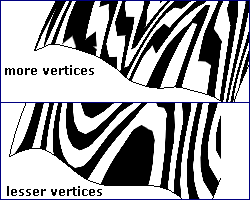 |
|
Doesn't Work This Way ? Then Try That Way Creating BlueSurfs and you have a set of curves for the cross-section and and another set of curves for the guide-curves. There are no hard-and-fast rules as to which should be the guide curves and which are the cross-sections. The surface may fail in one way, do not panic, if it doesn't work this way, then you can always try it that way. Here is how... | 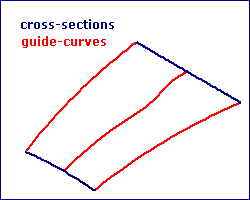 |
|
Say you picked the cross-sections and guide-curves as shown in the top-side figure and things didn't work your way. Swap partners and it will work. Try picking the guide-curves and cross-sections as shown in the bottom figure. Chances are you may get the desired result. | 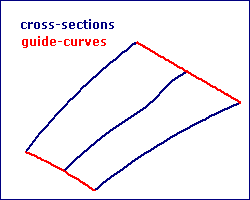 |
|
Handling Cusps - The Zebra Strip Tool is Your Friend Surfaces are always made up of groups of four edges, mathematically. So, creating surfaces (Blue or Bounded) not made up of four i.e. even number of edges, result in a concentration of control points coincident to each other, as the fourth edge is brought to a zero at that point. These concentration points are called cusps. | 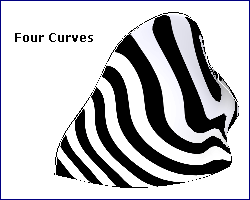 |
|
Given a free ticket to the African safari, which zebra would you choose to fondle and caress. The one with a smoother and even skin shown in top figure ( four curves ), Or the species with a coarser skin shown in bottom figure ( three curves ). To save time and money travelling across continents, I would prefer selecting Inspect > Zebra Strip. | 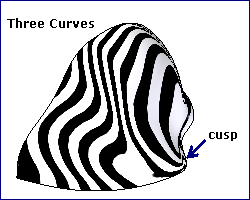 |
|
Click Here to go to part 1 |
|
Tushar Suradkar segurucool @ indiatimes.com |
