
SeGuruCool
The Largest Independant Solid Edge Resource Outside UGS
|
SeGuruCool The Largest Independant Solid Edge Resource Outside UGS |
|
27 Nov 2004 Tushar Suradkar www.geocities.com/SeGuruCool  segurucool @ indiatimes.com segurucool @ indiatimes.com |
|
|
 Threads Display
 How do I display threads ? - Linwood Tompkins <[email protected]> When you apply threading to a cylindrical face, Solid Edge displays the default green color to the face. To display more realistic threads without taking a helical cutout is to click Format > View and check ON textures on the Rendering tab. | 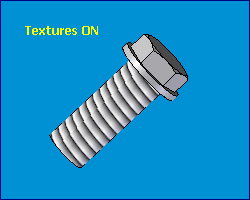 |
 Avoid all-round projection
 When I project curves on a cylindrical surface, it goes all round it, how to avoid this ? - Mary Lake < [email protected]> Split the surface to project using the Split Face command on the Surfacing toolbar. This way you can restrict the projection onto a specific portion of the surface. See figure. | 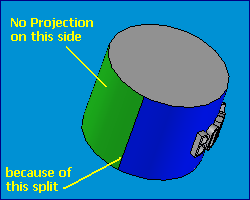 |
 Editing table
 Can I externally edit the xls file that created a table driven curve ? - Abdul Holley <[email protected] > No, the table driving a curve can be edited only from within Solid Edge. |
|
Tushar Suradkar segurucool @ indiatimes.com |

 Download FREE 6 chapters & source code