
SeGuruCool
The Largest Independant Solid Edge Resource Outside UGS
|
SeGuruCool The Largest Independant Solid Edge Resource Outside UGS |
|
7 June 2004 Tushar Suradkar www.geocities.com/SeGuruCool  segurucool @ indiatimes.com segurucool @ indiatimes.com |
|
|
  Transperant Workplanes
 My Workplanes are no longer Transparent, why ? - Amit Nakhate <[email protected]> Select Tools > Options... Take the View tab. Click the Use shading on reference planes check box and see to it that the check mark is present. Adjust the transperancy from 5-30 %. | 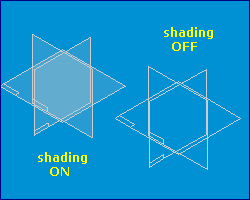 |
 Arrowheads
 How do I change Dimension Arrowheads ? - Renaldo Bohanan <[email protected]> Right click on a dimension and select properties. The Dimension Properties dialog will appear. Take the General tab. In the Terminator area, select an arrowhead from the Type: pull-down list. | 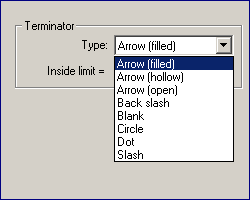 |
 Horizontal/Vertical
 What other uses do Horizontal/Vertical relatonship serves ? - Lecia SeyFried <[email protected]> The Horizontal/Vertical  geometric relationship can be used for more than making lines be horizontal or vertical. geometric relationship can be used for more than making lines be horizontal or vertical. 1. Aligning 2 circles or hole centers horizontally or vertically. | 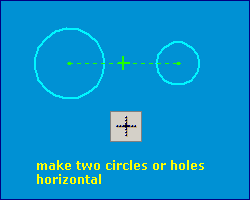 |
|
2. To make a circle concentric to a rectangle, apply the Horz-Vert geometric relationship between : Next, change the rectangle dimensions and check - the circle always stays in the center. | 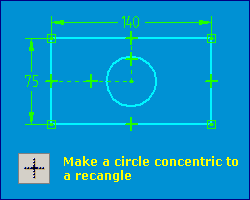 |
|
3. Making base feature symmetric about reference planes. See detailed illustration on the Tip Trick page. |
|
Tushar Suradkar segurucool @ indiatimes.com |

 Download FREE 6 chapters & source code