 |
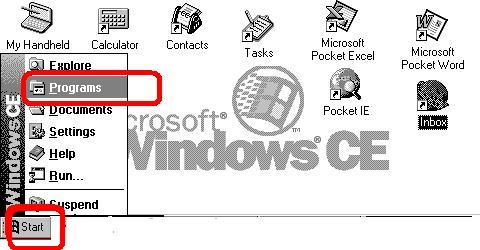
Step 1
- Click on Start
- Click on Programs
|
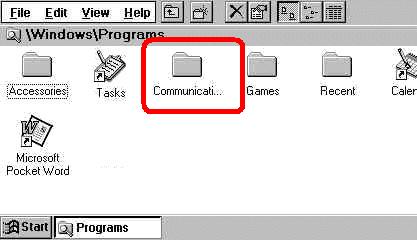 |
Step 2
|
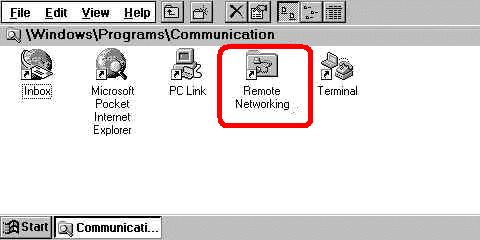 |
Step 3
- Click on Remote Networking
|
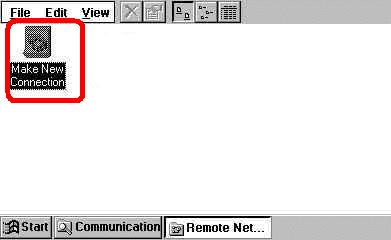 |
Step 4
- Click on make new connection
|
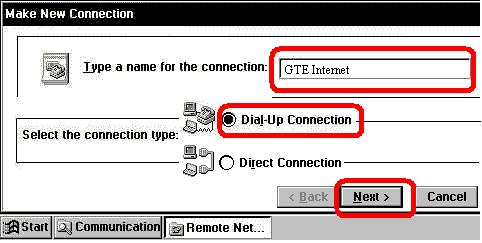 |
Step 5
- Enter a name for the connection or leave a default name
- Select Dial-up Connection
- Click Next
|
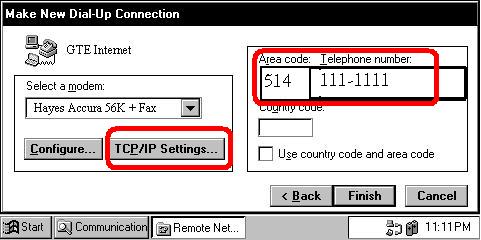 |
Step 6
- Enter the phone number to dial provided by your ISP
- Click onTCP/IP Settings
|
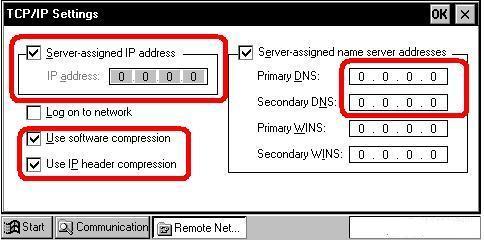 |
Step 7
- Enter the Primary and secondary DNS providede by your ISP
- CheckUse sofware compression
- Check Use IP header compression
- Check Server assigned IP addressIF You need IT
and add the IP adress provided by your ISP
|
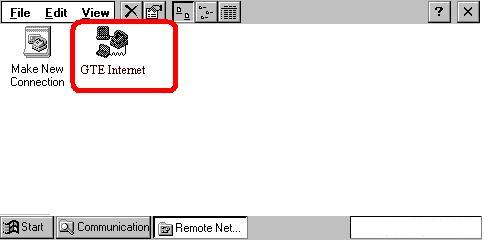 |
Step 8
- New icon is created
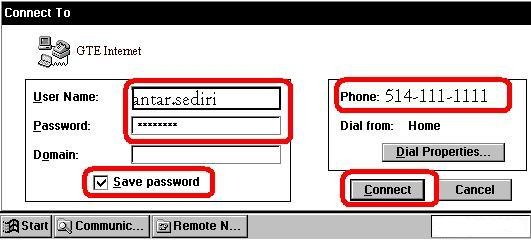
- Double click on the connection and you will get the following screen
|
 |
Step 9
- Enter your user name provided by your ISP:antar.sediri
- Enter yourpassword
- Check Save password
- Click on connect
|