RELATIONAL DATABASE
How do relationships work?
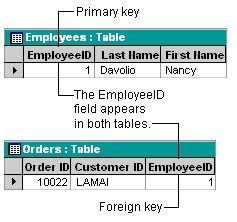
A relationship works by matching data in key fields — usually a field with the same name in both tables. In most cases, these matching fields are the primary key from one table, which provides a unique identifier for each record, and a foreign key in the other table. For example, employees can be associated with orders they're responsible for by creating a relationship between the Employees table and the Orders table using the EmployeeID fields.
A one-to-many relationship
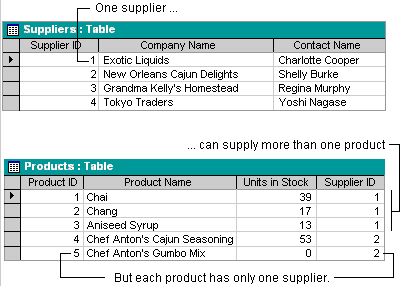
A one-to-many relationship is the most common type of relationship. In a one-to-many relationship, a record in Table A can have many matching records in Table B, but a record in Table B has only one matching record in Table A.
A many-to-many relationship
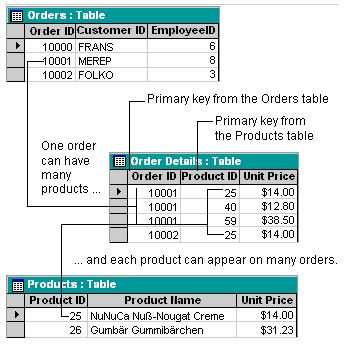
In a many-to-many relationship, a record in Table A can have many matching records in Table B, and a record in Table B can have many matching records in Table A. This type of relationship is only possible by defining a third table (called a junction table) whose primary key consists of two fields — the foreign keys from both Tables A and B. A many-to-many relationship is really two one-to-many relationships with a third table. For example, the Orders table and the Products table have a many-to-many relationship that's defined by creating two one-to-many relationships to the Order Details table.
A one-to-one relationship
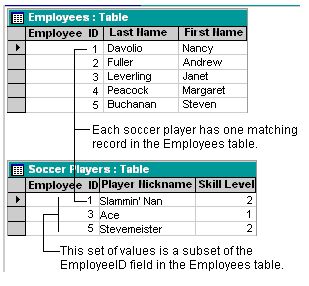
In a one-to-one relationship, each record in Table A can have only one matching record in Table B, and each record in Table B can have only one matching record in Table A. This type of relationship is not common, because most information related in this way would be in one table. You might use a one-to-one relationship to divide a table with many fields, to isolate part of a table for security reasons, or to store information that applies only to a subset of the main table. For example, you might want to create a table to track employees participating in a fundraising soccer game.
Defining relationships
You define a relationship by adding the tables that you want to relate to the Relationships window, and then dragging the key field from one table and dropping it on the key field in the other table. You can also define relationships by using the keyboard.
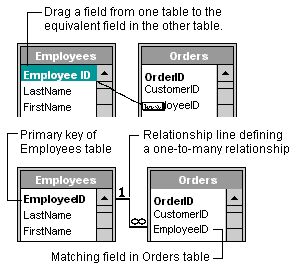
The kind of relationship that Microsoft Access creates depends on how the related fields are defined:
· A one-to-many relationship is created if only one of the related fields is a primary key or has a unique index.
· A one-to-one relationship is created if both of the related fields are primary keys or have unique indexes.
· A many-to-many relationship is really two one-to-many relationships with a third table whose primary key consists of two fields — the foreign keys from the two other tables.