Seawolf Broadband Display
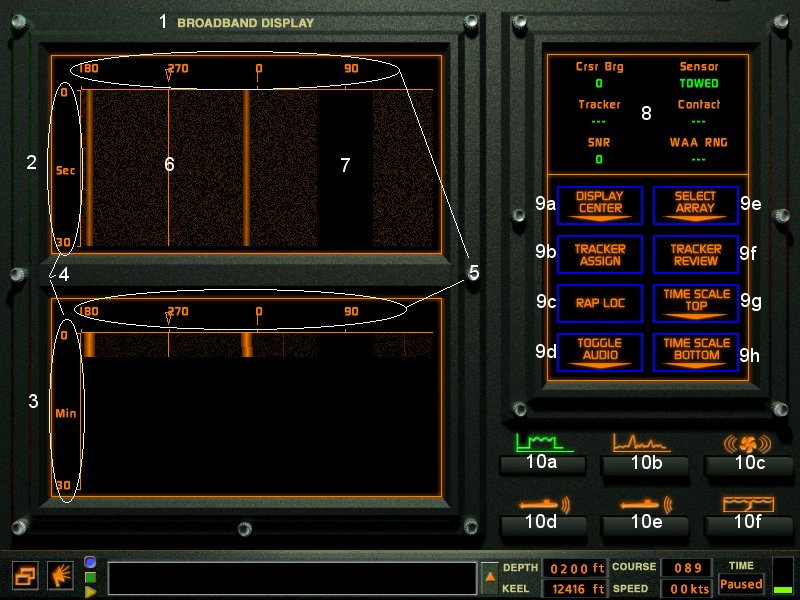
- 1-Station name. Also Auto crew can be turned on/off by clicking here.
- 2-Upper Waterfall Display.
- 3-Lower Waterfall Display.
- 4-Time Scales.
- 5-Bearing Indicator. All Bearing's are True, not relative to your sub.
- 6-Ownship marker. This line is 180 from ownship course.
- 7-Sensor blindspot.
- 8-Data Display.
- 9a-Display Center. Changes the waterfall center to North or South.
- 9b-Tracker Assign. Assign's a Tracker to the contact at the location of the cursor.
- 9c-Rap Loc. Rapid Localization (Seawolf only). Sends any WAA range information to the TMA.
- 9d-Toggle Audio.Toggles Broadband audio on and off.
- 9e-Select Array. Sphere or Towed arrays can be selected in Broadband.
- 9f-Tracker Review. Displays contact Information the the data display.
- 9g-Time Scale Top. Changes the time average in the upper waterfall display. STA=Short Term Average, ITA=Intermediate Term Average, LTA=Long tern Average.
- 9h-Time Scale Bottom. Changes the time average in the upper waterfall display. STA=Short Term Average, ITA=Intermediate Term Average, LTA=Long tern Average.
- 10a-Broadband Station.
- 10b-Narrowband Station.
- 10c-Demon Station.
- 10d-Active Sonar Station.
- 10e-Active Intercept Station.
- 10f-Sound Speed Profile (SSP) Station.