The Computer Graphics Companion Online Edition
Damian Scattergood 1999-2001
|
The Computer Graphics Companion Online Edition Damian Scattergood 1999-2001 |
|
DRAWING PRIMITIVES |
| Every object no matter how complete in design can always be represented by the basic drawing elements. The most fundamental of these is the line. From the basic line we can create arcs, circles, rectangles and many more basic shapes. This chapter deals with the basic drawing elements and lists various algorithms to produce them, from which you can choose to use the best for your graphics program. |
|
LINE ALGORITHMS |
|
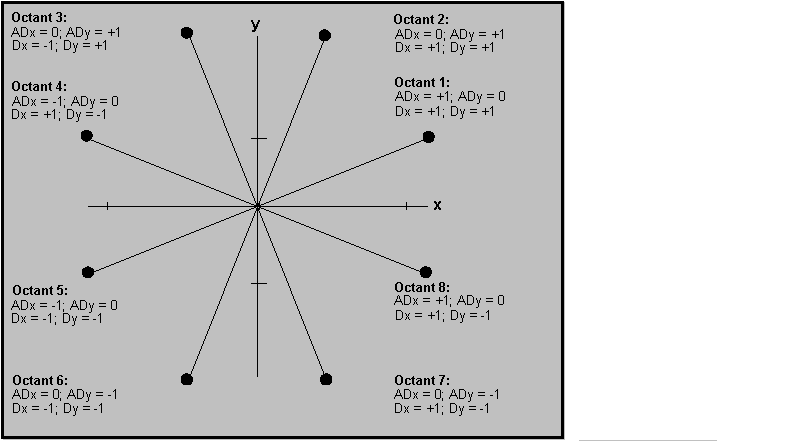
The line is probably the most fundamental element in any graphics system. From this basic element you can create any of the more complex elements. So it is imperative that your line routine is accurate and also quick. In a CAD system for instance any given image could contain thousands of lines. So by deducation any slowness in your line algorithm will slow you CAD program immensely. In effect there are two areas of the line algorithm you must be aware of. The first is the setup section, where you perform setup calculations before you begin to draw pixels. In this section you can get away with some slower code as this will only be executed once per line. The second section, actually drawing the line pixels is the most time intensive. The operation of writing each pixel one at a time and then recalulating the position of the new pixel is quite time cosuming. These calculations are preformed each time you draw a pixel so any overhead here will drastically slow down you line routine. It is in this are you should concentrate for speed increases. One of the fastest line routines developed is the Bresenham Line Algorithm. It is extremely quick due to the fact that it is integer based and does not require any complex mathamatical calculations. Jack Bresenham of IBM first devised this algorithm in 1965. The Bresenham algorithm is by far the best of the general purpose line agorithms. You can however produce faster algorithms by using specific line routines. For example in a Horizontal line there is no need to perform any Vertical calculations so this code can be eliminated. It is possible to have a line routine for each possible combination of line, Horizontal, Vertical or Diagonal. In fact you could develop line routines for different types for Diagonal lines. This is the technique used in quite a lot of 3D Computer Games today. There are in fact eight different types of Diagonal line that can be drawn depending on the slope of the line. Each Octant has its own particular characteristics as follows:- |
|
|
|
BASIC INCREMENTAL LINE ALGORITHM |
|
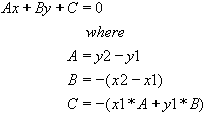
Any given line between two points x1,y1 and x2,y2 can be
represented by solving the general equation where where m is the slope of the line and b is the offset, or by the equation
//Sign x = y = 0; |
|
BRESENHAMS LINE ALGORITHM |
|
This is by far one of the fastest and most efficient general line algorithms available. //Bresenhams Line Algorithm void BresLine ( xstart, ystart, xend, yend)
//Determine if ending point lies to right or left of start point d = b + b -a; //2*b-a; |
|
HORIZONTAL LINE ALGORITHM |
|
One area worth considering is tailoring an algorithm to fit you specific display hardware. When considering line algorithms we always seems to think in terms of pixel writes. With some display types that use BitPlanes you can easily write Horiontal runs of pixels by inserting Byte values thus writing 8 pixels at a time. This is by far one of the quickest methods of displaying Horizontal lines. Displaying Horizontal lines in this way can dramatically increase draw speed in say a polygon fill routine. There are however some small problems to overcome. Firstly not all lines will start on byte boundaries. Your line may start of end somewhere in the middle of a byte. So your algorithm has to be altered slightly. The basic method for a Horizontal line routine based on this algorithm is. · Identify how many Real pixels to write to reach a byte boundary. · Identify how may bytes to write to reach the byte end of our line. · Identify how many Real pixels are required to reach the end of the line from the last byte boundary. So your new quick Horizontal Line Algorithm becomes. //Horizontal Line Algorithm void QuickHorizontalLine
( x, y, xlen ) int xend; //End point. //Calculate last pixel. //Calculate number of bytes to write. //Produce Left and Right Masks. rightmask = ~( 0xFF >> (xend & 7) ) //Inverse mask creating *Scr_address++ |= leftmask; //Write Left pixels if ( (numbytes>0) && (rightmask!=0) ) |
|
CIRCLE ALGORITHMS |
|
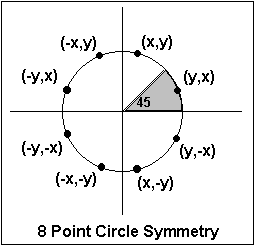
There are a variety of ways in which one can draw a circle. The simplest method is to solve the general equation for a circle using the Sin and Cos commands. A variety of techniques are available but here we shall show three basic routines. When drawing circles you need to decide whether you require a small or fast algorithm. The routine BasicCircle is by far the shortest and simplest method for drawing circles, and is used by most programmers. However Bresenhams method is probably the fastest drawing method, but is a lot more complex. The faster circle routines take advantage of the symmetry of circles. A Circle contains eight octants points on each of which can be calculated by reflection from one of the other octants. So when calculating our cicrle points we need only work with a single octant, working through 45 degrees. The circle octants can be represented by the following graph:
Given the eight point symmetry of a circle we need only calculate the first octant and then plot the correct points in the other octants. This method leads to an extremely fast circle algorithm. Now to the examples. |
|
BASIC CIRCLE ALGORITHM |
|
By far the simplest Circle Algorithm is that produced solving for trigonmetic values of Sin and Cos.This algorithm produces a circle based on calculating certain key points around the circle surface and drawing the connecting lines between them to produce the full image. In using this method you can easily specify the number of angles to use to produce an even surface. For most purposes you can easily achieve a good representation of a circle using anything above 70. In the example we calculate points at every 1 degree radians, to give as smooth a circle as possible using 360 points. The only optimization we use is that we do not calculate the first point as this should always be (x + r , y), being the furthest rightside point on the circles radius. There are a few methods to increas the speed of this algorithm. Firstly we can limit the number of angles we use to produce the circle outline. We could easily produce a good circle by using steps of 2 or 3 degrees instead of 1. Depending on the screen resolution you use this may vary for you. Secondly you will notice that the routine must calculate values for Sin and Cos for each angle. One method around this is to have your software produce Sin and Cos tables and your routine can take the values accordingly for each angle. If you then made the variable 'i' an integer varying from 1 to 360 you could easily rewrite the code as for (i = 0; i < 360; i += step) { This method is quite efficient and will give very good improvements in speed. // |
|
CIRCLE POINTS SYMMETRY ALGORITHM |
| // // CirclePoints Algorithm // // Given any given point x,y on a circles circumference, plot the symmetric points in // each of the circles octants. // void CirclePoints( xc, yc, x, y) int xc, yc; int x, y; { Pixel(xc+x,yc+y); Pixel(xc+y,yc+x); Pixel(xc+y,yc-x); Pixel(xc+x,yc-y); Pixel(xc-x,yc-y); Pixel(xc-y,yc-x); Pixel(xc-y,yc+x); Pixel(xc-x,yc+y); } |
|
BRESENHAMS INTEGER CIRCLE ALGORITHM |
| // // BresCircle // // Draw a given circle using only Integer variables. // void BresCircle( int xc, int yc, int radius) { int x,y,d; x=0; y=radius; d=2*(1-radius); while (y>x) { CirclePoints(xc, yc, x,y); if (d+y>0) { y=y-1; d=d-2*y+1; } if (x>d) { x=x+1; d=d+2*x+1; } } } |
|
ARC ALGORITHMS |
|
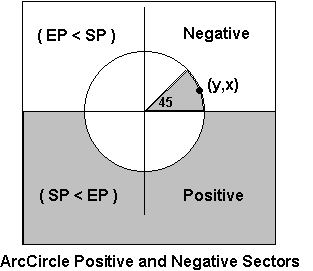
There are many ways to draw an arc, some more complex than others. By far the simplest algorithm is to calculate all the points on the boundary of the arc between the start and end angles and then draw the connecting lines between these points. This algorithm although simply to code is quite slow and does not always generate smooth arcs. For most general applications this method of arc generation is perfectly acceptable and is produced in only a few lines of code. The basic algorithm starts by calculating the start and end points of the arc and then working its way around the arc draws a line from the starting point to the next point found on the boundary. The continues in steps of x degrees until the final point is found and a line is drawn to the final arc end point. One advantage of this technique is that it can be made faster by removing the number of steps between arc point co-ordinates. As we saw in the circle algorithm using around 72 points will give a fairly decent circle image. It is possible with this technique to limit the number of points whilst the initial arc is being drawn for speed and at a later stage to increase the number of points to draw a more accurate arc (but obviously much slower). The basic arc algoithm can be implemented as follows. void Arc (float x1, float y1, float sa, float ea, float r) The main disadvantage of this algorithm is its use of floating point math to calculae each point along the way. This can be very time cosuming and should really be avoided. What we need is an Integer based alorithm which is both fast and accurate. One of the fastest methods to draw arcs is based on the Bresenham circle algorithm. If you consider your circle to be broken into eight sectors then for any given arc all that is required is to calculate which sectors are drawn and then using the Circle algorthm plot only the correct points in those sectors. Using the circle algorithm we only need calculate points for the first sector and then reflex those points into the other sectors for drawing. The only problem we have to overcome is to know what points are plotted in each sector. The easy bit is to start by working out which sectors are not drawn at all and then eliminate these from the plot routines. After this we calcualate which sectors are drawn completely and mark these to draw every point. The problem then occurs of working with partially draw sectors. Due to the fact that these points are reflected about the circles centre it makes it difficult to calculate where on the arc these points lie. The algorithm I use is based on the Positive & Negative direction of the arc drawing. If you take an arc starting a 0 degrees and ending at 45 you will see this arc will be drawn from right to left across the top of our circle as shown in the diagram below. For every arc drawn along the top of the circle the EndAngle Point will always be smaller than the StartAngle Point. Using this information as a basis we need only calculate if our selected X point will be between EP and SP before plotting it.
In the same way we do the reverse for any points after 180 degrees as these points will be flowing in the positive direction, left to right. At first sight this algorithm looks quite complex, and is quite lengthy, but it compensates for this is speed and accuracy. It requires only 3 code modules, the basic circle algorithm and code to handle the Positive and Negative sector areas. The algorithm only requires floating point math at the start to calculate the arc start and end points. With a little thought the floating point lines could be calculate using integer math also, and increase the speed that little bit more. // /*''Calculate the Start and End Points*/ if (arc_sector[s] == ENDS_HERE) { //draw all points flowing from left if (arc_sector[s] == STARTS_ENDS_HERE) { //fill only sections of this
sector. if (arc_sector[s] == STARTS_HERE) { //Draw all points flowing to the left |
|
SOLID CIRCLE |
|
// void SolidCircle(int xc, int yc, int r) void main() |
|
SOLID ARC |
|
int Start_Angle = 30;
void PositiveSectorPoint (int x, int y, int s, int ss, int es) void NegativeSectorPoint (int x, int y, int s, int ss, int es) void SolidCurve (int xc, int yc, int r, int sa, int ea) Arc_CX=xc; start_sector = sa / 45; void main() |