The Computer Graphics Companion Online Edition
Damian Scattergood 1999-2001
|
The Computer Graphics Companion Online Edition Damian Scattergood 1999-2001 |
|
FRACTALS |
|
THE MANDELBROT SET |

Basic Mandelbrot Set Algorithm
// Mandelbrot Set Drawing Routine.
void Mandelbrot ( )
{
int maxcol = 160; //Maximum number of pixel columns to display
int maxrow = 100; //Maximium number of pixel rows to display.
int max_colors = 255; //Maximum colors to display
int max_it = 256; //Maximum number of iterations.
int max_size =4;
float PMAX=1.75, PMIN=-1.75, QMAX=1.5, QMIN=-1.5;
float P,DP,DQ,X,Y,XS,YS;
int color, row,col;
DP=(PMAX-PMIN)/(maxcol-1);
DQ=(QMAX-QMIN)/(maxrow-1);
for (col=0; col<=maxcol; col++) {
P=PMIN + col*DP;
for (row=0; row<=maxrow; row++) {
X=Y=0.0;
for (color=0; color<=max_it; color++) {
XS=X*X;
YS=Y*Y;
if ((XS+YS) > max_size) break;
Y=2*X*Y+(QMIN+row*DQ);
X=XS-YS+P;
}
_setcolor(color % max_colors);
_setpixel(col,row);
}
}
}
|
THE ROSE |
|
|
|
|
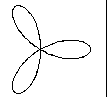
r = ra Cos (3A) |
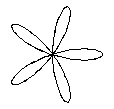
r = ra Cos (5A) |
//
//Rose()
//
// Draws the Rose diagram of the equation -
// r = ra*cos (n*A);
//Draw a rose equation-
//Paramters - xc,yc : Center of Rose.
// - n : Cos Multiplication Number
// - ra ; Rose Radius.
#define PI 3.14
void Rose(xc,yc,n,ra)
double xc,yc; //centre of Rose
double n; //n value for Equation r = a*cos(n*A)
double ra; //True Rose Radius
{
int r;
double a;
double x,y;
double F=PI/180;
double xr;
double x1,y1;
//Calculate start point
r = 1;
a = (double) r * F;
xr = ra*cos (n*a); //Equation r=a*cos(N*A)
x1 = xc + xr*cos (a);
y1 = yc + xr*sin (a);
Moveto ( x1, y1); //Move to First Point.
//Draw Rose
for (r = 2; r < 360; r++) {
a = (double) r * F;
xr = ra*cos (n*a); //Equation r=a*cos(N*A)
x = xc + xr*cos (a);
y = yc + xr*sin (a);
Lineto (x, y); //Draw a line from first point to new point.
}
}
|
LISSAJOUS FIGURES |

|
|
|
|
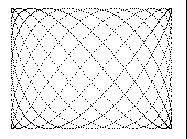
Lissajous ( 200, 200, 20, 4, 7, 3, 11); |
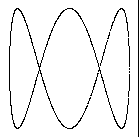
lissajous ( 200, 200, 20, 3, 2, 3, 6); |
//
//Lissajous()
//
//Draw a Lissajous graph
//xc,yc = Centre of Lissajous Graph
//Sc = scale factor
//a,w1 = x values for x = a Sin w1 t
//b,W2 = y values for y = b Cos w2 t
//
void lissajous (xc, yc, Sc, a, w1,
b, w2)
float xc, yc;
float Sc;
float a,b,w1,w2;
{
float PI = 3.14
float r;
float x,y;
for ( r = 1; r < 5 * PI; r += (PI / 360) ) {
x = xc + Sc * (a * Sin (w1 * r) );
y = yc + Sc * (b * Cos (w2 * r) );
Pixel (x, y);
}
}